
 Bloom Auto PickupPlugins · 1.21 – 26.x
Highly Optimized and Supported Auto Pickup Plugin. Folia, All Paper Forks, Spigot. 1.21.x - 26.3
Gratis5 descargas

Highly Optimized and Supported Home Plugin. Folia, All Paper Forks, Spigot. 1.21.x - 26.x
Descarga directa desde Modrinth · 3 descargas
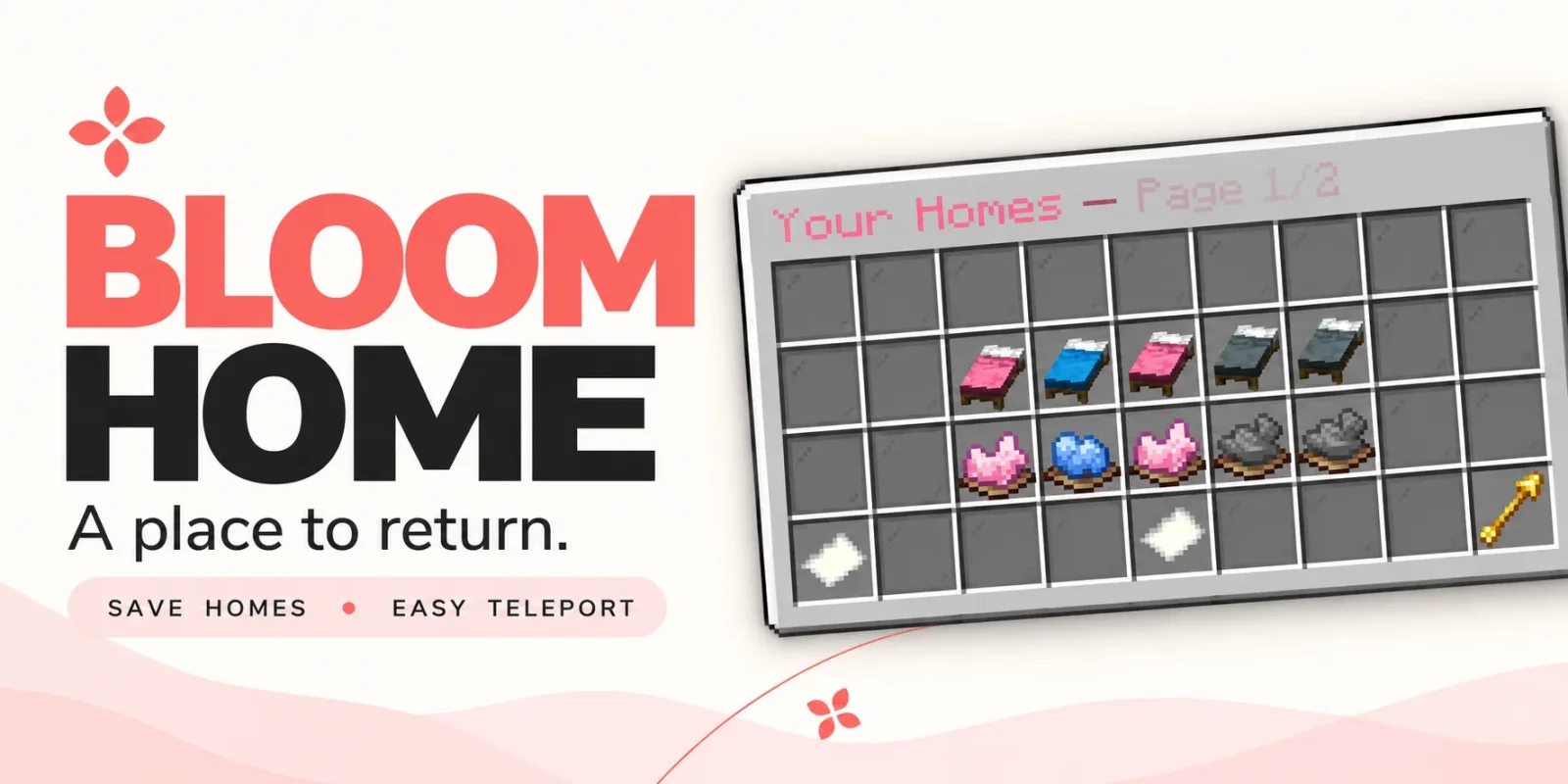
Metene creó Bloom Home (plugin) para servidores Paper / Spigot. Highly Optimized and Supported Home Plugin. Folia, All Paper Forks, Spigot. 1.21.x - 26.x.
Es compatible con Minecraft 1.21 – 26.x. Se ha descargado 3 veces en Modrinth. Eso lo sitúa en el puesto 89 de los 105 plugins de teletransporte y warps de esta lista. La última actualización salió el 03/11/2026.
Bloom Home ha publicado 2 versiones en Modrinth desde el 28/10/2026. 2 salieron en el último año. La más reciente es 1.1.7, publicada el 03/11/2026. Está hecha para Minecraft 1.21 – 26.3. Funciona en Bukkit, Folia, Paper, Purpur y Spigot. La descarga ocupa 128 KB.
| Versión | Publicado | Minecraft | Tipo |
|---|---|---|---|
1.1.7 | 03/11/2026 | 1.21 – 26.3 | Estable |
1.1.4 | 28/10/2026 | 1.21 – 26.3 | Estable |
Los comandos que aparecen en la página de Bloom Home en Modrinth:
/home/homes/sethome/delhome/bloomhomePermisos que se nombran allí, para dar con un plugin como LuckPerms:
bloomhome.usebloomhome.admin.reloadbloomhome.limit.5bloomhome.limit.10bloomhome.limit.15bloomhome.limitbloomhome.teleport.bypassbloom.**A little charm. A place to return.
From your first shelter to your favorite hideaway, keep the places that matter close. Bloom Home combines simple home management, soft pink menus, and gentle sounds to make returning home feel welcoming.
Save your spot. Make it yours. Come home.
Open /home to manage your saved locations through a clean, easy-to-use menu.
Click an available bed to save your current location. Your next home is ready.
Left-click a saved bed to return home, or use /home .
A gentle 3-second countdown appears before teleporting. Moving cancels the countdown, and server owners can customize the delay.
Give selected players or ranks instant travel with the teleport bypass permission.
A cozy cabin? A mountain retreat? Your favorite fishing spot?
Right-click a saved bed to rename it and make your home menu feel personal.
Ready for somewhere new? Click the dye beneath a saved home to open its deletion confirmation menu. Cancel or close the confirmation to keep your home.
Players start with 3 home slots by default. Server owners can change that starting allowance and grant additional homes through permissions.
Use limits such as 5, 10, 15, or any other positive number to suit your ranks.
The highest granted limit applies when it exceeds the configured default. Limits do not stack.
Locked slots can send a customizable, clickable store link in private chat, helping players discover your server’s upgrades.
English and Turkish translations are included, with editable messages and menu text.
Customize the experience to match your server:
Command · Description
/home · Open the home menu.
/homes · Alias for /home.
/home · Teleport to a saved home, with a countdown unless bypassed.
/sethome · Save your current location to an empty home slot.
/delhome · Open deletion confirmation for that home.
/bloomhome reload · Reload configuration and language files.
Players can access the home menu and player commands by default. Use permissions to grant additional slots or skip the teleport countdown.
Permission · Default · Description
bloomhome.use · Everyone · Access the home menu and player commands.
bloomhome.admin.reload · OP · Use /bloomhome reload.
bloomhome.limit.5 · Not granted · Grant a limit of 5 homes if higher than the configured default.
bloomhome.limit.10 · Not granted · Grant a limit of 10 homes if higher than the configured default.
bloomhome.limit.15 · Not granted · Grant a limit of 15 homes if higher than the configured default.
bloomhome.limit. · Not granted · Grant any positive numeric home limit, resolved at runtime.
bloomhome.teleport.bypass · Not granted · Skip the home teleport countdown.
Teleport bypass must be granted explicitly, including for OPs. Give it to the players or ranks you choose.
🌸 New adventures. Familiar places. Let your home Bloom.
Escrita por Metene. Léela con imágenes en Modrinth.
Asegúrate de que tu servidor use Paper y Spigot en Minecraft 1.21 – 26.x.
Descarga el archivo .jar desde Modrinth y ponlo en la carpeta plugins de tu servidor.
Reinicia el servidor. Evita /reload, muchos plugins no lo llevan bien.
Escribe /plugins en la consola: Bloom Home debería aparecer en verde. Sus archivos de configuración se crean en la carpeta plugins al primer arranque.
Guía completa: Cómo instalar plugins en un servidor de Minecraft
| Recurso | Descargas | Versiones | Última actualización | Precio |
|---|---|---|---|---|
| Bloom Homeel que estabas viendo | 3 | 1.21 – 26.x | hace 11 días | Gratis |
| Bloom Auto PickupMetene | 5 | 1.21 – 26.x | hace 1 día | Gratis |
 Bloom BountyMetene | 4 | 1.21 – 26.x | hace 11 días | Gratis |
 Bloom PerksMetene | 4 | 1.21 – 26.x | hace 10 días | Gratis |
Sí. Bloom Home es compatible con Minecraft 26.x. Todas las versiones compatibles: 26.x, 1.21.
Sí. Bloom Home se puede descargar gratis desde Modrinth.
Bloom Home funciona en servidores Paper y Spigot.
Sí. La última actualización salió en el último día.
Los más parecidos son Bloom Auto Pickup, Bloom Bounty y Bloom Perks. Comparar todas las alternativas
Bloom Auto PickupPlugins · 1.21 – 26.xHighly Optimized and Supported Auto Pickup Plugin. Folia, All Paper Forks, Spigot. 1.21.x - 26.3
Bloom BountyPlugins · 1.21 – 26.xHighly Optimized and Supported Bounty Plugin. Folia, All Paper Forks, Spigot. 1.21.x - 26.x
Bloom PerksPlugins · 1.21 – 26.xHighly Optimized and Supported Perks Plugin. Folia, All Paper Forks, Spigot. 1.21.x - 26.x
 Bloom Night VisionPlugins · 1.21 – 26.x
Highly Optimized and Supported Night Vision Plugin. Folia, All Paper Forks, Spigot. 1.21.x - 26.x
 Bloom ToolsPlugins · 1.21 – 26.x
Highly Optimized and Supported Tools Plugin. Folia, All Paper Forks, Spigot. 1.21.x - 26.x
 Bloom SpawnersPlugins · 1.21 – 26.x
Highly Optimized and Supported Spawner Plugin. Folia, All Paper Forks, Spigot. 1.21.x - 26.3
Inicia sesión para dejar una reseña.