
 Bloom BountyPlugins · 1.21 – 26.x
Highly Optimized and Supported Bounty Plugin. Folia, All Paper Forks, Spigot. 1.21.x - 26.x
Kostenlos4 Downloads

Highly Optimized and Supported Shop Plugin. Folia, All Paper Forks, Spigot. 1.21.x - 26.x
Direkter Download von Modrinth · 3 Downloads
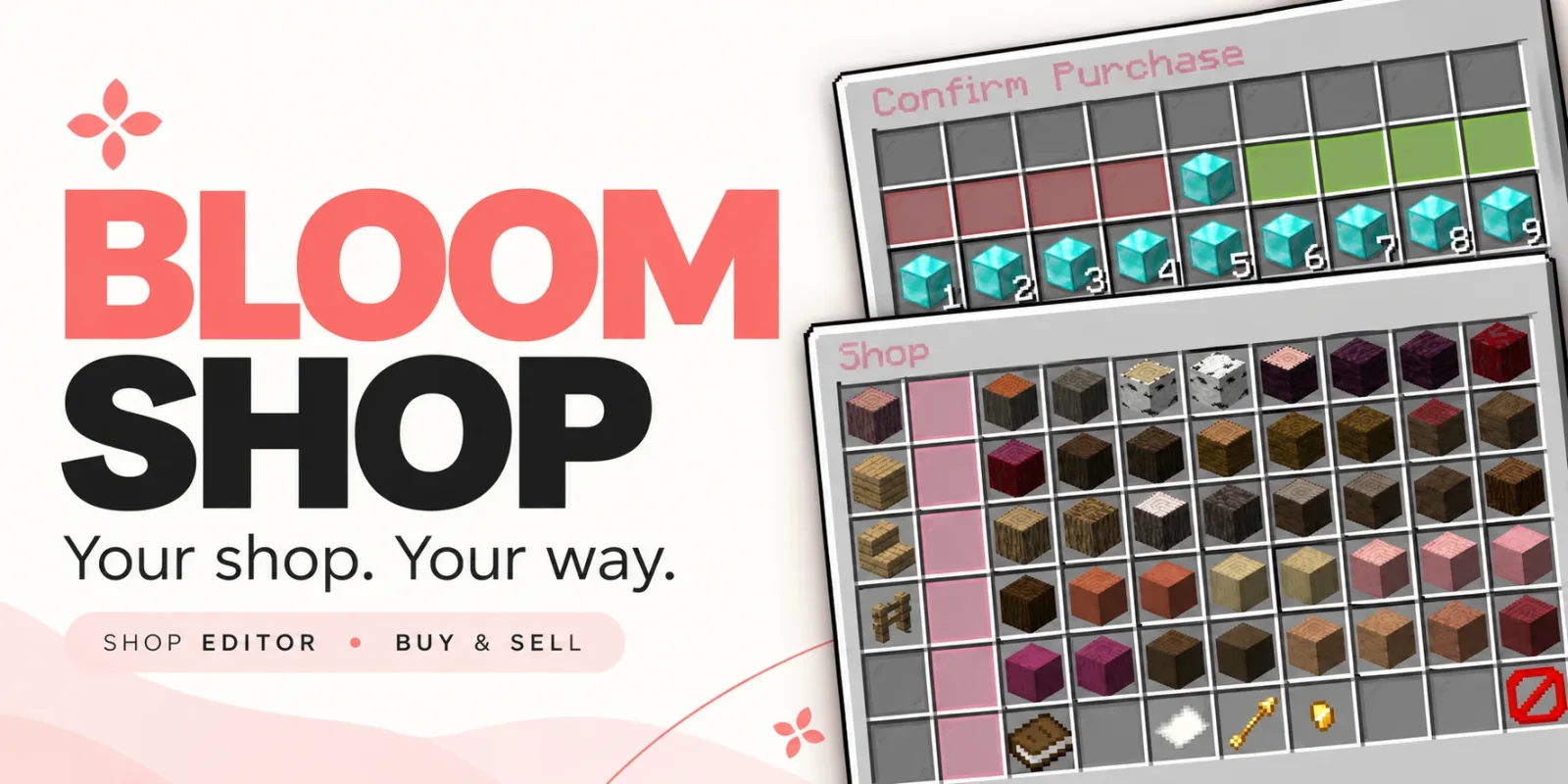
Bloom Shop (Plugin) ist für Server mit Paper / Spigot gedacht und stammt von Metene. Highly Optimized and Supported Shop Plugin. Folia, All Paper Forks, Spigot. 1.21.x - 26.x.
Unterstützt wird Minecraft 1.21 – 26.x. Auf Modrinth gibt es 3 Downloads. Damit liegt es auf Platz 114 der 138 hier gelisteten Performance-Plugins. Das letzte Update erschien am 03.11.2026.
Bloom Shop hat seit 28.10.2026 2 Versionen auf Modrinth veröffentlicht. 2 davon erschienen im letzten Jahr. Die neueste ist 1.6.1, erschienen am 03.11.2026. Sie ist für Minecraft 1.21 – 26.3 gemacht. Sie läuft auf Bukkit, Folia, Paper, Purpur und Spigot. Der Download ist 229 KB groß.
| Version | Veröffentlicht | Minecraft | Typ |
|---|---|---|---|
1.6.1 | 03.11.2026 | 1.21 – 26.3 | Release |
1.5.0 | 28.10.2026 | 1.21 – 26.3 | Release |
Die Befehle, die auf der Modrinth-Seite von Bloom Shop stehen:
/shopDort genannte Berechtigungen, zu vergeben mit einem Plugin wie LuckPerms:
bloomshop.usebloomshop.buybloomshop.sellbloomshop.admin.editorbloomshop.admin.reloadbloomshop.admin.*bloom.**Your shop. Your way.
Make everyday shopping a lovely part of your server. Bloom Shop brings organized markets, simple buying and selling, and an in-game editor together with soft pink menus and gentle sounds.
Beautiful menus. Easy editing. No resource pack required.
Open /shop, choose a market, and explore its categories.
From building supplies to everyday essentials, give your players a convenient place to find what they need.
Left-click to buy. Right-click to sell.
Choose a product, adjust the quantity, and review the total before confirming.
Use +1, +16, +32, and +64 quantity controls, or choose from 1–9 stack presets for larger transactions.
Open /shop editor to manage your shop through an interface that follows the same layout your players see.
Arrange your market to suit your server, with control over where each entry appears.
Enable Quick Add and click an inventory item to start creating a product. Set its price, adjust its settings, and save it into your shop.
Your original item stays in your inventory. Unfinished drafts stay out of the customer menu.
Start with a broad default catalog covering building materials, wood, colored blocks, natural items, food, farming supplies, resources, tools, and more.
Keep what fits, adjust individual products, or remove entire markets and build your own.
Included prices are a starting point. Customize them around your server’s economy and progression.
Keep the soft pink defaults or create your own style.
Customize names, descriptions, messages, icons, positions, prices, and sounds. Supported color codes and hex colors help give your shop a consistent look.
Markets, subcategories, and products can also be managed through configuration files.
Edit in-game or work with files—the choice is yours.
English and Turkish language files are included.
Adjust player messages, menu labels, editor instructions, and confirmations to match your community.
Gentle chimes add a little personality, with configurable sounds for servers that prefer a quieter experience.
Bloom Shop connects to your server’s existing economy through Vault and a compatible economy provider.
Set individual buying and selling prices, and make each product buy-only, sell-only, or available in both directions.
Balance, inventory space, item availability, and permissions are checked before a transaction completes.
Confirmation menus help players review their choices, while repeated-click protections help prevent duplicate transactions.
Shop instructions remain on menu previews, keeping purchased items free from extra price labels and interface lore.
Command · Description
/shop · Open the market selection menu.
/shop · Open a market by its ID.
/shop editor · Open the in-game shop editor.
/shop reload · Reload configuration, language files, and shop data.
Permission · Description
bloomshop.use · Access the shop.
bloomshop.buy · Purchase products.
bloomshop.sell · Sell eligible items.
bloomshop.admin.editor · Access the shop editor.
bloomshop.admin.reload · Reload the plugin.
bloomshop.admin.* · Grant the plugin’s administrative permissions.
Optional permission requirements can also be assigned to individual markets, subcategories, and products.
Check the included compatibility documentation for exact supported versions and any Folia economy-provider requirements.
🌸 Small details. Sweeter shopping. Let your shop Bloom.
Geschrieben von Metene. Mit Bildern auf Modrinth lesen.
Stelle sicher, dass dein Server Paper und Spigot auf Minecraft 1.21 – 26.x nutzt.
Lade die .jar-Datei von Modrinth herunter und lege sie in den plugins-Ordner deines Servers.
Starte den Server neu. Vermeide /reload, viele Plugins kommen damit nicht gut klar.
Gib /plugins in der Konsole ein: Bloom Shop sollte grün aufgelistet sein. Die Konfigurationsdateien werden beim ersten Start im plugins-Ordner angelegt.
Ausführliche Anleitung: So installierst du Plugins auf einem Minecraft-Server
| Ressource | Downloads | Versionen | Letztes Update | Preis |
|---|---|---|---|---|
| Bloom Shopdie du angesehen hast | 3 | 1.21 – 26.x | vor 11 Tagen | Kostenlos |
| Bloom BountyMetene | 4 | 1.21 – 26.x | vor 11 Tagen | Kostenlos |
 Bloom Auto PickupMetene | 5 | 1.21 – 26.x | vor 1 Tag | Kostenlos |
 Bloom PerksMetene | 4 | 1.21 – 26.x | vor 10 Tagen | Kostenlos |
Ja. Bloom Shop unterstützt Minecraft 26.x. Alle unterstützten Versionen: 26.x, 1.21.
Ja. Bloom Shop kannst du kostenlos bei Modrinth herunterladen.
Bloom Shop läuft auf Servern mit Paper und Spigot.
Ja. Das letzte Update kam innerhalb des letzten Tages.
Am ähnlichsten sind Bloom Bounty, Bloom Auto Pickup und Bloom Perks. Alle Alternativen vergleichen
Bloom BountyPlugins · 1.21 – 26.xHighly Optimized and Supported Bounty Plugin. Folia, All Paper Forks, Spigot. 1.21.x - 26.x
Bloom Auto PickupPlugins · 1.21 – 26.xHighly Optimized and Supported Auto Pickup Plugin. Folia, All Paper Forks, Spigot. 1.21.x - 26.3
Bloom PerksPlugins · 1.21 – 26.xHighly Optimized and Supported Perks Plugin. Folia, All Paper Forks, Spigot. 1.21.x - 26.x
 Bloom Night VisionPlugins · 1.21 – 26.x
Highly Optimized and Supported Night Vision Plugin. Folia, All Paper Forks, Spigot. 1.21.x - 26.x
 Bloom HomePlugins · 1.21 – 26.x
Highly Optimized and Supported Home Plugin. Folia, All Paper Forks, Spigot. 1.21.x - 26.x
 Bloom ToolsPlugins · 1.21 – 26.x
Highly Optimized and Supported Tools Plugin. Folia, All Paper Forks, Spigot. 1.21.x - 26.x
Logg dich ein, um eine Bewertung zu schreiben.