
 Bloom Auto PickupPlugins · 1.21 – 26.x
Highly Optimized and Supported Auto Pickup Plugin. Folia, All Paper Forks, Spigot. 1.21.x - 26.3
Kostenlos5 Downloads

Highly Optimized and Supported Perks Plugin. Folia, All Paper Forks, Spigot. 1.21.x - 26.x
Direkter Download von Modrinth · 4 Downloads
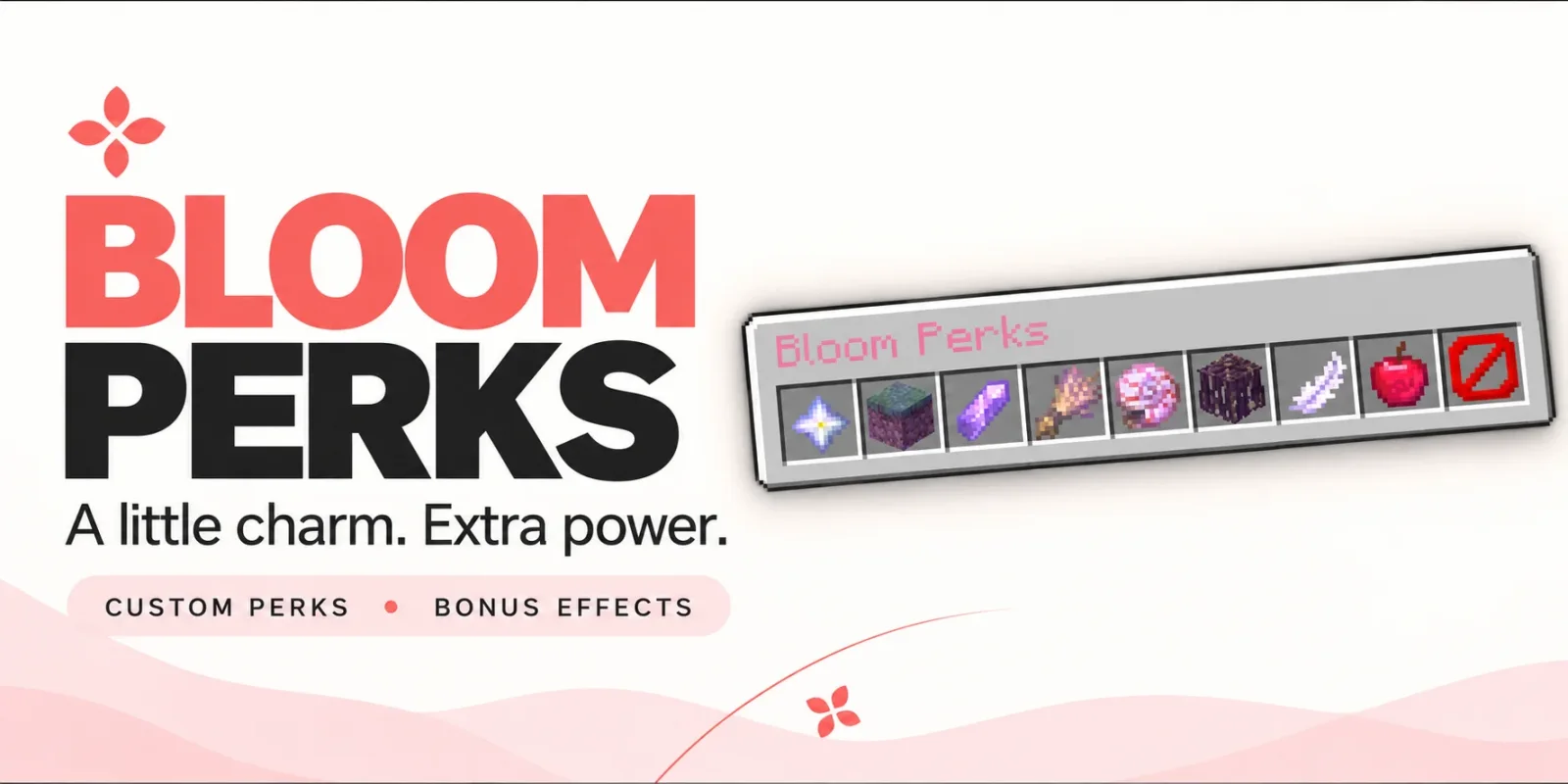
Bloom Perks (Plugin) ist für Server mit Paper / Spigot gedacht und stammt von Metene. Highly Optimized and Supported Perks Plugin. Folia, All Paper Forks, Spigot. 1.21.x - 26.x.
Unterstützt wird Minecraft 1.21 – 26.x. Auf Modrinth gibt es 4 Downloads. Damit liegt es auf Platz 107 der 138 hier gelisteten Performance-Plugins. Das letzte Update erschien am 04.11.2026.
Bloom Perks hat seit 28.10.2026 3 Versionen auf Modrinth veröffentlicht. 3 davon erschienen im letzten Jahr. Die neueste ist 1.0.5, erschienen am 04.11.2026. Sie ist für Minecraft 1.21 – 26.3 gemacht. Sie läuft auf Bukkit, Folia, Paper, Purpur und Spigot. Der Download ist 160 KB groß.
| Version | Veröffentlicht | Minecraft | Typ |
|---|---|---|---|
1.0.5 | 04.11.2026 | 1.21 – 26.3 | Release |
1.0.4 | 03.11.2026 | 1.21 – 26.3 | Release |
1.0.1 | 28.10.2026 | 1.21 – 26.3 | Release |
Die Befehle, die auf der Modrinth-Seite von Bloom Perks stehen:
/perks/bloomperksDort genannte Berechtigungen, zu vergeben mit einem Plugin wie LuckPerms:
bloomperks.usebloomperks.admin.givebloomperks.admin.reloadbloomperks.admin.*bloom.**A little charm. Extra power.
Give everyday adventures a little something extra. Bloom Perks adds equippable perk items, useful bonuses, and a simple pink menu to your server.
10 ready-to-use perks. Seven equipment slots. No resource pack required.
Open /perks, equip your favorite items, and enjoy their effects.
Perk · Default bonus
🌿 Builder’s Touch · Reach blocks 2 blocks farther away.
❤️ Bloom Heart · Gain 2 extra maximum hearts.
🪶 Wind Charm · Move 10% faster.
🔮 Miner’s Spark · Mine blocks 15% faster.
🐇 Soft Landing · Take 20% less fall damage.
🥾 Mountain Step · Step up one-block ledges without jumping.
🪵 Steady Roots · Gain additional knockback resistance.
🐚 Ocean Pearl · Mine 25% faster underwater.
🌾 Harvest Charm · Get a 10% chance of extra produce from eligible mature crops.
💠 Scholar’s Crystal · Earn 10% more XP from collected experience orbs.
All bonus values are configurable.
Choose up to seven different perks to suit your adventures.
Bonuses activate while perks are equipped and disappear when removed. Simply carrying a perk in your inventory does not activate it.
Create additional perk items through perks.yml using the supported effect types.
Choose each item’s material, name, description, enchanted glow, and bonus values. You can also combine multiple effects into one item.
Customize messages, menu text, colors, and sounds to match your server.
English and Turkish translations are included. No resource pack required.
Command · Description
/perks · Open your perk equipment menu.
/perks help · View commands and equipment instructions.
/perks give [amount] · Give perk items to an online player.
/bloomperks reload · Reload configuration and language files.
Players can access the perk menu and help by default. Administrative commands are restricted to OPs unless their permissions are granted separately.
Permission · Default · Description
bloomperks.use · Everyone · Access the perk menu and help.
bloomperks.admin.give · OP · Give perk items.
bloomperks.admin.reload · OP · Reload plugin configuration.
bloomperks.admin.* · OP · Access all administrative commands.
🌸 A little boost for every adventure. Let your adventures Bloom.
Geschrieben von Metene. Mit Bildern auf Modrinth lesen.
Stelle sicher, dass dein Server Paper und Spigot auf Minecraft 1.21 – 26.x nutzt.
Lade die .jar-Datei von Modrinth herunter und lege sie in den plugins-Ordner deines Servers.
Starte den Server neu. Vermeide /reload, viele Plugins kommen damit nicht gut klar.
Gib /plugins in der Konsole ein: Bloom Perks sollte grün aufgelistet sein. Die Konfigurationsdateien werden beim ersten Start im plugins-Ordner angelegt.
Ausführliche Anleitung: So installierst du Plugins auf einem Minecraft-Server
| Ressource | Downloads | Versionen | Letztes Update | Preis |
|---|---|---|---|---|
| Bloom Perksdie du angesehen hast | 4 | 1.21 – 26.x | vor 10 Tagen | Kostenlos |
| Bloom Auto PickupMetene | 5 | 1.21 – 26.x | vor 1 Tag | Kostenlos |
 Bloom BountyMetene | 4 | 1.21 – 26.x | vor 11 Tagen | Kostenlos |
 Bloom Night VisionMetene | 4 | 1.21 – 26.x | vor 11 Tagen | Kostenlos |
Ja. Bloom Perks unterstützt Minecraft 26.x. Alle unterstützten Versionen: 26.x, 1.21.
Ja. Bloom Perks kannst du kostenlos bei Modrinth herunterladen.
Bloom Perks läuft auf Servern mit Paper und Spigot.
Ja. Das letzte Update kam innerhalb des letzten Tages.
Am ähnlichsten sind Bloom Auto Pickup, Bloom Bounty und Bloom Night Vision. Alle Alternativen vergleichen
Bloom Auto PickupPlugins · 1.21 – 26.xHighly Optimized and Supported Auto Pickup Plugin. Folia, All Paper Forks, Spigot. 1.21.x - 26.3
Bloom BountyPlugins · 1.21 – 26.xHighly Optimized and Supported Bounty Plugin. Folia, All Paper Forks, Spigot. 1.21.x - 26.x
Bloom Night VisionPlugins · 1.21 – 26.xHighly Optimized and Supported Night Vision Plugin. Folia, All Paper Forks, Spigot. 1.21.x - 26.x
 Bloom HomePlugins · 1.21 – 26.x
Highly Optimized and Supported Home Plugin. Folia, All Paper Forks, Spigot. 1.21.x - 26.x
 Bloom ToolsPlugins · 1.21 – 26.x
Highly Optimized and Supported Tools Plugin. Folia, All Paper Forks, Spigot. 1.21.x - 26.x
 Bloom SpawnersPlugins · 1.21 – 26.x
Highly Optimized and Supported Spawner Plugin. Folia, All Paper Forks, Spigot. 1.21.x - 26.3
Logg dich ein, um eine Bewertung zu schreiben.