
 You're in Grave DangerMods · 1.16 – 1.21
A mod focused around death. Will add graves to minecraft
Kostenlos4,765,735 Downloads
Never lose your items again!
Never lose your items again!
Corpse (Ressource) stammt von henkelmax. Unterstützt wird Minecraft 1.19 – 26.x. Auf Modrinth gibt es 4,733,337 Downloads. Das letzte Update erschien am 22.10.2026.
Corpse hat seit 25.06.2022 111 Versionen auf Modrinth veröffentlicht. 19 davon erschienen im letzten Jahr. Die neueste ist neoforge-1.1.22+26.3, erschienen am 22.10.2026. Sie ist für Minecraft 26.3 gemacht. Sie läuft auf NeoForge. Der Download ist 246 KB groß.
| Version | Veröffentlicht | Minecraft | Typ |
|---|---|---|---|
neoforge-1.1.22+26.3 | 22.10.2026 | 26.3 | Release |
neoforge-1.1.22+26.2 | 22.10.2026 | 26.2 | Release |
neoforge-1.1.22+26.1.2 | 22.10.2026 | 26.1, 26.1.1, 26.1.2 | Release |
neoforge-1.21.11-1.1.22 | 22.10.2026 | 1.21.11 | Release |
neoforge-1.21.1-1.1.22 | 22.10.2026 | 1.21, 1.21.1 | Release |
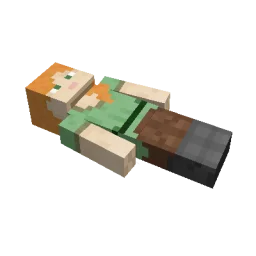
This mod brings a corpse into the game.
It will spawn upon your death containing all items that you had in your inventory.
The corpse will appear at the players location upon death.
Your player skin will be applied to the corpse.
It contains all the items you had when you died.
It can hold an infinite amount of items.
You can access the items by right-clicking the corpse.
When you take out all items, the corpse will disappear.
The corpse can't fall into the void or burn in lava.
It also floats in liquids like lava or water.
After 1 hour, the corpse will turn into a skeleton, indicating that it existed for a longer time.
This won't change the functionality of the corpse.
You get all your items back into their original slots when transferring the items.
You can view all your past deaths by pressing the 'U' key.
You can retrieve lost items if you are in creative mode.
By typing /deathhistory as an operator, you can view the death history of another player.
You can retrieve lost items by pressing the "Items" button in the death history GUI.
Note that you can only take out items if you are in creative mode.
By clicking on the "Location" area in the death history GUI, the command to teleport you to the death location will be displayed in chat.
It includes the coordinates and the dimension.
Geschrieben von henkelmax. Mit Bildern auf Modrinth lesen.
Diese Mod wird auf dem Server und bei jedem Spieler gebraucht.
Installiere Forge und NeoForge für Minecraft 1.19 – 26.x.
Lade die .jar-Datei von Modrinth herunter und lege sie in den mods-Ordner deines .minecraft-Verzeichnisses.
Starte Minecraft mit dem Forge-Profil.
Mit dem CraftRank Launcher sparst du dir diese Schritte: Öffne Mods, suche nach Corpse und klicke auf Installieren.
| Ressource | Downloads | Versionen | Letztes Update | Preis |
|---|---|---|---|---|
| Corpsedie du angesehen hast | 4.7M | 1.19 – 26.x | vor 18 Tagen | Kostenlos |
| You're in Grave Dangerb1n-ry | 4.8M | 1.16 – 1.21 | 22. Juni 2025 | Kostenlos |
 Inventory Profiles Nextblackd | 42.2M | 1.16 – 26.x | 27. Sept. 2026 | Kostenlos |
 XP Tomebl4ckscor3 | 2.9M | 1.12 – 26.x | 20. Sept. 2026 | Kostenlos |
Ja. Corpse unterstützt Minecraft 26.x. Alle unterstützten Versionen: 26.x, 1.21, 1.20, 1.19.
Ja. Corpse kannst du kostenlos bei Modrinth herunterladen.
Beides. Der Server und jeder Spieler brauchen Corpse.
Ja: Jade 🔍. Installiere es vor Corpse.
Ja. Das letzte Update kam innerhalb des letzten Tages.
Am ähnlichsten sind You're in Grave Danger, Inventory Profiles Next und XP Tome. Alle Alternativen vergleichen
You're in Grave DangerMods · 1.16 – 1.21A mod focused around death. Will add graves to minecraft
Inventory Profiles NextMods · 1.16 – 26.xTake control over your inventory. Sort. Move matching Items. Throw all. Locked slots. Gear sets! And much more.
XP TomeMods · 1.12 – 26.xAdds a book that can store a configurable amount of XP.
 Inventory ManagementMods · 1.18 – 26.x
Sort and transfer items with the click of a button.
 Craft & FindMods · 1.20 – 1.21
Find, access, and craft with items from nearby storage — all from one convenient workbench.
 Traveler's BackpackMods · 1.12 – 26.x
Unique and upgradeable backpacks with customisation, Curios API/Trinkets integration and more!
Logg dich ein, um eine Bewertung zu schreiben.