
 You're in Grave DangerМоды · 1.16 – 1.21
A mod focused around death. Will add graves to minecraft
БесплатноЗагрузок: 4,765,735
Never lose your items again!
Never lose your items again!
Corpse — ресурс от henkelmax. Поддерживаемые версии: Minecraft 1.19 – 26.x. Скачиваний на Modrinth: 4,733,337. Последнее обновление: 22.10.2026.
С 25.06.2022 у Corpse вышло 111 версий на Modrinth. 19 из них вышли за последний год. Новейшая — neoforge-1.1.22+26.3, вышла 22.10.2026. Она сделана для Minecraft 26.3. Работает на NeoForge. Размер файла — 246 KB.
| Версия | Выпущен | Minecraft | Тип |
|---|---|---|---|
neoforge-1.1.22+26.3 | 22.10.2026 | 26.3 | Релиз |
neoforge-1.1.22+26.2 | 22.10.2026 | 26.2 | Релиз |
neoforge-1.1.22+26.1.2 | 22.10.2026 | 26.1, 26.1.1, 26.1.2 | Релиз |
neoforge-1.21.11-1.1.22 | 22.10.2026 | 1.21.11 | Релиз |
neoforge-1.21.1-1.1.22 | 22.10.2026 | 1.21, 1.21.1 | Релиз |
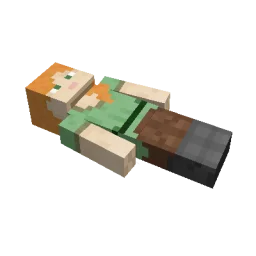
This mod brings a corpse into the game.
It will spawn upon your death containing all items that you had in your inventory.
The corpse will appear at the players location upon death.
Your player skin will be applied to the corpse.
It contains all the items you had when you died.
It can hold an infinite amount of items.
You can access the items by right-clicking the corpse.
When you take out all items, the corpse will disappear.
The corpse can't fall into the void or burn in lava.
It also floats in liquids like lava or water.
After 1 hour, the corpse will turn into a skeleton, indicating that it existed for a longer time.
This won't change the functionality of the corpse.
You get all your items back into their original slots when transferring the items.
You can view all your past deaths by pressing the 'U' key.
You can retrieve lost items if you are in creative mode.
By typing /deathhistory as an operator, you can view the death history of another player.
You can retrieve lost items by pressing the "Items" button in the death history GUI.
Note that you can only take out items if you are in creative mode.
By clicking on the "Location" area in the death history GUI, the command to teleport you to the death location will be displayed in chat.
It includes the coordinates and the dimension.
Автор: henkelmax. С картинками — на Modrinth.
Этот мод нужен и на сервере, и у каждого игрока.
Установи Forge и NeoForge для Minecraft 1.19 – 26.x.
Скачай .jar-файл с Modrinth и положи его в папку mods в каталоге .minecraft.
Запусти Minecraft с профилем Forge.
С CraftRank Launcher эти шаги не нужны: открой Моды, найди Corpse и нажми Установить.
| Ресурс | Загрузки | Версии | Обновление | Цена |
|---|---|---|---|---|
| Corpseтот, что ты смотрел | 4.7M | 1.19 – 26.x | 18 дн. назад | Бесплатно |
| You're in Grave Dangerb1n-ry | 4.8M | 1.16 – 1.21 | 22 июн. 2025 | Бесплатно |
 Inventory Profiles Nextblackd | 42.2M | 1.16 – 26.x | 27 сент. 2026 | Бесплатно |
 XP Tomebl4ckscor3 | 2.9M | 1.12 – 26.x | 20 сент. 2026 | Бесплатно |
Да. Corpse поддерживает Minecraft 26.x. Все поддерживаемые версии: 26.x, 1.21, 1.20, 1.19.
Да. Corpse можно бесплатно скачать на Modrinth.
И там, и там. Corpse нужен и на сервере, и у каждого игрока.
Да: Jade 🔍. Установи это до Corpse.
Да. Последнее обновление вышло за последние сутки.
Ближе всего к нему You're in Grave Danger, Inventory Profiles Next и XP Tome. Сравнить все альтернативы
You're in Grave DangerМоды · 1.16 – 1.21A mod focused around death. Will add graves to minecraft
Inventory Profiles NextМоды · 1.16 – 26.xTake control over your inventory. Sort. Move matching Items. Throw all. Locked slots. Gear sets! And much more.
XP TomeМоды · 1.12 – 26.xAdds a book that can store a configurable amount of XP.
 Inventory ManagementМоды · 1.18 – 26.x
Sort and transfer items with the click of a button.
 Craft & FindМоды · 1.20 – 1.21
Find, access, and craft with items from nearby storage — all from one convenient workbench.
 Traveler's BackpackМоды · 1.12 – 26.x
Unique and upgradeable backpacks with customisation, Curios API/Trinkets integration and more!
Войди, чтобы оставить отзыв.