
 You're in Grave DangerMods · 1.16 – 1.21
A mod focused around death. Will add graves to minecraft
Gratis4,765,735 descargas
Never lose your items again!
Never lose your items again!
Corpse (recurso) es obra de henkelmax. Es compatible con Minecraft 1.19 – 26.x. Se ha descargado 4,733,337 veces en Modrinth. La última actualización salió el 22/10/2026.
Corpse ha publicado 111 versiones en Modrinth desde el 25/06/2022. 19 salieron en el último año. La más reciente es neoforge-1.1.22+26.3, publicada el 22/10/2026. Está hecha para Minecraft 26.3. Funciona en NeoForge. La descarga ocupa 246 KB.
| Versión | Publicado | Minecraft | Tipo |
|---|---|---|---|
neoforge-1.1.22+26.3 | 22/10/2026 | 26.3 | Estable |
neoforge-1.1.22+26.2 | 22/10/2026 | 26.2 | Estable |
neoforge-1.1.22+26.1.2 | 22/10/2026 | 26.1, 26.1.1, 26.1.2 | Estable |
neoforge-1.21.11-1.1.22 | 22/10/2026 | 1.21.11 | Estable |
neoforge-1.21.1-1.1.22 | 22/10/2026 | 1.21, 1.21.1 | Estable |
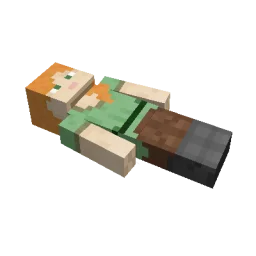
This mod brings a corpse into the game.
It will spawn upon your death containing all items that you had in your inventory.
The corpse will appear at the players location upon death.
Your player skin will be applied to the corpse.
It contains all the items you had when you died.
It can hold an infinite amount of items.
You can access the items by right-clicking the corpse.
When you take out all items, the corpse will disappear.
The corpse can't fall into the void or burn in lava.
It also floats in liquids like lava or water.
After 1 hour, the corpse will turn into a skeleton, indicating that it existed for a longer time.
This won't change the functionality of the corpse.
You get all your items back into their original slots when transferring the items.
You can view all your past deaths by pressing the 'U' key.
You can retrieve lost items if you are in creative mode.
By typing /deathhistory as an operator, you can view the death history of another player.
You can retrieve lost items by pressing the "Items" button in the death history GUI.
Note that you can only take out items if you are in creative mode.
By clicking on the "Location" area in the death history GUI, the command to teleport you to the death location will be displayed in chat.
It includes the coordinates and the dimension.
Escrita por henkelmax. Léela con imágenes en Modrinth.
Este mod hace falta en el servidor y en cada jugador que entra.
Instala Forge y NeoForge para Minecraft 1.19 – 26.x.
Descarga el archivo .jar desde Modrinth y ponlo en la carpeta mods de tu directorio .minecraft.
Inicia Minecraft con el perfil de Forge.
Con el CraftRank Launcher te saltas estos pasos: abre Mods, busca Corpse y pulsa Instalar.
| Recurso | Descargas | Versiones | Última actualización | Precio |
|---|---|---|---|---|
| Corpseel que estabas viendo | 4.7M | 1.19 – 26.x | hace 18 días | Gratis |
| You're in Grave Dangerb1n-ry | 4.8M | 1.16 – 1.21 | 22 jun 2025 | Gratis |
 Inventory Profiles Nextblackd | 42.2M | 1.16 – 26.x | 27 sept 2026 | Gratis |
 XP Tomebl4ckscor3 | 2.9M | 1.12 – 26.x | 20 sept 2026 | Gratis |
Sí. Corpse es compatible con Minecraft 26.x. Todas las versiones compatibles: 26.x, 1.21, 1.20, 1.19.
Sí. Corpse se puede descargar gratis desde Modrinth.
Ambos. El servidor y cada jugador necesitan Corpse instalado.
Sí: Jade 🔍. Instálalo antes de Corpse.
Sí. La última actualización salió en el último día.
Los más parecidos son You're in Grave Danger, Inventory Profiles Next y XP Tome. Comparar todas las alternativas
You're in Grave DangerMods · 1.16 – 1.21A mod focused around death. Will add graves to minecraft
Inventory Profiles NextMods · 1.16 – 26.xTake control over your inventory. Sort. Move matching Items. Throw all. Locked slots. Gear sets! And much more.
XP TomeMods · 1.12 – 26.xAdds a book that can store a configurable amount of XP.
 Inventory ManagementMods · 1.18 – 26.x
Sort and transfer items with the click of a button.
 Craft & FindMods · 1.20 – 1.21
Find, access, and craft with items from nearby storage — all from one convenient workbench.
 Traveler's BackpackMods · 1.12 – 26.x
Unique and upgradeable backpacks with customisation, Curios API/Trinkets integration and more!
Inicia sesión para dejar una reseña.