
 BalancedShadersShader · 1.16 – 26.x
An ultra-lightweight shader pack optimized specifically for weak PCs and laptops without a dedicated graphics card. It delivers a smooth 60+ FPS while…
Kostenlos187 Downloads
basically a lightweight shader specifically tuned for older generation devices, providing wonderful graphics.
Direkter Download von Modrinth · 1 Downloads
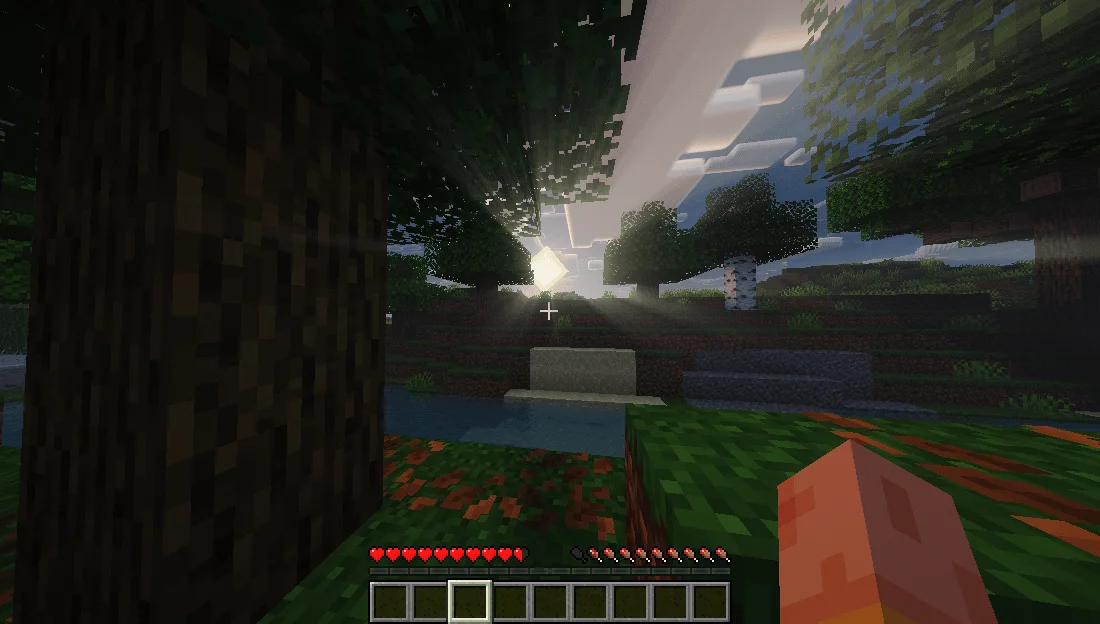
UltraLightShader (Shaderpack) stammt von kaiso5693. basically a lightweight shader specifically tuned for older generation devices, providing wonderful graphics.
Unterstützt wird Minecraft 1.12 – 26.x. Auf Modrinth gibt es 1 Downloads. Das letzte Update erschien am 15.11.2026.
Die neueste ist 1.0.0, erschienen am 15.11.2026. Sie ist für Minecraft 1.12.2 – 26.3 gemacht. Sie läuft auf Iris und Optifine. Der Download ist 429 KB groß.
| Version | Veröffentlicht | Minecraft | Typ |
|---|---|---|---|
1.0.0 | 15.11.2026 | 1.12.2 – 26.3 | Release |
A realistic, low-end-first shader pack for Minecraft 1.21.x on Iris + Sodium.
UltraLight is built around one rule: every effect has a cheap path. It was developed and tuned on an AMD Radeon R4 iGPU (2 compute units, 6.7 GB RAM) at 1600x900 — not on a desktop GPU with headroom to waste. You get soft shadow-mapped lighting, reflective water, volumetric clouds and a graded image without the frame-time cliff that usually comes with them.
Water
Reflections
Sky & atmosphere
Lighting
Post
Minecraft · 1.21.x (developed on 1.21.11)
Loader · Fabric + Sodium + Iris (1.8 or newer)
GPU · OpenGL 3.2+; tuned for integrated graphics
RAM · 4 GB+
Defaults target a 2-CU integrated GPU. If you need more frames, cut in this order:
Step · Setting · Change
1 · Shadow Map Resolution · 1024 → 512
2 · Cloud Coverage / Volumetric Clouds · 1.0 → 0.5, or off
3 · Bloom Strength · 1.0 → 0.5
4 · Render Distance · 8–10 chunks
All rights reserved. Do not redistribute or republish without permission.
Geschrieben von kaiso5693. Mit Bildern auf Modrinth lesen.
Installiere Iris (mit Sodium) oder OptiFine für deine Minecraft-Version: Shader brauchen eins davon.
Lade die .zip-Datei von Modrinth herunter. Entpacke sie nicht.
Öffne in Minecraft Optionen, dann Grafikeinstellungen, dann Shaderpacks und klicke auf Shaderpack-Ordner öffnen.
Lege die .zip-Datei in diesen Ordner, wähle UltraLightShader in der Liste und klicke auf Fertig.
Shader belasten die Grafikkarte. Wird das Spiel langsam, wähle in den Shader-Einstellungen ein niedrigeres Profil.
| Ressource | Downloads | Versionen | Letztes Update | Preis |
|---|---|---|---|---|
| UltraLightShaderdie du angesehen hast | 1 | 1.12 – 26.x | vor 10 Stunden | Kostenlos |
| BalancedShadersramizarbailow | 187 | 1.16 – 26.x | vor 9 Tagen | Kostenlos |
 Fullbright+ ShadersNiix-Dan | 41K | 1.12 – 26.x | 30. Sept. 2026 | Kostenlos |
 Terder's Potato ShaderTerdernah | 24K | 1.20 – 26.x | vor 21 Tagen | Kostenlos |
Ja. UltraLightShader unterstützt Minecraft 26.x. Alle unterstützten Versionen: 26.x, 1.21, 1.20, 1.19, 1.18, 1.17, 1.16, 1.13, 1.12.
Ja. UltraLightShader kannst du kostenlos bei Modrinth herunterladen.
Ja. Das letzte Update kam innerhalb des letzten Tages.
Am ähnlichsten sind BalancedShaders, Fullbright+ Shaders und Terder's Potato Shader. Alle Alternativen vergleichen
BalancedShadersShader · 1.16 – 26.xAn ultra-lightweight shader pack optimized specifically for weak PCs and laptops without a dedicated graphics card. It delivers a smooth 60+ FPS while…
Fullbright+ ShadersShader · 1.12 – 26.xA lightweight Minecraft shader that removes darkness by providing full brightness, making caves, nights, and dim areas fully visible while keeping gameplay…
Terder's Potato ShaderShader · 1.20 – 26.xA lightweight, optimized shader designed specifically for low-end and potato PCs.
 Low WaterShader · 1.19 – 1.21
Low Water is a shader pack for any Minecraft Java Edition version. It's a simple, lightweight, shader pack built for low-end-devices. It adds refractions…
 LumeauShader · 1.16 – 26.x
A shader adding shadows, light and waves, while being lightweight to allow older hardware to run at a good number of fps.
 UltraVanilla+Shader · 1.16 – 26.x
Ultravanilla+ is a lightweight shader designed to run smoothly on older or low-end computers. It enhances the game’s visuals while maintaining strong…
Logg dich ein, um eine Bewertung zu schreiben.