
 BalancedShadersShaders · 1.16 – 26.x
An ultra-lightweight shader pack optimized specifically for weak PCs and laptops without a dedicated graphics card. It delivers a smooth 60+ FPS while…
Gratuit187 téléchargements
basically a lightweight shader specifically tuned for older generation devices, providing wonderful graphics.
Téléchargement direct depuis Modrinth · 1 téléchargements
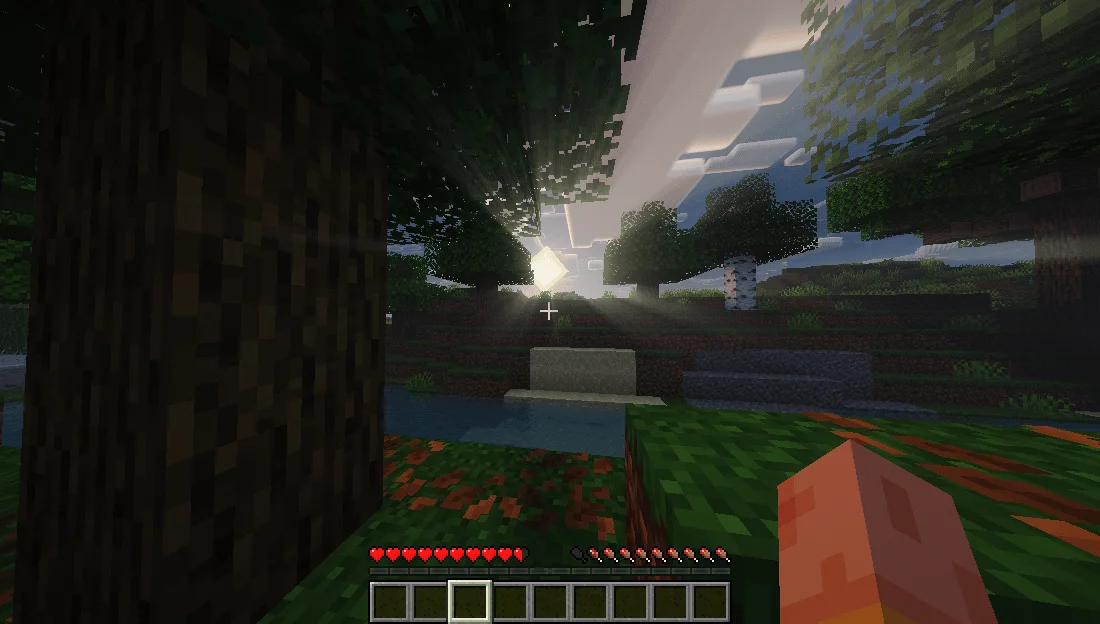
UltraLightShader (pack de shaders) est une création de kaiso5693. basically a lightweight shader specifically tuned for older generation devices, providing wonderful graphics.
Versions prises en charge : Minecraft 1.12 – 26.x. On compte 1 téléchargements sur Modrinth. La dernière mise à jour date du 15/11/2026.
La plus récente est 1.0.0, sortie le 15/11/2026. Elle est faite pour Minecraft 1.12.2 – 26.3. Elle fonctionne sur Iris et Optifine. Le téléchargement fait 429 KB.
| Version | Publié | Minecraft | Type |
|---|---|---|---|
1.0.0 | 15/11/2026 | 1.12.2 – 26.3 | Stable |
A realistic, low-end-first shader pack for Minecraft 1.21.x on Iris + Sodium.
UltraLight is built around one rule: every effect has a cheap path. It was developed and tuned on an AMD Radeon R4 iGPU (2 compute units, 6.7 GB RAM) at 1600x900 — not on a desktop GPU with headroom to waste. You get soft shadow-mapped lighting, reflective water, volumetric clouds and a graded image without the frame-time cliff that usually comes with them.
Water
Reflections
Sky & atmosphere
Lighting
Post
Minecraft · 1.21.x (developed on 1.21.11)
Loader · Fabric + Sodium + Iris (1.8 or newer)
GPU · OpenGL 3.2+; tuned for integrated graphics
RAM · 4 GB+
Defaults target a 2-CU integrated GPU. If you need more frames, cut in this order:
Step · Setting · Change
1 · Shadow Map Resolution · 1024 → 512
2 · Cloud Coverage / Volumetric Clouds · 1.0 → 0.5, or off
3 · Bloom Strength · 1.0 → 0.5
4 · Render Distance · 8–10 chunks
All rights reserved. Do not redistribute or republish without permission.
Écrite par kaiso5693. À lire avec les images sur Modrinth.
Installe Iris (avec Sodium) ou OptiFine pour ta version de Minecraft : les shaders ont besoin de l'un des deux.
Télécharge le fichier .zip depuis Modrinth. Ne le décompresse pas.
Dans Minecraft, ouvre Options, puis Paramètres vidéo, puis Shaders, et clique sur Ouvrir le dossier des shaders.
Dépose le fichier .zip dans ce dossier, choisis UltraLightShader dans la liste et clique sur Terminé.
Les shaders sollicitent beaucoup la carte graphique. Si le jeu ralentit, choisis un profil plus bas dans leurs réglages.
| Ressource | Téléchargements | Versions | Mise à jour | Prix |
|---|---|---|---|---|
| UltraLightShadercelle que tu regardais | 1 | 1.12 – 26.x | il y a 10 heures | Gratuit |
| BalancedShadersramizarbailow | 187 | 1.16 – 26.x | il y a 9 jours | Gratuit |
 Fullbright+ ShadersNiix-Dan | 41K | 1.12 – 26.x | 30 sept. 2026 | Gratuit |
 Terder's Potato ShaderTerdernah | 24K | 1.20 – 26.x | il y a 21 jours | Gratuit |
Oui. UltraLightShader prend en charge Minecraft 26.x. Toutes les versions prises en charge : 26.x, 1.21, 1.20, 1.19, 1.18, 1.17, 1.16, 1.13, 1.12.
Oui. UltraLightShader se télécharge gratuitement sur Modrinth.
Oui. La dernière mise à jour date des dernières 24 heures.
Les plus proches sont BalancedShaders, Fullbright+ Shaders et Terder's Potato Shader. Comparer toutes les alternatives
BalancedShadersShaders · 1.16 – 26.xAn ultra-lightweight shader pack optimized specifically for weak PCs and laptops without a dedicated graphics card. It delivers a smooth 60+ FPS while…
Fullbright+ ShadersShaders · 1.12 – 26.xA lightweight Minecraft shader that removes darkness by providing full brightness, making caves, nights, and dim areas fully visible while keeping gameplay…
Terder's Potato ShaderShaders · 1.20 – 26.xA lightweight, optimized shader designed specifically for low-end and potato PCs.
 Low WaterShaders · 1.19 – 1.21
Low Water is a shader pack for any Minecraft Java Edition version. It's a simple, lightweight, shader pack built for low-end-devices. It adds refractions…
 LumeauShaders · 1.16 – 26.x
A shader adding shadows, light and waves, while being lightweight to allow older hardware to run at a good number of fps.
 UltraVanilla+Shaders · 1.16 – 26.x
Ultravanilla+ is a lightweight shader designed to run smoothly on older or low-end computers. It enhances the game’s visuals while maintaining strong…
Connecte-toi pour laisser un avis.