
 BalancedShadersShaders · 1.16 – 26.x
An ultra-lightweight shader pack optimized specifically for weak PCs and laptops without a dedicated graphics card. It delivers a smooth 60+ FPS while…
Free187 downloads

basically a lightweight shader specifically tuned for older generation devices, providing wonderful graphics.
Direct download from Modrinth · 1 downloads
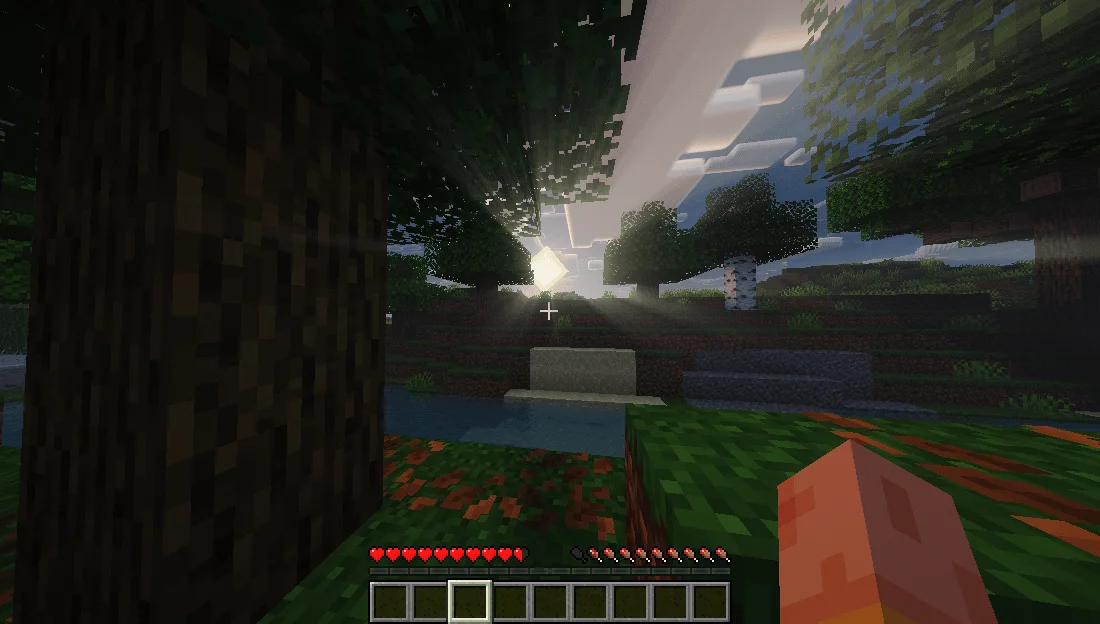
UltraLightShader is a shader pack made by kaiso5693. basically a lightweight shader specifically tuned for older generation devices, providing wonderful graphics.
It supports Minecraft 1.12 – 26.x. It has been downloaded 1 times on Modrinth. The last update came out on Nov 15, 2026.
The newest is 1.0.0, released on Nov 15, 2026. It is made for Minecraft 1.12.2 – 26.3. It runs on Iris and Optifine. The download is 429 KB.
| Version | Released | Minecraft | Type |
|---|---|---|---|
1.0.0 | Nov 15, 2026 | 1.12.2 – 26.3 | Release |
A realistic, low-end-first shader pack for Minecraft 1.21.x on Iris + Sodium.
UltraLight is built around one rule: every effect has a cheap path. It was developed and tuned on an AMD Radeon R4 iGPU (2 compute units, 6.7 GB RAM) at 1600x900 — not on a desktop GPU with headroom to waste. You get soft shadow-mapped lighting, reflective water, volumetric clouds and a graded image without the frame-time cliff that usually comes with them.
Water
Reflections
Sky & atmosphere
Lighting
Post
Minecraft · 1.21.x (developed on 1.21.11)
Loader · Fabric + Sodium + Iris (1.8 or newer)
GPU · OpenGL 3.2+; tuned for integrated graphics
RAM · 4 GB+
Defaults target a 2-CU integrated GPU. If you need more frames, cut in this order:
Step · Setting · Change
1 · Shadow Map Resolution · 1024 → 512
2 · Cloud Coverage / Volumetric Clouds · 1.0 → 0.5, or off
3 · Bloom Strength · 1.0 → 0.5
4 · Render Distance · 8–10 chunks
All rights reserved. Do not redistribute or republish without permission.
Written by kaiso5693. Read it with pictures on Modrinth.
Install Iris (with Sodium) or OptiFine for your Minecraft version: shaders need one of them.
Download the .zip file from Modrinth. Do not unzip it.
In Minecraft, open Options, then Video Settings, then Shader Packs, and click Open Shader Pack Folder.
Drop the .zip file into that folder, pick UltraLightShader in the list and click Done.
Shaders are heavy on the graphics card. If the game gets slow, pick a lower profile in the shader settings.
Full guide: How to install Minecraft shaders
| Resource | Downloads | Versions | Last update | Price |
|---|---|---|---|---|
| UltraLightShaderthe one you looked at | 1 | 1.12 – 26.x | 10 hours ago | Free |
| BalancedShadersramizarbailow | 187 | 1.16 – 26.x | 9 days ago | Free |
 Fullbright+ ShadersNiix-Dan | 41K | 1.12 – 26.x | Sep 30, 2026 | Free |
 Terder's Potato ShaderTerdernah | 24K | 1.20 – 26.x | 21 days ago | Free |
Yes. UltraLightShader supports Minecraft 26.x. All supported versions: 26.x, 1.21, 1.20, 1.19, 1.18, 1.17, 1.16, 1.13, 1.12.
Yes. UltraLightShader is free to download from Modrinth.
Yes. The last update came out in the past day.
The closest ones are BalancedShaders, Fullbright+ Shaders and Terder's Potato Shader. Compare all alternatives
BalancedShadersShaders · 1.16 – 26.xAn ultra-lightweight shader pack optimized specifically for weak PCs and laptops without a dedicated graphics card. It delivers a smooth 60+ FPS while…
Fullbright+ ShadersShaders · 1.12 – 26.xA lightweight Minecraft shader that removes darkness by providing full brightness, making caves, nights, and dim areas fully visible while keeping gameplay…
Terder's Potato ShaderShaders · 1.20 – 26.xA lightweight, optimized shader designed specifically for low-end and potato PCs.
 Low WaterShaders · 1.19 – 1.21
Low Water is a shader pack for any Minecraft Java Edition version. It's a simple, lightweight, shader pack built for low-end-devices. It adds refractions…
 LumeauShaders · 1.16 – 26.x
A shader adding shadows, light and waves, while being lightweight to allow older hardware to run at a good number of fps.
 UltraVanilla+Shaders · 1.16 – 26.x
Ultravanilla+ is a lightweight shader designed to run smoothly on older or low-end computers. It enhances the game’s visuals while maintaining strong…
Log in to leave a review.