
 CinchsMissingBlocksPaperizedPlugins · 1.21 – 26.x
Brings Cinch's Missing Blocks to Paper servers using CraftEngine, also adds horizontal stairs and vertical slabs!
Gratis27 descargas
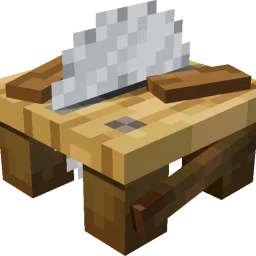
WoodworkingSaw adds a sawmill to the Minecraft server, allowing planks to be processed into stairs, slabs, doors, fences, and more. Ingredients and outputs…
Descarga directa desde Modrinth · 21 descargas
che1s creó WoodworkingSaw (plugin) para servidores Paper / Spigot. WoodworkingSaw adds a sawmill to the Minecraft server, allowing planks to be processed into stairs, slabs, doors, fences, and more. Ingredients and outputs…
Es compatible con Minecraft 1.21 – 26.x. Se ha descargado 21 veces en Modrinth. La última actualización salió el 14/11/2026.
La más reciente es 1.0.1, publicada el 28/10/2026. Está hecha para Minecraft 1.21.11 – 26.3. Funciona en Folia y Paper. La descarga ocupa 102 KB.
| Versión | Publicado | Minecraft | Tipo |
|---|---|---|---|
1.0.1 | 28/10/2026 | 1.21.11 – 26.3 | Estable |
Los comandos que aparecen en la página de WoodworkingSaw en Modrinth:
/ce/sawtablePermisos que se nombran allí, para dar con un plugin como LuckPerms:
woodworkingsaw.givewoodworkingsaw.adminwoodworkingsaw.useWoodworkingSaw es de código abierto. Su última versión en GitHub es 1.0.5, publicada el 14/11/2026.
i18n
English, Simplified Chinese, Japanese, Korean, Traditional Chinese, German, French, Spanish, Russian.
Antes: 1.0.1 (03/11/2026), 1.0.0 (27/10/2026).
A saw table for stripping logs and cutting planks, built on CraftEngine.
WoodworkingSaw adds a saw table to your server. Cut planks into stairs, slabs, doors, fences and more, with fully customizable input/output recipes. Requires CraftEngine.
Component · Requirement
Server · Paper / Folia on 1.21.11 / 26.1 / 26.2 / 26.3
CraftEngine · Required
Java · Runtime 21 / 25
· Stonecutter ·
Oak Planks Oak Log Oak Planks
Iron Block Iron Block Iron Block
(You can of course modify the saw table crafting recipe.)
Log / Stem → Stripped Log / Stripped Stem → Fence → Fence Gate → Button
Planks → Stairs → Slab → Pressure Plate → Button
Door → Trapdoor → Button
Sapling → Stick
Tall Flower → Small Flower; Big Dripleaf → Small Dripleaf
Coral Block → Coral; Cobweb → String
Sulfur → Sulfur Spike; Dripstone Block → Pointed Dripstone; Magma Block → 2 Magma Cream
Bed → Wool → [26.3+: Wool Stairs → Wool Slab → Cushion] → Carpet → String
26.2 and older: Bed → Wool → Carpet → String
Command · Description · Permission
/sawtable give [player] [amount] · Get a saw table · woodworkingsaw.give
/sawtable status · View status · woodworkingsaw.admin
/sawtable reload · Reload config and resources · woodworkingsaw.admin
/sawtable update · Check the latest stable GitHub release · woodworkingsaw.admin
Aliases: /woodworking. Using the saw table requires woodworkingsaw.use (default: everyone).
Run /sawtable reload after making changes.
Update checks. Set check-for-updates to false to disable these checks.
Problem · Solution
Cutting GUI won't open · Left-click with an empty hand; run /ce reload all if not loaded
Right-click doesn't transform · Check whether transformations.yml has a rule for the item
Can't get a saw table · Run /ce reload all, then /sawtable give
Can't use it · Check the woodworkingsaw.use permission
Escrita por che1s. Léela con imágenes en Modrinth.
Asegúrate de que tu servidor use Paper y Spigot en Minecraft 1.21 – 26.x.
Instala primero lo que necesita: CraftEngine.
Descarga el archivo .jar desde Modrinth y ponlo en la carpeta plugins de tu servidor.
Reinicia el servidor. Evita /reload, muchos plugins no lo llevan bien.
Escribe /plugins en la consola: WoodworkingSaw debería aparecer en verde. Sus archivos de configuración se crean en la carpeta plugins al primer arranque.
Guía completa: Cómo instalar plugins en un servidor de Minecraft
| Recurso | Descargas | Valoración | Versiones | Última actualización | Precio |
|---|---|---|---|---|---|
| WoodworkingSawel que estabas viendo | 21 | – | 1.21 – 26.x | hace 1 día | Gratis |
| CinchsMissingBlocksPaperizedcastledking | 27 | – | 1.21 – 26.x | hace 16 días | Gratis |
 【Super Chairs】: Sitting without modskixmc | 158K | 4.7 | 1.13 – 1.17 | 27 jul 2020 | Gratis |
 Easy SitJodek | 40K | – | 1.21 – 26.x | hace 10 días | Gratis |
Sí. WoodworkingSaw es compatible con Minecraft 26.x. Todas las versiones compatibles: 26.x, 1.21.
Sí. WoodworkingSaw se puede descargar gratis desde Modrinth.
WoodworkingSaw funciona en servidores Paper y Spigot.
Sí: CraftEngine. Instálalo antes de WoodworkingSaw.
Sí. La última actualización salió en el último día.
Los más parecidos son CinchsMissingBlocksPaperized, 【Super Chairs】: Sitting without mods y Easy Sit. Comparar todas las alternativas
CinchsMissingBlocksPaperizedPlugins · 1.21 – 26.xBrings Cinch's Missing Blocks to Paper servers using CraftEngine, also adds horizontal stairs and vertical slabs!
【Super Chairs】: Sitting without modsPlugins · 1.13 – 1.17Turn stairs & slabs (or any block) into chairs , or sit down anywhere!
Easy SitPlugins · 1.21 – 26.xSit anywhere with /trigger sit: on stairs, slabs, blocks or the ground
 OpenSitPlugins · 1.20 – 26.x
A plugin for sitting. You can sit down with /sit or by clicking stairs or slabs while holding no items.
 Chorus SitPlugins · 26.x
Customizable sit plugin for Paper 26.2: sit on stairs, slabs and carpets, on the ground or on players. Hex colors, editable messages, purple theme.
Inicia sesión para dejar una reseña.