
 CinchsMissingBlocksPaperizedPlugins · 1.21 – 26.x
Brings Cinch's Missing Blocks to Paper servers using CraftEngine, also adds horizontal stairs and vertical slabs!
Gratuit27 téléchargements
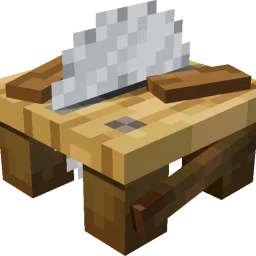
WoodworkingSaw adds a sawmill to the Minecraft server, allowing planks to be processed into stairs, slabs, doors, fences, and more. Ingredients and outputs…
Téléchargement direct depuis Modrinth · 21 téléchargements
che1s a créé WoodworkingSaw (plugin) pour les serveurs Paper / Spigot. WoodworkingSaw adds a sawmill to the Minecraft server, allowing planks to be processed into stairs, slabs, doors, fences, and more. Ingredients and outputs…
Versions prises en charge : Minecraft 1.21 – 26.x. On compte 21 téléchargements sur Modrinth. La dernière mise à jour date du 14/11/2026.
La plus récente est 1.0.1, sortie le 28/10/2026. Elle est faite pour Minecraft 1.21.11 – 26.3. Elle fonctionne sur Folia et Paper. Le téléchargement fait 102 KB.
| Version | Publié | Minecraft | Type |
|---|---|---|---|
1.0.1 | 28/10/2026 | 1.21.11 – 26.3 | Stable |
Les commandes citées sur la page Modrinth de WoodworkingSaw :
/ce/sawtablePermissions citées là-bas, à donner avec un plugin comme LuckPerms :
woodworkingsaw.givewoodworkingsaw.adminwoodworkingsaw.useWoodworkingSaw est open source. Sa dernière version sur GitHub est 1.0.5, publiée le 14/11/2026.
i18n
English, Simplified Chinese, Japanese, Korean, Traditional Chinese, German, French, Spanish, Russian.
Avant : 1.0.1 (03/11/2026), 1.0.0 (27/10/2026).
A saw table for stripping logs and cutting planks, built on CraftEngine.
WoodworkingSaw adds a saw table to your server. Cut planks into stairs, slabs, doors, fences and more, with fully customizable input/output recipes. Requires CraftEngine.
Component · Requirement
Server · Paper / Folia on 1.21.11 / 26.1 / 26.2 / 26.3
CraftEngine · Required
Java · Runtime 21 / 25
· Stonecutter ·
Oak Planks Oak Log Oak Planks
Iron Block Iron Block Iron Block
(You can of course modify the saw table crafting recipe.)
Log / Stem → Stripped Log / Stripped Stem → Fence → Fence Gate → Button
Planks → Stairs → Slab → Pressure Plate → Button
Door → Trapdoor → Button
Sapling → Stick
Tall Flower → Small Flower; Big Dripleaf → Small Dripleaf
Coral Block → Coral; Cobweb → String
Sulfur → Sulfur Spike; Dripstone Block → Pointed Dripstone; Magma Block → 2 Magma Cream
Bed → Wool → [26.3+: Wool Stairs → Wool Slab → Cushion] → Carpet → String
26.2 and older: Bed → Wool → Carpet → String
Command · Description · Permission
/sawtable give [player] [amount] · Get a saw table · woodworkingsaw.give
/sawtable status · View status · woodworkingsaw.admin
/sawtable reload · Reload config and resources · woodworkingsaw.admin
/sawtable update · Check the latest stable GitHub release · woodworkingsaw.admin
Aliases: /woodworking. Using the saw table requires woodworkingsaw.use (default: everyone).
Run /sawtable reload after making changes.
Update checks. Set check-for-updates to false to disable these checks.
Problem · Solution
Cutting GUI won't open · Left-click with an empty hand; run /ce reload all if not loaded
Right-click doesn't transform · Check whether transformations.yml has a rule for the item
Can't get a saw table · Run /ce reload all, then /sawtable give
Can't use it · Check the woodworkingsaw.use permission
Écrite par che1s. À lire avec les images sur Modrinth.
Vérifie que ton serveur tourne sous Paper et Spigot en Minecraft 1.21 – 26.x.
Installe d'abord ce dont il a besoin : CraftEngine.
Télécharge le fichier .jar depuis Modrinth et place-le dans le dossier plugins de ton serveur.
Redémarre le serveur. Évite /reload, beaucoup de plugins le supportent mal.
Tape /plugins dans la console : WoodworkingSaw doit apparaître en vert. Ses fichiers de config sont créés dans le dossier plugins au premier démarrage.
Guide complet: Comment installer des plugins sur un serveur Minecraft
| Ressource | Téléchargements | Note | Versions | Mise à jour | Prix |
|---|---|---|---|---|---|
| WoodworkingSawcelle que tu regardais | 21 | – | 1.21 – 26.x | il y a 1 jour | Gratuit |
| CinchsMissingBlocksPaperizedcastledking | 27 | – | 1.21 – 26.x | il y a 16 jours | Gratuit |
 【Super Chairs】: Sitting without modskixmc | 158K | 4.7 | 1.13 – 1.17 | 27 juil. 2020 | Gratuit |
 Easy SitJodek | 40K | – | 1.21 – 26.x | il y a 10 jours | Gratuit |
Oui. WoodworkingSaw prend en charge Minecraft 26.x. Toutes les versions prises en charge : 26.x, 1.21.
Oui. WoodworkingSaw se télécharge gratuitement sur Modrinth.
WoodworkingSaw fonctionne sur les serveurs Paper et Spigot.
Oui : CraftEngine. Installe-le avant WoodworkingSaw.
Oui. La dernière mise à jour date des dernières 24 heures.
Les plus proches sont CinchsMissingBlocksPaperized, 【Super Chairs】: Sitting without mods et Easy Sit. Comparer toutes les alternatives
CinchsMissingBlocksPaperizedPlugins · 1.21 – 26.xBrings Cinch's Missing Blocks to Paper servers using CraftEngine, also adds horizontal stairs and vertical slabs!
【Super Chairs】: Sitting without modsPlugins · 1.13 – 1.17Turn stairs & slabs (or any block) into chairs , or sit down anywhere!
Easy SitPlugins · 1.21 – 26.xSit anywhere with /trigger sit: on stairs, slabs, blocks or the ground
 OpenSitPlugins · 1.20 – 26.x
A plugin for sitting. You can sit down with /sit or by clicking stairs or slabs while holding no items.
 Chorus SitPlugins · 26.x
Customizable sit plugin for Paper 26.2: sit on stairs, slabs and carpets, on the ground or on players. Hex colors, editable messages, purple theme.
Connecte-toi pour laisser un avis.