
 CinchsMissingBlocksPaperizedPlugins · 1.21 – 26.x
Brings Cinch's Missing Blocks to Paper servers using CraftEngine, also adds horizontal stairs and vertical slabs!
Free27 downloads
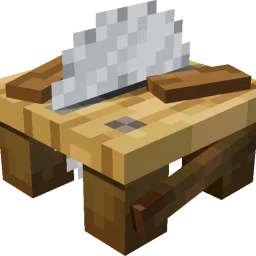
WoodworkingSaw adds a sawmill to the Minecraft server, allowing planks to be processed into stairs, slabs, doors, fences, and more. Ingredients and outputs…
Direct download from Modrinth · 14 downloads
WoodworkingSaw is a plugin for Paper / Spigot servers, made by che1s. WoodworkingSaw adds a sawmill to the Minecraft server, allowing planks to be processed into stairs, slabs, doors, fences, and more. Ingredients and outputs…
It supports Minecraft 1.21 – 26.x. It has been downloaded 14 times on Modrinth. The last update came out on Oct 28, 2026.
The newest is 1.0.1, released on Oct 28, 2026. It is made for Minecraft 1.21.11 – 26.3. It runs on Folia and Paper. The download is 102 KB.
| Version | Released | Minecraft | Type |
|---|---|---|---|
1.0.1 | Oct 28, 2026 | 1.21.11 – 26.3 | Release |
The commands named on the Modrinth page of WoodworkingSaw:
/ce/sawtablePermission nodes named there, to give with a plugin like LuckPerms:
woodworkingsaw.givewoodworkingsaw.adminwoodworkingsaw.useWoodworkingSaw is open source. Its newest release on GitHub is 1.0.1, published on Nov 3, 2026.
-
Right-click the saw table while holding an item:
Log / Stem → Stripped Log / Stripped Stem → Fence → Fence Gate → Button
Planks → Stairs → Slab → Pressure Plate → Button
Door → Trapdoor → Button
Sapling → Stick
Tall Flower → Small Flower; Big Dripleaf → Small Dripleaf
Coral Block → Coral; Cobweb → String
Sulfur → Sulfur Spike; Dripstone Block → Pointed Dripstone; Magma Block → 2 Magma Cream
Bed → Wool → [26.3+: Wool Stairs → Wool Slab → Cushion] → Carpet → String
26.2 and older: Bed → Wool → Carpet → String
Before that: 1.0.0 (Oct 27, 2026).
A saw table for stripping logs and cutting planks, built on CraftEngine.
WoodworkingSaw adds a saw table to your server. Cut planks into stairs, slabs, doors, fences and more, with fully customizable input/output recipes. Requires CraftEngine.
Component · Requirement
Server · Paper / Folia on 1.21.11 / 26.1 / 26.2 / 26.3
CraftEngine · Required
Java · Runtime 21 / 25
· Stonecutter ·
Oak Planks Oak Log Oak Planks
Iron Block Iron Block Iron Block
(You can of course modify the saw table crafting recipe.)
Log / Stem → Stripped Log / Stripped Stem → Fence → Fence Gate → Button
Planks → Stairs → Slab → Pressure Plate → Button
Door → Trapdoor → Button
Sapling → Stick
Tall Flower → Small Flower; Big Dripleaf → Small Dripleaf
Coral Block → Coral; Cobweb → String
Sulfur → Sulfur Spike; Dripstone Block → Pointed Dripstone; Magma Block → 2 Magma Cream
Bed → Wool → [26.3+: Wool Stairs → Wool Slab → Cushion] → Carpet → String
26.2 and older: Bed → Wool → Carpet → String
Command · Description · Permission
/sawtable give [player] [amount] · Get a saw table · woodworkingsaw.give
/sawtable status · View status · woodworkingsaw.admin
/sawtable reload · Reload config and resources · woodworkingsaw.admin
/sawtable update · Check the latest stable GitHub release · woodworkingsaw.admin
Aliases: /woodworking. Using the saw table requires woodworkingsaw.use (default: everyone).
Run /sawtable reload after making changes.
Update checks. Set check-for-updates to false to disable these checks.
Problem · Solution
Cutting GUI won't open · Left-click with an empty hand; run /ce reload all if not loaded
Right-click doesn't transform · Check whether transformations.yml has a rule for the item
Can't get a saw table · Run /ce reload all, then /sawtable give
Can't use it · Check the woodworkingsaw.use permission
Written by che1s. Read it with pictures on Modrinth.
Make sure your server runs Paper and Spigot on Minecraft 1.21 – 26.x.
Install what it needs first: CraftEngine.
Download the .jar file from Modrinth and put it in the plugins folder of your server.
Restart the server. Avoid /reload, many plugins do not handle it well.
Type /plugins in the console: WoodworkingSaw should be listed in green. Its config files are created in the plugins folder on the first start.
Full guide: How to install plugins on a Minecraft server
| Resource | Downloads | Rating | Versions | Last update | Price |
|---|---|---|---|---|---|
| WoodworkingSawthe one you looked at | 14 | – | 1.21 – 26.x | 17 days ago | Free |
| CinchsMissingBlocksPaperizedcastledking | 27 | – | 1.21 – 26.x | 15 days ago | Free |
 【Super Chairs】: Sitting without modskixmc | 158K | 4.7 | 1.13 – 1.17 | Jul 27, 2020 | Free |
 Easy SitJodek | 40K | – | 1.21 – 26.x | 9 days ago | Free |
Yes. WoodworkingSaw supports Minecraft 26.x. All supported versions: 26.x, 1.21.
Yes. WoodworkingSaw is free to download from Modrinth.
WoodworkingSaw runs on Paper and Spigot servers.
Yes: CraftEngine. Install it before WoodworkingSaw.
Yes. The last update came out 2 days ago.
The closest ones are CinchsMissingBlocksPaperized, 【Super Chairs】: Sitting without mods and Easy Sit. Compare all alternatives
CinchsMissingBlocksPaperizedPlugins · 1.21 – 26.xBrings Cinch's Missing Blocks to Paper servers using CraftEngine, also adds horizontal stairs and vertical slabs!
【Super Chairs】: Sitting without modsPlugins · 1.13 – 1.17Turn stairs & slabs (or any block) into chairs , or sit down anywhere!
Easy SitPlugins · 1.21 – 26.xSit anywhere with /trigger sit: on stairs, slabs, blocks or the ground
 OpenSitPlugins · 1.20 – 26.x
A plugin for sitting. You can sit down with /sit or by clicking stairs or slabs while holding no items.
 Chorus SitPlugins · 26.x
Customizable sit plugin for Paper 26.2: sit on stairs, slabs and carpets, on the ground or on players. Hex colors, editable messages, purple theme.
Log in to leave a review.