
 CinchsMissingBlocksPaperizedPlugins · 1.21 – 26.x
Brings Cinch's Missing Blocks to Paper servers using CraftEngine, also adds horizontal stairs and vertical slabs!
Grátis27 downloads
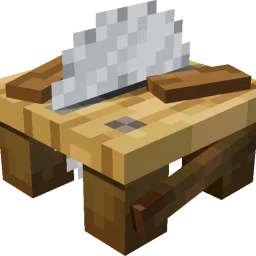
WoodworkingSaw adds a sawmill to the Minecraft server, allowing planks to be processed into stairs, slabs, doors, fences, and more. Ingredients and outputs…
Download direto do Modrinth · 21 downloads
che1s criou WoodworkingSaw (plugin) para servidores Paper / Spigot. WoodworkingSaw adds a sawmill to the Minecraft server, allowing planks to be processed into stairs, slabs, doors, fences, and more. Ingredients and outputs…
É compatível com o Minecraft 1.21 – 26.x. Tem 21 downloads em Modrinth. A última atualização saiu em 14/11/2026.
A mais recente é 1.0.1, lançada em 28/10/2026. Ela é feita para o Minecraft 1.21.11 – 26.3. Ela roda em Folia e Paper. O download tem 102 KB.
| Versão | Lançado | Minecraft | Tipo |
|---|---|---|---|
1.0.1 | 28/10/2026 | 1.21.11 – 26.3 | Estável |
Os comandos citados na página de WoodworkingSaw no Modrinth:
/ce/sawtablePermissões citadas lá, para dar com um plugin como o LuckPerms:
woodworkingsaw.givewoodworkingsaw.adminwoodworkingsaw.useWoodworkingSaw é de código aberto. A versão mais recente no GitHub é 1.0.5, publicada em 14/11/2026.
i18n
English, Simplified Chinese, Japanese, Korean, Traditional Chinese, German, French, Spanish, Russian.
Antes: 1.0.1 (03/11/2026), 1.0.0 (27/10/2026).
A saw table for stripping logs and cutting planks, built on CraftEngine.
WoodworkingSaw adds a saw table to your server. Cut planks into stairs, slabs, doors, fences and more, with fully customizable input/output recipes. Requires CraftEngine.
Component · Requirement
Server · Paper / Folia on 1.21.11 / 26.1 / 26.2 / 26.3
CraftEngine · Required
Java · Runtime 21 / 25
· Stonecutter ·
Oak Planks Oak Log Oak Planks
Iron Block Iron Block Iron Block
(You can of course modify the saw table crafting recipe.)
Log / Stem → Stripped Log / Stripped Stem → Fence → Fence Gate → Button
Planks → Stairs → Slab → Pressure Plate → Button
Door → Trapdoor → Button
Sapling → Stick
Tall Flower → Small Flower; Big Dripleaf → Small Dripleaf
Coral Block → Coral; Cobweb → String
Sulfur → Sulfur Spike; Dripstone Block → Pointed Dripstone; Magma Block → 2 Magma Cream
Bed → Wool → [26.3+: Wool Stairs → Wool Slab → Cushion] → Carpet → String
26.2 and older: Bed → Wool → Carpet → String
Command · Description · Permission
/sawtable give [player] [amount] · Get a saw table · woodworkingsaw.give
/sawtable status · View status · woodworkingsaw.admin
/sawtable reload · Reload config and resources · woodworkingsaw.admin
/sawtable update · Check the latest stable GitHub release · woodworkingsaw.admin
Aliases: /woodworking. Using the saw table requires woodworkingsaw.use (default: everyone).
Run /sawtable reload after making changes.
Update checks. Set check-for-updates to false to disable these checks.
Problem · Solution
Cutting GUI won't open · Left-click with an empty hand; run /ce reload all if not loaded
Right-click doesn't transform · Check whether transformations.yml has a rule for the item
Can't get a saw table · Run /ce reload all, then /sawtable give
Can't use it · Check the woodworkingsaw.use permission
Escrita por che1s. Leia com imagens no Modrinth.
Confira se o seu servidor roda Paper e Spigot no Minecraft 1.21 – 26.x.
Instale primeiro o que ele precisa: CraftEngine.
Baixe o arquivo .jar pelo Modrinth e coloque na pasta plugins do seu servidor.
Reinicie o servidor. Evite /reload, muitos plugins não lidam bem com ele.
Digite /plugins no console: WoodworkingSaw deve aparecer em verde. Os arquivos de configuração são criados na pasta plugins na primeira inicialização.
Guia completo: Como instalar plugins em um servidor de Minecraft
| Recurso | Downloads | Nota | Versões | Última atualização | Preço |
|---|---|---|---|---|---|
| WoodworkingSawo que você estava vendo | 21 | – | 1.21 – 26.x | há 1 dia | Grátis |
| CinchsMissingBlocksPaperizedcastledking | 27 | – | 1.21 – 26.x | há 16 dias | Grátis |
 【Super Chairs】: Sitting without modskixmc | 158K | 4.7 | 1.13 – 1.17 | 27 jul 2020 | Grátis |
 Easy SitJodek | 40K | – | 1.21 – 26.x | há 11 dias | Grátis |
Sim. WoodworkingSaw é compatível com o Minecraft 26.x. Todas as versões compatíveis: 26.x, 1.21.
Sim. Você pode baixar WoodworkingSaw de graça em Modrinth.
WoodworkingSaw roda em servidores Paper e Spigot.
Sim: CraftEngine. Instale antes de WoodworkingSaw.
Sim. A última atualização saiu no último dia.
Os mais parecidos são CinchsMissingBlocksPaperized, 【Super Chairs】: Sitting without mods e Easy Sit. Comparar todas as alternativas
CinchsMissingBlocksPaperizedPlugins · 1.21 – 26.xBrings Cinch's Missing Blocks to Paper servers using CraftEngine, also adds horizontal stairs and vertical slabs!
【Super Chairs】: Sitting without modsPlugins · 1.13 – 1.17Turn stairs & slabs (or any block) into chairs , or sit down anywhere!
Easy SitPlugins · 1.21 – 26.xSit anywhere with /trigger sit: on stairs, slabs, blocks or the ground
 OpenSitPlugins · 1.20 – 26.x
A plugin for sitting. You can sit down with /sit or by clicking stairs or slabs while holding no items.
 Chorus SitPlugins · 26.x
Customizable sit plugin for Paper 26.2: sit on stairs, slabs and carpets, on the ground or on players. Hex colors, editable messages, purple theme.
Entre para deixar uma avaliação.