
 ImageFramePlugins · 1.13 – 26.x
Put images on maps and walls!
Gratis270,343 descargas
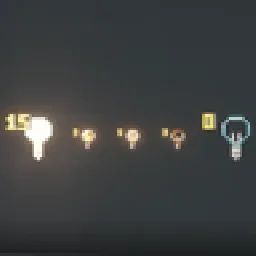
Craft light blocks with a torch and glass panes, pick any light level in the stonecutter, and see, break and adjust them in survival.
Descarga directa desde Modrinth · 5 descargas
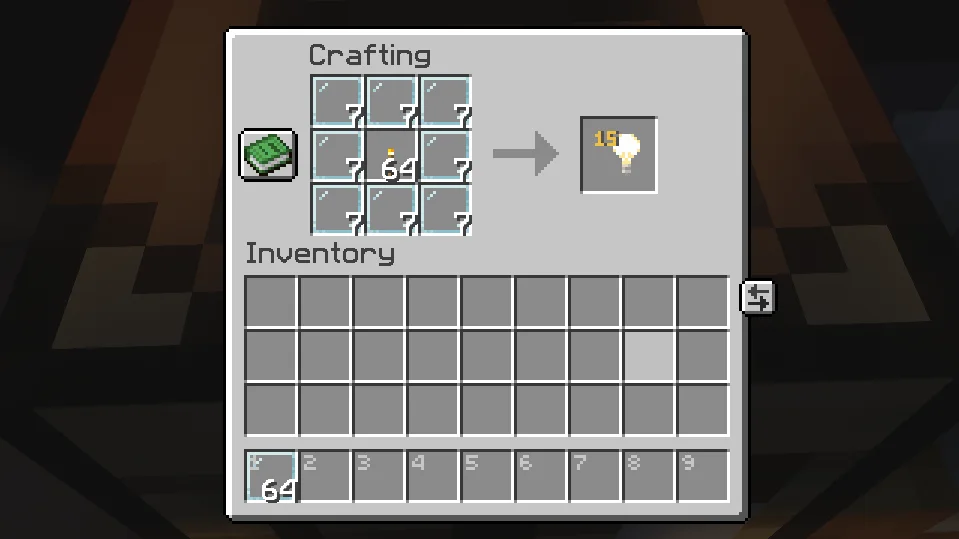
Von_To creó Craftable Light Blocks (plugin) para servidores Paper / Spigot. Craft light blocks with a torch and glass panes, pick any light level in the stonecutter, and see, break and adjust them in survival.
Es compatible con Minecraft 1.21 – 26.x. Se ha descargado 5 veces en Modrinth. Eso lo sitúa en el puesto 111 de los 118 plugins cosméticos y de visualización de esta lista. La última actualización salió el 08/11/2026.
Craftable Light Blocks ha publicado 4 versiones en Modrinth desde el 08/11/2026. 4 salieron en el último año. La más reciente es 1.2.0-datapack, publicada el 08/11/2026. Está hecha para Minecraft 26.1 – 26.3. Funciona en Data pack. La descarga ocupa 24 KB.
| Versión | Publicado | Minecraft | Tipo |
|---|---|---|---|
1.2.0-datapack | 08/11/2026 | 26.1 – 26.3 | Estable |
1.2.0 | 08/11/2026 | 1.21.3 – 26.3 | Estable |
1.1.1-datapack | 08/11/2026 | 26.1 – 26.3 | Estable |
1.1.1 | 08/11/2026 | 1.21.4 – 26.3 | Estable |
Los comandos que aparecen en la página de Craftable Light Blocks en Modrinth:
/lichtblock/function/reloadCraft light blocks in survival, pick any light level, and see and adjust them – just like in creative mode.
Surround a Torch with 8 Glass Panes:
Put a light block into a Stonecutter and choose any of the 16 light levels (0–15). The level is shown right on the item, just like in the creative inventory.
Hold a light block in survival mode and you can:
Removing works just like vanilla: place any other block where the light block is. Break that block again and the light block is gone.
Optional extra – break with left-click: turn it on and you can pick light blocks up with a left-click. They drop with the same light level. It's off by default and can be switched on in the settings menu, with a command or in the config.
In creative mode, Minecraft already does all of this by itself.
Both are included – pick the one that fits your game.
Plugin · Datapack
Works on · Paper / Purpur servers · Singleplayer & any server
Minecraft · 1.21.4 – 26.3 · 26.1 – 26.3
Marker range · 32 blocks (up to 160) · 16 blocks
Adjust & break from · normal reach · up to 3 blocks
Settings menu (clickable in chat) · ✅ · ✅
Respects land-claim plugins · ✅ · –
Configurable recipe · ✅ · –
Use either the plugin or the datapack – not both at once.
Plugin
Command · Effect
/lichtblock · Clickable settings menu
/lichtblock abbauen an\ · aus · Turn left-click breaking on/off
/lichtblock lichtstaerke an\ · aus · Turn right-click light level changing on/off
/lichtblock geben [player] [level] · Give light blocks, optionally with light level 0–15
Datapack
Command · Effect
/function lichtbloecke:einstellungen · Clickable settings menu (breaking & light level on/off)
/function lichtbloecke:geben {anzahl:16} · Give light blocks
/function lichtbloecke:geben_stufe {anzahl:16,stufe:7} · Give light blocks with light level 0–15
/function lichtbloecke:deinstallieren · Remove everything, then disable the pack
Permission · Default · Effect
lichtbloecke.sehen · everyone · See light blocks while holding one
lichtbloecke.bearbeiten · everyone · Change the light level (and break light blocks, if turned on)
lichtbloecke.give · operators · Use /lichtblock geben
lichtbloecke.einstellungen · operators · Use the settings menu and on/off commands
In plugins/Lichtbloecke/config.yml you can change the recipe's center item and result amount, allow colored glass panes, turn the stonecutter, left-click breaking (abbauen, off by default) and level changing on or off, and set the marker range.
🔌 Plugin
Datapack – Singleplayer
Datapack – Server
The markers are particles – the only way to show something to a single player. After you put the light block away, they stay visible for up to 4 seconds.
Escrita por Von_To. Léela con imágenes en Modrinth.
Asegúrate de que tu servidor use Paper y Spigot en Minecraft 1.21 – 26.x.
Descarga el archivo .jar desde Modrinth y ponlo en la carpeta plugins de tu servidor.
Reinicia el servidor. Evita /reload, muchos plugins no lo llevan bien.
Escribe /plugins en la consola: Craftable Light Blocks debería aparecer en verde. Sus archivos de configuración se crean en la carpeta plugins al primer arranque.
Guía completa: Cómo instalar plugins en un servidor de Minecraft
| Recurso | Descargas | Versiones | Última actualización | Precio |
|---|---|---|---|---|
| Craftable Light Blocksel que estabas viendo | 5 | 1.21 – 26.x | hace 2 días | Gratis |
| ImageFrameLOOHP | 270K | 1.13 – 26.x | 18 sept 2026 | Gratis |
 Drop HeadSolmey | 146K | 1.13 – 26.x | 17 jun 2026 | Gratis |
 NoEmotecraftTheMeko | 118K | 1.21 | 6 nov 2024 | Gratis |
Sí. Craftable Light Blocks es compatible con Minecraft 26.x. Todas las versiones compatibles: 26.x, 1.21.
Sí. Craftable Light Blocks se puede descargar gratis desde Modrinth.
Craftable Light Blocks funciona en servidores Paper y Spigot.
Sí. La última actualización salió en el último día.
Los más parecidos son ImageFrame, Drop Head y NoEmotecraft. Comparar todas las alternativas
ImageFramePlugins · 1.13 – 26.xPut images on maps and walls!
Drop HeadPlugins · 1.13 – 26.xDrop a player's head when they die
NoEmotecraftPlugins · 1.21Emotecraft fork with 1.21.x update
 DonutScoreboardPlugins · 1.21 – 26.x
This plugin creates a scoreboard easy adjustment and configuration exactly like the famous server "DonutSMP" that owned but "DrDonutt"
 Tool Trims AlternativePlugins · 1.20 – 1.21
Allows you to trim weapons and tools. There are over 1200 combinations!
 Click VillagersPlugins · 1.20 – 26.x
Click to pick up villagers, reset their trades, change their biomes, claim them and much more!
Inicia sesión para dejar una reseña.