
 ImageFrameEklentiler · 1.13 – 26.x
Put images on maps and walls!
Ücretsiz270,343 indirme
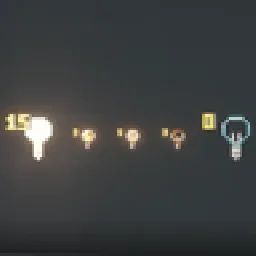
Craft light blocks with a torch and glass panes, pick any light level in the stonecutter, and see, break and adjust them in survival.
Modrinth üzerinden doğrudan indirme · 5 indirme
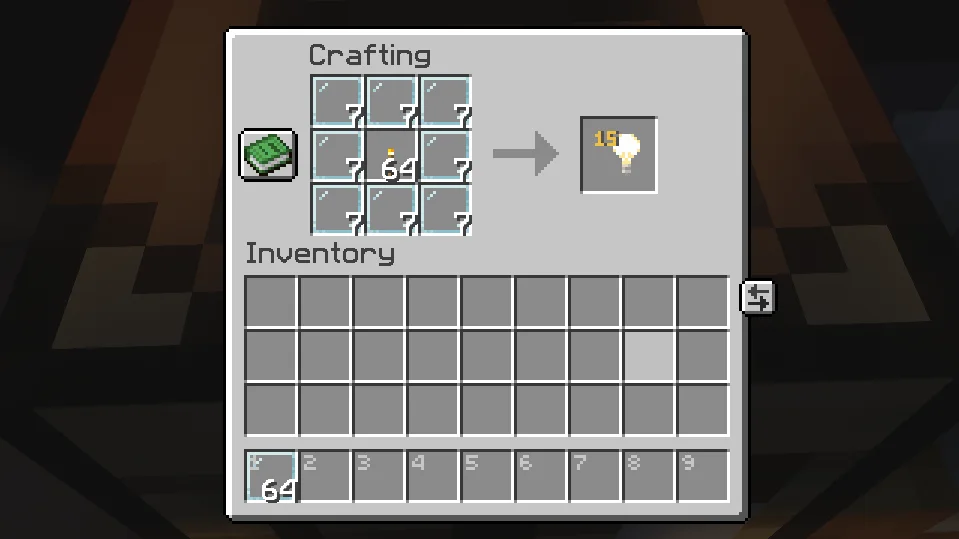
Craftable Light Blocks, Von_To tarafından Paper / Spigot sunucuları için yapılmış bir eklenti. Craft light blocks with a torch and glass panes, pick any light level in the stonecutter, and see, break and adjust them in survival.
Desteklediği sürümler: Minecraft 1.21 – 26.x. Modrinth üzerinde 5 kez indirildi. Böylece burada listelenen kozmetik ve görsel eklentiler (118 adet) arasında 111. sırada yer alıyor. Son güncelleme 08.11.2026 tarihinde çıktı.
Craftable Light Blocks, 08.11.2026 tarihinden beri Modrinth üzerinde 4 sürüm yayınladı. Bunların 4 tanesi son bir yılda çıktı. En yenisi 08.11.2026 tarihinde çıkan 1.2.0-datapack. Minecraft 26.1 – 26.3 için yapıldı. Data pack üzerinde çalışır. İndirme boyutu 24 KB.
| Sürüm | Yayın tarihi | Minecraft | Tür |
|---|---|---|---|
1.2.0-datapack | 08.11.2026 | 26.1 – 26.3 | Kararlı |
1.2.0 | 08.11.2026 | 1.21.3 – 26.3 | Kararlı |
1.1.1-datapack | 08.11.2026 | 26.1 – 26.3 | Kararlı |
1.1.1 | 08.11.2026 | 1.21.4 – 26.3 | Kararlı |
Craftable Light Blocks için Modrinth sayfasında geçen komutlar:
/lichtblock/function/reloadCraft light blocks in survival, pick any light level, and see and adjust them – just like in creative mode.
Surround a Torch with 8 Glass Panes:
Put a light block into a Stonecutter and choose any of the 16 light levels (0–15). The level is shown right on the item, just like in the creative inventory.
Hold a light block in survival mode and you can:
Removing works just like vanilla: place any other block where the light block is. Break that block again and the light block is gone.
Optional extra – break with left-click: turn it on and you can pick light blocks up with a left-click. They drop with the same light level. It's off by default and can be switched on in the settings menu, with a command or in the config.
In creative mode, Minecraft already does all of this by itself.
Both are included – pick the one that fits your game.
Plugin · Datapack
Works on · Paper / Purpur servers · Singleplayer & any server
Minecraft · 1.21.4 – 26.3 · 26.1 – 26.3
Marker range · 32 blocks (up to 160) · 16 blocks
Adjust & break from · normal reach · up to 3 blocks
Settings menu (clickable in chat) · ✅ · ✅
Respects land-claim plugins · ✅ · –
Configurable recipe · ✅ · –
Use either the plugin or the datapack – not both at once.
Plugin
Command · Effect
/lichtblock · Clickable settings menu
/lichtblock abbauen an\ · aus · Turn left-click breaking on/off
/lichtblock lichtstaerke an\ · aus · Turn right-click light level changing on/off
/lichtblock geben [player] [level] · Give light blocks, optionally with light level 0–15
Datapack
Command · Effect
/function lichtbloecke:einstellungen · Clickable settings menu (breaking & light level on/off)
/function lichtbloecke:geben {anzahl:16} · Give light blocks
/function lichtbloecke:geben_stufe {anzahl:16,stufe:7} · Give light blocks with light level 0–15
/function lichtbloecke:deinstallieren · Remove everything, then disable the pack
Permission · Default · Effect
lichtbloecke.sehen · everyone · See light blocks while holding one
lichtbloecke.bearbeiten · everyone · Change the light level (and break light blocks, if turned on)
lichtbloecke.give · operators · Use /lichtblock geben
lichtbloecke.einstellungen · operators · Use the settings menu and on/off commands
In plugins/Lichtbloecke/config.yml you can change the recipe's center item and result amount, allow colored glass panes, turn the stonecutter, left-click breaking (abbauen, off by default) and level changing on or off, and set the marker range.
🔌 Plugin
Datapack – Singleplayer
Datapack – Server
The markers are particles – the only way to show something to a single player. After you put the light block away, they stay visible for up to 4 seconds.
Yazan: Von_To. Resimli halini Modrinth sayfasında oku.
Sunucunun Minecraft 1.21 – 26.x üzerinde Paper ve Spigot çalıştırdığından emin ol.
.jar dosyasını Modrinth üzerinden indir ve sunucunun plugins klasörüne koy.
Sunucuyu yeniden başlat. /reload kullanma, birçok eklenti bununla sorun çıkarır.
Konsola /plugins yaz: Craftable Light Blocks yeşil olarak listelenmeli. Ayar dosyaları ilk açılışta plugins klasöründe oluşturulur.
Detaylı rehber: Minecraft sunucusuna eklenti nasıl kurulur
| Kaynak | İndirmeler | Sürümler | Son güncelleme | Fiyat |
|---|---|---|---|---|
| Craftable Light Blocksbaktığın | 5 | 1.21 – 26.x | 2 gün önce | Ücretsiz |
| ImageFrameLOOHP | 270K | 1.13 – 26.x | 18 Eyl 2026 | Ücretsiz |
 Drop HeadSolmey | 146K | 1.13 – 26.x | 17 Haz 2026 | Ücretsiz |
 NoEmotecraftTheMeko | 118K | 1.21 | 6 Kas 2024 | Ücretsiz |
Evet. Craftable Light Blocks, Minecraft 26.x sürümünü destekliyor. Desteklenen tüm sürümler: 26.x, 1.21.
Evet. Craftable Light Blocks, Modrinth üzerinden ücretsiz indirilebilir.
Craftable Light Blocks, Paper ve Spigot sunucularında çalışır.
Evet. Son güncelleme son 24 saat içinde çıktı.
En yakın olanlar ImageFrame, Drop Head ve NoEmotecraft. Tüm alternatifleri karşılaştır
ImageFrameEklentiler · 1.13 – 26.xPut images on maps and walls!
Drop HeadEklentiler · 1.13 – 26.xDrop a player's head when they die
NoEmotecraftEklentiler · 1.21Emotecraft fork with 1.21.x update
 DonutScoreboardEklentiler · 1.21 – 26.x
This plugin creates a scoreboard easy adjustment and configuration exactly like the famous server "DonutSMP" that owned but "DrDonutt"
 Tool Trims AlternativeEklentiler · 1.20 – 1.21
Allows you to trim weapons and tools. There are over 1200 combinations!
 Click VillagersEklentiler · 1.20 – 26.x
Click to pick up villagers, reset their trades, change their biomes, claim them and much more!
Yorum yazmak için giriş yap.