
 ImageFramePluginy · 1.13 – 26.x
Put images on maps and walls!
Za darmoPobrania: 270,343
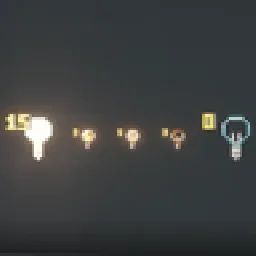
Craft light blocks with a torch and glass panes, pick any light level in the stonecutter, and see, break and adjust them in survival.
Bezpośrednie pobieranie z Modrinth · 5 pobrań
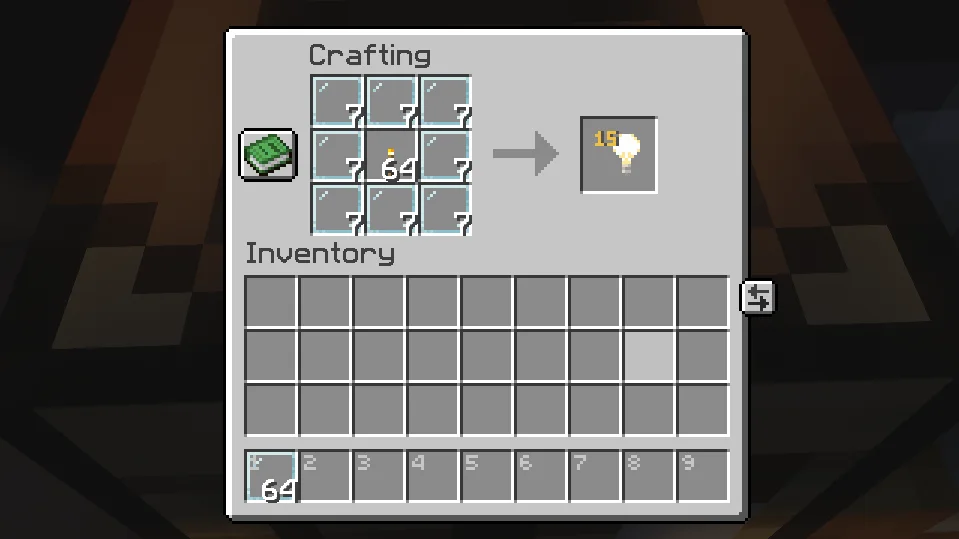
Craftable Light Blocks to plugin do serwerów Paper / Spigot, autor: Von_To. Craft light blocks with a torch and glass panes, pick any light level in the stonecutter, and see, break and adjust them in survival.
Obsługiwane wersje: Minecraft 1.21 – 26.x. Liczba pobrań w serwisie Modrinth: 5. Zajmuje 111. miejsce w kategorii „pluginy kosmetyczne i wizualne” (łącznie: 118). Ostatnia aktualizacja: 08.11.2026.
Craftable Light Blocks ma 4 wydań na Modrinth od 08.11.2026. 4 z nich wyszło w ostatnim roku. Najnowsza to 1.2.0-datapack, wydana 08.11.2026. Jest zrobiona dla Minecraft 26.1 – 26.3. Działa na Data pack. Plik ma 24 KB.
| Wersja | Wydano | Minecraft | Typ |
|---|---|---|---|
1.2.0-datapack | 08.11.2026 | 26.1 – 26.3 | Wydanie |
1.2.0 | 08.11.2026 | 1.21.3 – 26.3 | Wydanie |
1.1.1-datapack | 08.11.2026 | 26.1 – 26.3 | Wydanie |
1.1.1 | 08.11.2026 | 1.21.4 – 26.3 | Wydanie |
Komendy wymienione na stronie Craftable Light Blocks w Modrinth:
/lichtblock/function/reloadCraft light blocks in survival, pick any light level, and see and adjust them – just like in creative mode.
Surround a Torch with 8 Glass Panes:
Put a light block into a Stonecutter and choose any of the 16 light levels (0–15). The level is shown right on the item, just like in the creative inventory.
Hold a light block in survival mode and you can:
Removing works just like vanilla: place any other block where the light block is. Break that block again and the light block is gone.
Optional extra – break with left-click: turn it on and you can pick light blocks up with a left-click. They drop with the same light level. It's off by default and can be switched on in the settings menu, with a command or in the config.
In creative mode, Minecraft already does all of this by itself.
Both are included – pick the one that fits your game.
Plugin · Datapack
Works on · Paper / Purpur servers · Singleplayer & any server
Minecraft · 1.21.4 – 26.3 · 26.1 – 26.3
Marker range · 32 blocks (up to 160) · 16 blocks
Adjust & break from · normal reach · up to 3 blocks
Settings menu (clickable in chat) · ✅ · ✅
Respects land-claim plugins · ✅ · –
Configurable recipe · ✅ · –
Use either the plugin or the datapack – not both at once.
Plugin
Command · Effect
/lichtblock · Clickable settings menu
/lichtblock abbauen an\ · aus · Turn left-click breaking on/off
/lichtblock lichtstaerke an\ · aus · Turn right-click light level changing on/off
/lichtblock geben [player] [level] · Give light blocks, optionally with light level 0–15
Datapack
Command · Effect
/function lichtbloecke:einstellungen · Clickable settings menu (breaking & light level on/off)
/function lichtbloecke:geben {anzahl:16} · Give light blocks
/function lichtbloecke:geben_stufe {anzahl:16,stufe:7} · Give light blocks with light level 0–15
/function lichtbloecke:deinstallieren · Remove everything, then disable the pack
Permission · Default · Effect
lichtbloecke.sehen · everyone · See light blocks while holding one
lichtbloecke.bearbeiten · everyone · Change the light level (and break light blocks, if turned on)
lichtbloecke.give · operators · Use /lichtblock geben
lichtbloecke.einstellungen · operators · Use the settings menu and on/off commands
In plugins/Lichtbloecke/config.yml you can change the recipe's center item and result amount, allow colored glass panes, turn the stonecutter, left-click breaking (abbauen, off by default) and level changing on or off, and set the marker range.
🔌 Plugin
Datapack – Singleplayer
Datapack – Server
The markers are particles – the only way to show something to a single player. After you put the light block away, they stay visible for up to 4 seconds.
Autor: Von_To. Z obrazkami na Modrinth.
Upewnij się, że twój serwer działa na Paper i Spigot w Minecraft 1.21 – 26.x.
Pobierz plik .jar z Modrinth i wrzuć go do folderu plugins na serwerze.
Zrestartuj serwer. Unikaj /reload, wiele pluginów źle to znosi.
Wpisz /plugins w konsoli: Craftable Light Blocks powinien być na zielono. Pliki konfiguracyjne tworzą się w folderze plugins przy pierwszym starcie.
Pełny poradnik: Jak zainstalować pluginy na serwerze Minecraft
| Zasób | Pobrania | Wersje | Aktualizacja | Cena |
|---|---|---|---|---|
| Craftable Light Blocksten, który oglądałeś | 5 | 1.21 – 26.x | 2 d. temu | Za darmo |
| ImageFrameLOOHP | 270K | 1.13 – 26.x | 18 wrz 2026 | Za darmo |
 Drop HeadSolmey | 146K | 1.13 – 26.x | 17 cze 2026 | Za darmo |
 NoEmotecraftTheMeko | 118K | 1.21 | 6 lis 2024 | Za darmo |
Tak. Craftable Light Blocks działa w wersji Minecrafta 26.x. Wszystkie obsługiwane wersje: 26.x, 1.21.
Tak. Craftable Light Blocks można pobrać za darmo z serwisu Modrinth.
Craftable Light Blocks działa na serwerach Paper i Spigot.
Tak. Ostatnia aktualizacja wyszła w ciągu ostatniej doby.
Najbliższe to ImageFrame, Drop Head i NoEmotecraft. Porównaj wszystkie alternatywy
ImageFramePluginy · 1.13 – 26.xPut images on maps and walls!
Drop HeadPluginy · 1.13 – 26.xDrop a player's head when they die
NoEmotecraftPluginy · 1.21Emotecraft fork with 1.21.x update
 DonutScoreboardPluginy · 1.21 – 26.x
This plugin creates a scoreboard easy adjustment and configuration exactly like the famous server "DonutSMP" that owned but "DrDonutt"
 Tool Trims AlternativePluginy · 1.20 – 1.21
Allows you to trim weapons and tools. There are over 1200 combinations!
 Click VillagersPluginy · 1.20 – 26.x
Click to pick up villagers, reset their trades, change their biomes, claim them and much more!
Zaloguj się, aby wystawić opinię.