
 Craftable Invisible framesPlugins · 1.13 – 26.x
This plugin enables the use of invisible item frames for survival players.
Grátis26,289 downloads
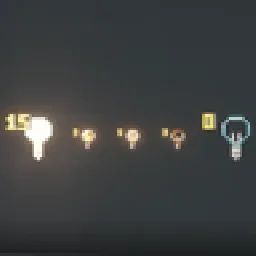
Craft light blocks with a torch and glass panes, pick any light level in the stonecutter, and see, break and adjust them in survival.
Download direto do Modrinth · 15 downloads
Von_To criou Craftable Light Blocks (plugin) para servidores Paper / Spigot. Craft light blocks with a torch and glass panes, pick any light level in the stonecutter, and see, break and adjust them in survival.
É compatível com o Minecraft 1.21 – 26.x. Tem 15 downloads em Modrinth. Isso o coloca na posição 106 entre os 125 plugins cosméticos e de exibição listados aqui. A última atualização saiu em 08/11/2026.
Craftable Light Blocks teve 4 versões no Modrinth desde 08/11/2026. 4 saíram no último ano. A mais recente é 1.2.0-datapack, lançada em 08/11/2026. Ela é feita para o Minecraft 26.1 – 26.3. Ela roda em Data pack. O download tem 24 KB.
| Versão | Lançado | Minecraft | Tipo |
|---|---|---|---|
1.2.0-datapack | 08/11/2026 | 26.1 – 26.3 | Estável |
1.2.0 | 08/11/2026 | 1.21.3 – 26.3 | Estável |
1.1.1-datapack | 08/11/2026 | 26.1 – 26.3 | Estável |
1.1.1 | 08/11/2026 | 1.21.4 – 26.3 | Estável |
Os comandos citados na página de Craftable Light Blocks no Modrinth:
/lichtblock/function/reloadCraft light blocks in survival, pick any light level, and see and adjust them – just like in creative mode.
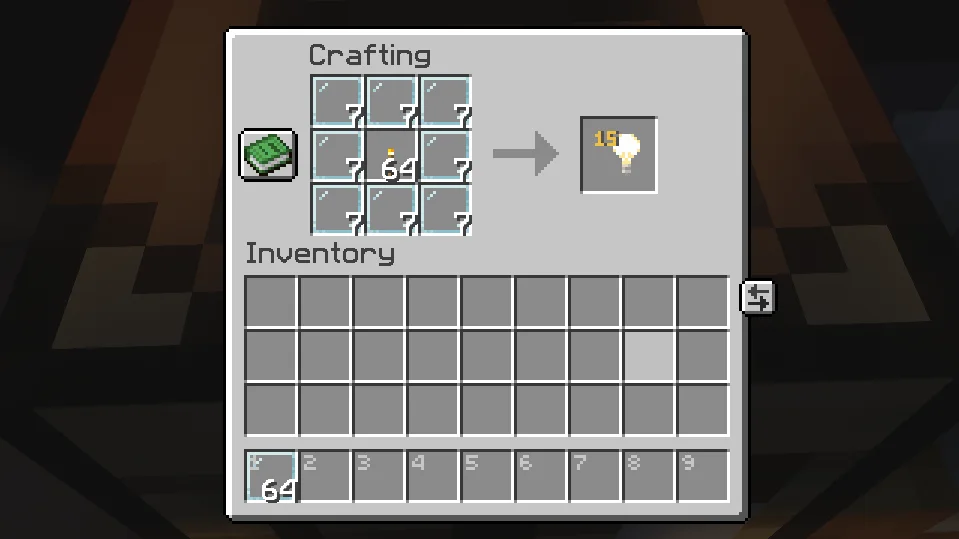
Surround a Torch with 8 Glass Panes:
Put a light block into a Stonecutter and choose any of the 16 light levels (0–15). The level is shown right on the item, just like in the creative inventory.
Hold a light block in survival mode and you can:
Removing works just like vanilla: place any other block where the light block is. Break that block again and the light block is gone.
Optional extra – break with left-click: turn it on and you can pick light blocks up with a left-click. They drop with the same light level. It's off by default and can be switched on in the settings menu, with a command or in the config.
In creative mode, Minecraft already does all of this by itself.
Both are included – pick the one that fits your game.
Plugin · Datapack
Works on · Paper / Purpur servers · Singleplayer & any server
Minecraft · 1.21.4 – 26.3 · 26.1 – 26.3
Marker range · 32 blocks (up to 160) · 16 blocks
Adjust & break from · normal reach · up to 3 blocks
Settings menu (clickable in chat) · ✅ · ✅
Respects land-claim plugins · ✅ · –
Configurable recipe · ✅ · –
Use either the plugin or the datapack – not both at once.
Plugin
Command · Effect
/lichtblock · Clickable settings menu
/lichtblock abbauen an\ · aus · Turn left-click breaking on/off
/lichtblock lichtstaerke an\ · aus · Turn right-click light level changing on/off
/lichtblock geben [player] [level] · Give light blocks, optionally with light level 0–15
Datapack
Command · Effect
/function lichtbloecke:einstellungen · Clickable settings menu (breaking & light level on/off)
/function lichtbloecke:geben {anzahl:16} · Give light blocks
/function lichtbloecke:geben_stufe {anzahl:16,stufe:7} · Give light blocks with light level 0–15
/function lichtbloecke:deinstallieren · Remove everything, then disable the pack
Permission · Default · Effect
lichtbloecke.sehen · everyone · See light blocks while holding one
lichtbloecke.bearbeiten · everyone · Change the light level (and break light blocks, if turned on)
lichtbloecke.give · operators · Use /lichtblock geben
lichtbloecke.einstellungen · operators · Use the settings menu and on/off commands
In plugins/Lichtbloecke/config.yml you can change the recipe's center item and result amount, allow colored glass panes, turn the stonecutter, left-click breaking (abbauen, off by default) and level changing on or off, and set the marker range.
🔌 Plugin
Datapack – Singleplayer
Datapack – Server
The markers are particles – the only way to show something to a single player. After you put the light block away, they stay visible for up to 4 seconds.
Escrita por Von_To. Leia com imagens no Modrinth.
Confira se o seu servidor roda Paper e Spigot no Minecraft 1.21 – 26.x.
Baixe o arquivo .jar pelo Modrinth e coloque na pasta plugins do seu servidor.
Reinicie o servidor. Evite /reload, muitos plugins não lidam bem com ele.
Digite /plugins no console: Craftable Light Blocks deve aparecer em verde. Os arquivos de configuração são criados na pasta plugins na primeira inicialização.
Guia completo: Como instalar plugins em um servidor de Minecraft
| Recurso | Downloads | Versões | Última atualização | Preço |
|---|---|---|---|---|
| Craftable Light Blockso que você estava vendo | 15 | 1.21 – 26.x | há 4 dias | Grátis |
| Craftable Invisible framesSpiritOTHawk | 26K | 1.13 – 26.x | 12 out 2026 | Grátis |
 Glint Prisms Server4ered1t | 2 | 1.21 – 26.x | há 5 dias | Grátis |
 ImageFrameLOOHP | 270K | 1.13 – 26.x | 18 set 2026 | Grátis |
Sim. Craftable Light Blocks é compatível com o Minecraft 26.x. Todas as versões compatíveis: 26.x, 1.21.
Sim. Você pode baixar Craftable Light Blocks de graça em Modrinth.
Craftable Light Blocks roda em servidores Paper e Spigot.
Sim. A última atualização saiu no último dia.
Os mais parecidos são Craftable Invisible frames, Glint Prisms Server e ImageFrame. Comparar todas as alternativas
Craftable Invisible framesPlugins · 1.13 – 26.xThis plugin enables the use of invisible item frames for survival players.
Glint Prisms ServerPlugins · 1.21 – 26.xServer plugin for Paper and Purpur: adds craftable colour prisms and glint recolouring to your server. Players see the colours with the Glint Prisms mod.
ImageFramePlugins · 1.13 – 26.xPut images on maps and walls!
 Drop HeadPlugins · 1.13 – 26.x
Drop a player's head when they die
 NoEmotecraftPlugins · 1.21
Emotecraft fork with 1.21.x update
 DonutScoreboardPlugins · 1.21 – 26.x
This plugin creates a scoreboard easy adjustment and configuration exactly like the famous server "DonutSMP" that owned but "DrDonutt"
Entre para deixar uma avaliação.