
 Jirniy's Pink HUDPaquetes de recursos · 1.21 – 26.x
modifies most of the hud icons (such as hearts, hunger, etc) to be more pink and cutesy :3
Gratis16,320 descargas
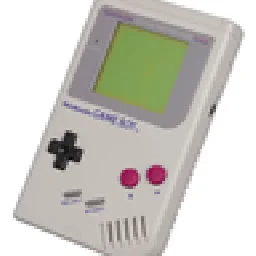
Turns your inventory, HUD and menus into a 4-shade green LCD screen. Pixel hearts, battery hunger, blinking cursor, scanlines and a dithered title panorama.
Descarga directa desde Modrinth · 2 descargas
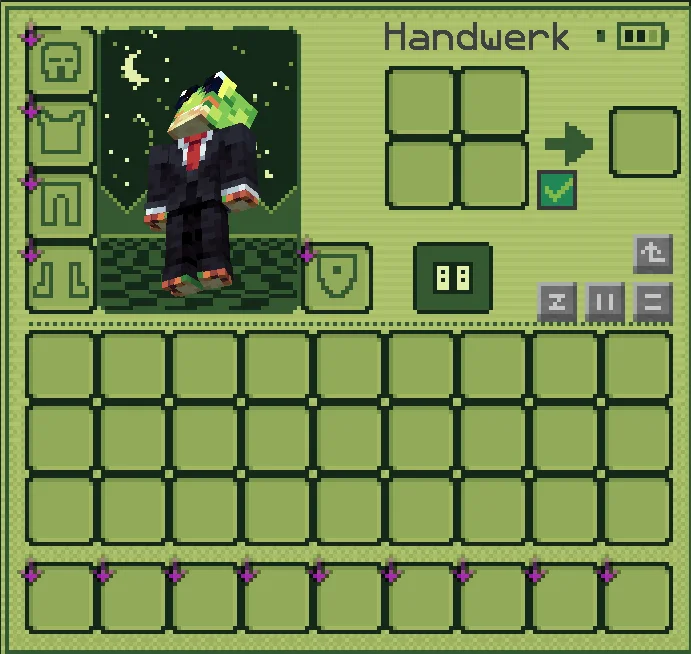
PocketLCD (paquete de recursos) es obra de izqou_. Turns your inventory, HUD and menus into a 4-shade green LCD screen. Pixel hearts, battery hunger, blinking cursor, scanlines and a dithered title panorama.
Es compatible con Minecraft 1.21 – 26.x. Se ha descargado 2 veces en Modrinth. La última actualización salió el 10/11/2026.
La más reciente es 1.0, publicada el 09/11/2026. Está hecha para Minecraft 1.21 – 26.3. Funciona en Minecraft. La descarga ocupa 186 KB.
| Versión | Publicado | Minecraft | Tipo |
|---|---|---|---|
1.0 | 09/11/2026 | 1.21 – 26.3 | Estable |
Play Minecraft like it runs on an old pocket console. PocketLCD repaints the whole interface in four shades of green, with scanlines, dithering and chunky pixel icons.
Inventory & containers
HUD
Menus
Extras
Found something that still looks vanilla? Tell me in the comments and I'll add it.
Escrita por izqou_. Léela con imágenes en Modrinth.
Descarga el archivo .zip desde Modrinth. No lo descomprimas.
En Minecraft, abre Opciones, luego Paquetes de recursos y luego Abrir carpeta de paquetes.
Suelta el archivo .zip en esa carpeta y vuelve al juego.
Mueve PocketLCD a la lista de la derecha y pulsa Hecho.
Está hecho para Minecraft 1.21 – 26.x. En otras versiones Minecraft lo marca como incompatible, pero a menudo funciona igual.
| Recurso | Descargas | Versiones | Última actualización | Precio |
|---|---|---|---|---|
| PocketLCDel que estabas viendo | 2 | 1.21 – 26.x | hace 1 día | Gratis |
| Jirniy's Pink HUDjirniyuwu | 16K | 1.21 – 26.x | hace 25 días | Gratis |
 Recolourful Containers GUI + HUDVi_Tul | 4.3M | 1.19 – 26.x | 1 oct 2026 | Gratis |
 Raki Kazuki HUD & GUIJellis | 543K | 1.19 – 1.20 | 7 jun 2024 | Gratis |
Sí. PocketLCD es compatible con Minecraft 26.x. Todas las versiones compatibles: 26.x, 1.21.
Sí. PocketLCD se puede descargar gratis desde Modrinth.
Sí. La última actualización salió en el último día.
Los más parecidos son Jirniy's Pink HUD, Recolourful Containers GUI + HUD y Raki Kazuki HUD & GUI. Comparar todas las alternativas
Jirniy's Pink HUDPaquetes de recursos · 1.21 – 26.xmodifies most of the hud icons (such as hearts, hunger, etc) to be more pink and cutesy :3
Recolourful Containers GUI + HUDPaquetes de recursos · 1.19 – 26.xDo you want more immersive, more interesting, more colourful GUIs and HUD? Than this pack is for you!
Raki Kazuki HUD & GUIPaquetes de recursos · 1.19 – 1.20A fan-driven HUD and GUI overhaul themed around PixelLink's 1st Generation VTuber, Raki Kazuki! Rah!
 Maxi's JourneyMap Cobblemon Minimap IconsPaquetes de recursos · 1.19 – 1.21
Adds entity icons of Pokémon found in the Cobblemon Mod to JourneyMap in Pixel or Shuffle style!
 Shader Panorama For 1.21.6~8:Chase the SkiesPaquetes de recursos · 1.21
A Panorama with shader for minecraft 1.21.6~8.
 Shader Panorama For 1.21.5: Spring to LifePaquetes de recursos · 1.21
A panorama with shader for 1.21.5
Inicia sesión para dejar una reseña.