
 Jirniy's Pink HUDРесурспаки · 1.21 – 26.x
modifies most of the hud icons (such as hearts, hunger, etc) to be more pink and cutesy :3
БесплатноЗагрузок: 16,320
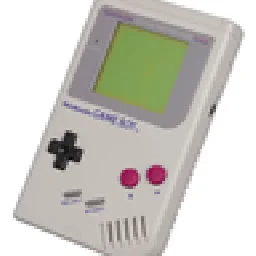
Turns your inventory, HUD and menus into a 4-shade green LCD screen. Pixel hearts, battery hunger, blinking cursor, scanlines and a dithered title panorama.
Прямая загрузка с Modrinth · 2 загрузок
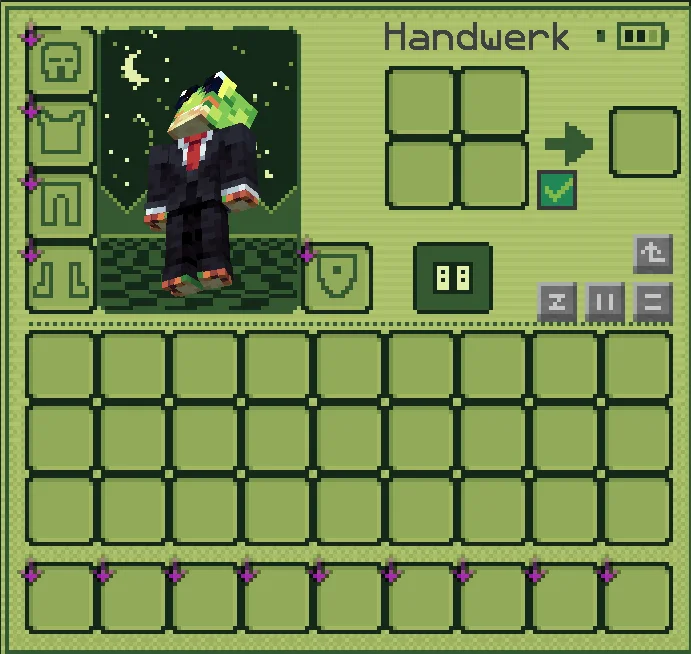
PocketLCD — ресурспак от izqou_. Turns your inventory, HUD and menus into a 4-shade green LCD screen. Pixel hearts, battery hunger, blinking cursor, scanlines and a dithered title panorama.
Поддерживаемые версии: Minecraft 1.21 – 26.x. Скачиваний на Modrinth: 2. Последнее обновление: 10.11.2026.
Новейшая — 1.0, вышла 09.11.2026. Она сделана для Minecraft 1.21 – 26.3. Работает на Minecraft. Размер файла — 186 KB.
| Версия | Выпущен | Minecraft | Тип |
|---|---|---|---|
1.0 | 09.11.2026 | 1.21 – 26.3 | Релиз |
Play Minecraft like it runs on an old pocket console. PocketLCD repaints the whole interface in four shades of green, with scanlines, dithering and chunky pixel icons.
Inventory & containers
HUD
Menus
Extras
Found something that still looks vanilla? Tell me in the comments and I'll add it.
Автор: izqou_. С картинками — на Modrinth.
Скачай .zip-файл с Modrinth. Не распаковывай его.
В Minecraft открой Настройки, затем Наборы ресурсов, затем Открыть папку наборов.
Положи .zip-файл в эту папку и вернись в игру.
Перенеси PocketLCD в правый список и нажми Готово.
Он сделан для Minecraft 1.21 – 26.x. На других версиях Minecraft помечает его как несовместимый, но часто он всё равно работает.
| Ресурс | Загрузки | Версии | Обновление | Цена |
|---|---|---|---|---|
| PocketLCDтот, что ты смотрел | 2 | 1.21 – 26.x | 1 день назад | Бесплатно |
| Jirniy's Pink HUDjirniyuwu | 16K | 1.21 – 26.x | 25 дн. назад | Бесплатно |
 Recolourful Containers GUI + HUDVi_Tul | 4.3M | 1.19 – 26.x | 1 окт. 2026 | Бесплатно |
 Raki Kazuki HUD & GUIJellis | 543K | 1.19 – 1.20 | 7 июн. 2024 | Бесплатно |
Да. PocketLCD поддерживает Minecraft 26.x. Все поддерживаемые версии: 26.x, 1.21.
Да. PocketLCD можно бесплатно скачать на Modrinth.
Да. Последнее обновление вышло за последние сутки.
Ближе всего к нему Jirniy's Pink HUD, Recolourful Containers GUI + HUD и Raki Kazuki HUD & GUI. Сравнить все альтернативы
Jirniy's Pink HUDРесурспаки · 1.21 – 26.xmodifies most of the hud icons (such as hearts, hunger, etc) to be more pink and cutesy :3
Recolourful Containers GUI + HUDРесурспаки · 1.19 – 26.xDo you want more immersive, more interesting, more colourful GUIs and HUD? Than this pack is for you!
Raki Kazuki HUD & GUIРесурспаки · 1.19 – 1.20A fan-driven HUD and GUI overhaul themed around PixelLink's 1st Generation VTuber, Raki Kazuki! Rah!
 Maxi's JourneyMap Cobblemon Minimap IconsРесурспаки · 1.19 – 1.21
Adds entity icons of Pokémon found in the Cobblemon Mod to JourneyMap in Pixel or Shuffle style!
 Shader Panorama For 1.21.6~8:Chase the SkiesРесурспаки · 1.21
A Panorama with shader for minecraft 1.21.6~8.
 Shader Panorama For 1.21.5: Spring to LifeРесурспаки · 1.21
A panorama with shader for 1.21.5
Войди, чтобы оставить отзыв.