
 Jirniy's Pink HUDResource packs · 1.21 – 26.x
modifies most of the hud icons (such as hearts, hunger, etc) to be more pink and cutesy :3
Free16,320 downloads
Turns your inventory, HUD and menus into a 4-shade green LCD screen. Pixel hearts, battery hunger, blinking cursor, scanlines and a dithered title panorama.
Direct download from Modrinth · 2 downloads
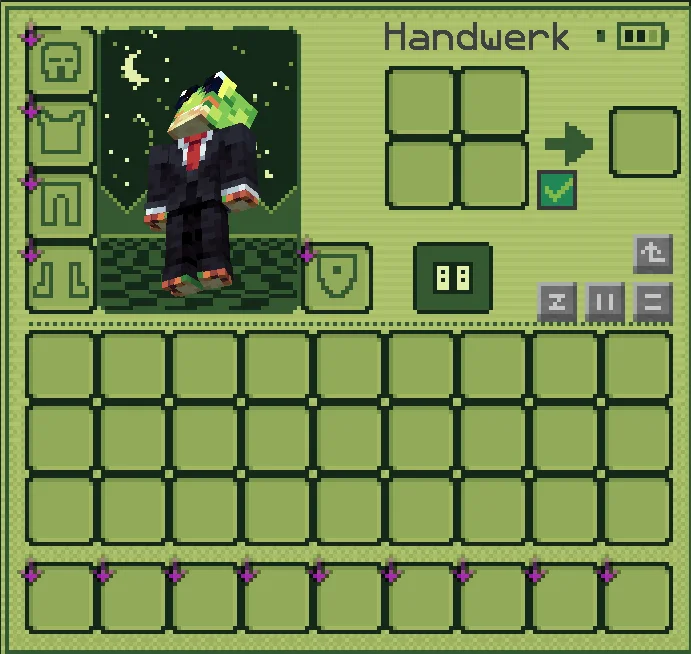
PocketLCD is a resource pack made by izqou_. Turns your inventory, HUD and menus into a 4-shade green LCD screen. Pixel hearts, battery hunger, blinking cursor, scanlines and a dithered title panorama.
It supports Minecraft 1.21 – 26.x. It has been downloaded 2 times on Modrinth. The last update came out on Nov 10, 2026.
The newest is 1.0, released on Nov 9, 2026. It is made for Minecraft 1.21 – 26.3. It runs on Minecraft. The download is 186 KB.
| Version | Released | Minecraft | Type |
|---|---|---|---|
1.0 | Nov 9, 2026 | 1.21 – 26.3 | Release |
Play Minecraft like it runs on an old pocket console. PocketLCD repaints the whole interface in four shades of green, with scanlines, dithering and chunky pixel icons.
Inventory & containers
HUD
Menus
Extras
Found something that still looks vanilla? Tell me in the comments and I'll add it.
Written by izqou_. Read it with pictures on Modrinth.
Download the .zip file from Modrinth. Do not unzip it.
In Minecraft, open Options, then Resource Packs, then Open Pack Folder.
Drop the .zip file into that folder and go back to the game.
Move PocketLCD to the right-hand list and click Done.
It is made for Minecraft 1.21 – 26.x. On other versions Minecraft marks it as incompatible, but it often still works.
Full guide: How to install Minecraft resource packs
| Resource | Downloads | Versions | Last update | Price |
|---|---|---|---|---|
| PocketLCDthe one you looked at | 2 | 1.21 – 26.x | 1 day ago | Free |
| Jirniy's Pink HUDjirniyuwu | 16K | 1.21 – 26.x | 25 days ago | Free |
 Recolourful Containers GUI + HUDVi_Tul | 4.3M | 1.19 – 26.x | Oct 1, 2026 | Free |
 Raki Kazuki HUD & GUIJellis | 543K | 1.19 – 1.20 | Jun 7, 2024 | Free |
Yes. PocketLCD supports Minecraft 26.x. All supported versions: 26.x, 1.21.
Yes. PocketLCD is free to download from Modrinth.
Yes. The last update came out in the past day.
The closest ones are Jirniy's Pink HUD, Recolourful Containers GUI + HUD and Raki Kazuki HUD & GUI. Compare all alternatives
Jirniy's Pink HUDResource packs · 1.21 – 26.xmodifies most of the hud icons (such as hearts, hunger, etc) to be more pink and cutesy :3
Recolourful Containers GUI + HUDResource packs · 1.19 – 26.xDo you want more immersive, more interesting, more colourful GUIs and HUD? Than this pack is for you!
Raki Kazuki HUD & GUIResource packs · 1.19 – 1.20A fan-driven HUD and GUI overhaul themed around PixelLink's 1st Generation VTuber, Raki Kazuki! Rah!
 Maxi's JourneyMap Cobblemon Minimap IconsResource packs · 1.19 – 1.21
Adds entity icons of Pokémon found in the Cobblemon Mod to JourneyMap in Pixel or Shuffle style!
 Shader Panorama For 1.21.6~8:Chase the SkiesResource packs · 1.21
A Panorama with shader for minecraft 1.21.6~8.
 Shader Panorama For 1.21.5: Spring to LifeResource packs · 1.21
A panorama with shader for 1.21.5
Log in to leave a review.