
 Jirniy's Pink HUDRessourcenpakete · 1.21 – 26.x
modifies most of the hud icons (such as hearts, hunger, etc) to be more pink and cutesy :3
Kostenlos16,320 Downloads
Turns your inventory, HUD and menus into a 4-shade green LCD screen. Pixel hearts, battery hunger, blinking cursor, scanlines and a dithered title panorama.
Direkter Download von Modrinth · 2 Downloads
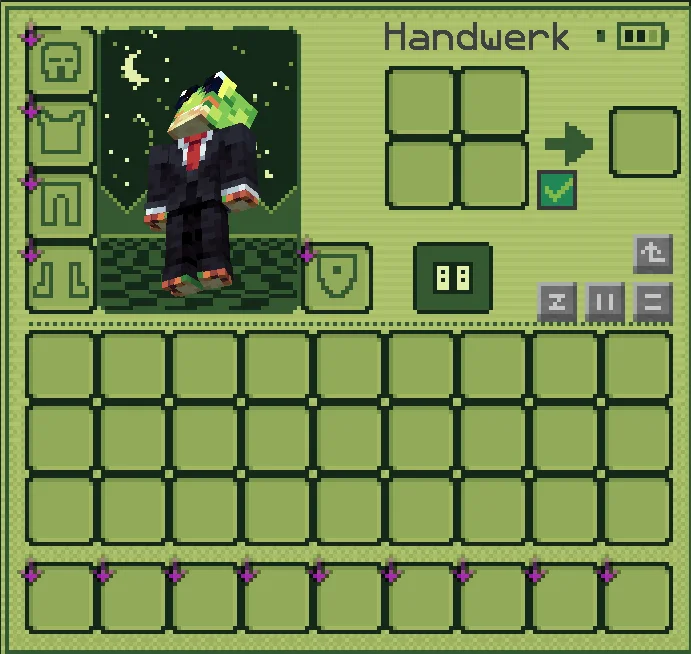
PocketLCD (Ressourcenpaket) stammt von izqou_. Turns your inventory, HUD and menus into a 4-shade green LCD screen. Pixel hearts, battery hunger, blinking cursor, scanlines and a dithered title panorama.
Unterstützt wird Minecraft 1.21 – 26.x. Auf Modrinth gibt es 2 Downloads. Das letzte Update erschien am 10.11.2026.
Die neueste ist 1.0, erschienen am 09.11.2026. Sie ist für Minecraft 1.21 – 26.3 gemacht. Sie läuft auf Minecraft. Der Download ist 186 KB groß.
| Version | Veröffentlicht | Minecraft | Typ |
|---|---|---|---|
1.0 | 09.11.2026 | 1.21 – 26.3 | Release |
Play Minecraft like it runs on an old pocket console. PocketLCD repaints the whole interface in four shades of green, with scanlines, dithering and chunky pixel icons.
Inventory & containers
HUD
Menus
Extras
Found something that still looks vanilla? Tell me in the comments and I'll add it.
Geschrieben von izqou_. Mit Bildern auf Modrinth lesen.
Lade die .zip-Datei von Modrinth herunter. Entpacke sie nicht.
Öffne in Minecraft Optionen, dann Ressourcenpakete, dann Paketordner öffnen.
Lege die .zip-Datei in diesen Ordner und gehe zurück ins Spiel.
Schiebe PocketLCD in die rechte Liste und klicke auf Fertig.
Es ist für Minecraft 1.21 – 26.x gemacht. Auf anderen Versionen markiert Minecraft es als inkompatibel, oft funktioniert es aber trotzdem.
| Ressource | Downloads | Versionen | Letztes Update | Preis |
|---|---|---|---|---|
| PocketLCDdie du angesehen hast | 2 | 1.21 – 26.x | vor 1 Tag | Kostenlos |
| Jirniy's Pink HUDjirniyuwu | 16K | 1.21 – 26.x | vor 25 Tagen | Kostenlos |
 Recolourful Containers GUI + HUDVi_Tul | 4.3M | 1.19 – 26.x | 1. Okt. 2026 | Kostenlos |
 Raki Kazuki HUD & GUIJellis | 543K | 1.19 – 1.20 | 7. Juni 2024 | Kostenlos |
Ja. PocketLCD unterstützt Minecraft 26.x. Alle unterstützten Versionen: 26.x, 1.21.
Ja. PocketLCD kannst du kostenlos bei Modrinth herunterladen.
Ja. Das letzte Update kam innerhalb des letzten Tages.
Am ähnlichsten sind Jirniy's Pink HUD, Recolourful Containers GUI + HUD und Raki Kazuki HUD & GUI. Alle Alternativen vergleichen
Jirniy's Pink HUDRessourcenpakete · 1.21 – 26.xmodifies most of the hud icons (such as hearts, hunger, etc) to be more pink and cutesy :3
Recolourful Containers GUI + HUDRessourcenpakete · 1.19 – 26.xDo you want more immersive, more interesting, more colourful GUIs and HUD? Than this pack is for you!
Raki Kazuki HUD & GUIRessourcenpakete · 1.19 – 1.20A fan-driven HUD and GUI overhaul themed around PixelLink's 1st Generation VTuber, Raki Kazuki! Rah!
 Maxi's JourneyMap Cobblemon Minimap IconsRessourcenpakete · 1.19 – 1.21
Adds entity icons of Pokémon found in the Cobblemon Mod to JourneyMap in Pixel or Shuffle style!
 Shader Panorama For 1.21.6~8:Chase the SkiesRessourcenpakete · 1.21
A Panorama with shader for minecraft 1.21.6~8.
 Shader Panorama For 1.21.5: Spring to LifeRessourcenpakete · 1.21
A panorama with shader for 1.21.5
Logg dich ein, um eine Bewertung zu schreiben.