
 No Report ButtonMods · 1.19 – 26.x
Removes the chat report button from the game menu screen
Gratuit3,722,841 téléchargements
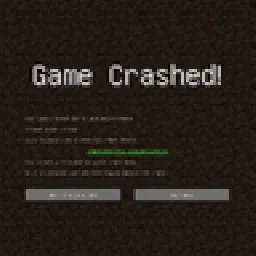
Simply added a crash menu to prevent exiting game during crash.
Téléchargement direct depuis Modrinth · 9 téléchargements
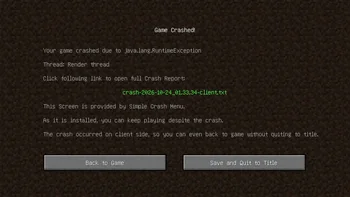
Simple Crash Menu (mod) est une création de Admsgenter. Simply added a crash menu to prevent exiting game during crash.
Versions prises en charge : Minecraft 1.16 – 1.21. On compte 9 téléchargements sur Modrinth. La dernière mise à jour date du 17/10/2026.
Simple Crash Menu a publié 8 versions sur Modrinth depuis le 16/10/2026. 8 sont sorties au cours de l'année passée. La plus récente est 0, sortie le 17/10/2026. Elle est faite pour Minecraft 1.21 – 1.21.11. Elle fonctionne sur NeoForge. Le téléchargement fait 16 KB.
| Version | Publié | Minecraft | Type |
|---|---|---|---|
0 | 17/10/2026 | 1.21 – 1.21.11 | Stable |
0 | 16/10/2026 | 1.20.1 | Stable |
0 | 16/10/2026 | 1.19.2 | Stable |
0 | 16/10/2026 | 1.18.2 | Stable |
0 | 16/10/2026 | 1.17.1 | Stable |
Simple Crash Menu is a client-sided mod simply provides a Crash Menu. When your game crashes, your game will go to a Crash Menu instead of exiting.
What this mod does is only to intercept the game right before a crash forces it to exit, and takes you to a Crash Menu.
This mod is extremely lightweight: it doesn't modify any vanilla game logic, doesn't add any extra try-catch sentences, doesn't perform any so-called "optimizations", and doesn't attempt to analyze the cause of the crash. It is only responsible for preventing the game from exiting when a crash would otherwise force it to exit, and redirecting you to the Crash Menu provided by this mod, so you can keep playing without restarting the game.
In addition, if the crash occurs only on client side, you can even just back to game without quiting to title!
Crash on client side:
Crash on server side:
If the button "Back to Title Screen" doesn't exist, don't worry, just press ESC to back to Title Screen.
Écrite par Admsgenter. À lire avec les images sur Modrinth.
Ce mod fonctionne uniquement dans ton jeu. Les serveurs n'en ont pas besoin, tu peux donc l'utiliser sur n'importe quel serveur.
Installe Forge et NeoForge pour Minecraft 1.16 – 1.21.
Télécharge le fichier .jar depuis Modrinth et place-le dans le dossier mods de ton répertoire .minecraft.
Lance Minecraft avec le profil Forge.
Plus simple : dans Prism Launcher ou la Modrinth App, cherche Simple Crash Menu dans les mods de ton instance et clique sur Install. Le loader et les mods requis sont ajoutés pour toi.
| Ressource | Téléchargements | Versions | Mise à jour | Prix |
|---|---|---|---|---|
| Simple Crash Menucelle que tu regardais | 9 | 1.16 – 1.21 | il y a 25 jours | Gratuit |
| No Report ButtonLucaslah | 3.7M | 1.19 – 26.x | 2 oct. 2026 | Gratuit |
 Container SearchVethre | 81 | 1.20 – 26.x | 10 oct. 2026 | Gratuit |
 Projection Opens Genshin / Crashtianhongya | 25 | 1.21 – 26.x | 9 août 2026 | Gratuit |
Pas encore. La version la plus récente prise en charge est Minecraft 1.21.
Oui. Simple Crash Menu se télécharge gratuitement sur Modrinth.
Côté client. Simple Crash Menu se place dans ton propre dossier mods et fonctionne sur n'importe quel serveur, même sans mods.
Oui. La dernière mise à jour date des dernières 24 heures.
Les plus proches sont No Report Button, Container Search et Projection Opens Genshin / Crash. Comparer toutes les alternatives
No Report ButtonMods · 1.19 – 26.xRemoves the chat report button from the game menu screen
Container SearchMods · 1.20 – 26.xThis project is a quality of life mod that indexes and organize the contents of containers into one in game menu to allow the player to easily find what they…
Projection Opens Genshin / CrashMods · 1.21 – 26.xDetects projection mods (Litematica/Schematica) and either opens the Genshin Impact website or crashes the game.
A mod to crash your game, just for kicks
Connecte-toi pour laisser un avis.