
 No Report ButtonMods · 1.19 – 26.x
Removes the chat report button from the game menu screen
Gratis3,722,841 descargas
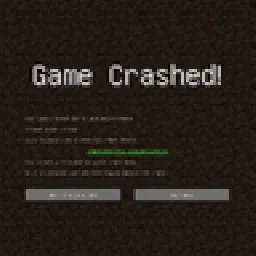
Simply added a crash menu to prevent exiting game during crash.
Descarga directa desde Modrinth · 9 descargas
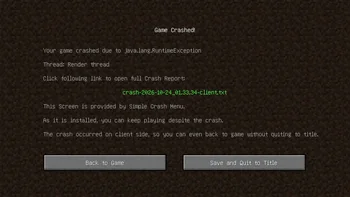
Simple Crash Menu (mod) es obra de Admsgenter. Simply added a crash menu to prevent exiting game during crash.
Es compatible con Minecraft 1.16 – 1.21. Se ha descargado 9 veces en Modrinth. La última actualización salió el 17/10/2026.
Simple Crash Menu ha publicado 8 versiones en Modrinth desde el 16/10/2026. 8 salieron en el último año. La más reciente es 0, publicada el 17/10/2026. Está hecha para Minecraft 1.21 – 1.21.11. Funciona en NeoForge. La descarga ocupa 16 KB.
| Versión | Publicado | Minecraft | Tipo |
|---|---|---|---|
0 | 17/10/2026 | 1.21 – 1.21.11 | Estable |
0 | 16/10/2026 | 1.20.1 | Estable |
0 | 16/10/2026 | 1.19.2 | Estable |
0 | 16/10/2026 | 1.18.2 | Estable |
0 | 16/10/2026 | 1.17.1 | Estable |
Simple Crash Menu is a client-sided mod simply provides a Crash Menu. When your game crashes, your game will go to a Crash Menu instead of exiting.
What this mod does is only to intercept the game right before a crash forces it to exit, and takes you to a Crash Menu.
This mod is extremely lightweight: it doesn't modify any vanilla game logic, doesn't add any extra try-catch sentences, doesn't perform any so-called "optimizations", and doesn't attempt to analyze the cause of the crash. It is only responsible for preventing the game from exiting when a crash would otherwise force it to exit, and redirecting you to the Crash Menu provided by this mod, so you can keep playing without restarting the game.
In addition, if the crash occurs only on client side, you can even just back to game without quiting to title!
Crash on client side:
Crash on server side:
If the button "Back to Title Screen" doesn't exist, don't worry, just press ESC to back to Title Screen.
Escrita por Admsgenter. Léela con imágenes en Modrinth.
Este mod funciona solo en tu propio juego. Los servidores no lo necesitan, así que puedes usarlo en cualquier servidor.
Instala Forge y NeoForge para Minecraft 1.16 – 1.21.
Descarga el archivo .jar desde Modrinth y ponlo en la carpeta mods de tu directorio .minecraft.
Inicia Minecraft con el perfil de Forge.
Más fácil: en Prism Launcher o la Modrinth App, busca Simple Crash Menu en los mods de tu instancia y haz clic en Install. Añade el loader y los mods que necesita por ti.
| Recurso | Descargas | Versiones | Última actualización | Precio |
|---|---|---|---|---|
| Simple Crash Menuel que estabas viendo | 9 | 1.16 – 1.21 | hace 25 días | Gratis |
| No Report ButtonLucaslah | 3.7M | 1.19 – 26.x | 2 oct 2026 | Gratis |
 Container SearchVethre | 81 | 1.20 – 26.x | 10 oct 2026 | Gratis |
 Projection Opens Genshin / Crashtianhongya | 25 | 1.21 – 26.x | 9 ago 2026 | Gratis |
Todavía no. La versión más reciente que admite es Minecraft 1.21.
Sí. Simple Crash Menu se puede descargar gratis desde Modrinth.
Del lado del cliente. Simple Crash Menu va en tu propia carpeta mods y funciona en cualquier servidor, incluso en servidores sin mods.
Sí. La última actualización salió en el último día.
Los más parecidos son No Report Button, Container Search y Projection Opens Genshin / Crash. Comparar todas las alternativas
No Report ButtonMods · 1.19 – 26.xRemoves the chat report button from the game menu screen
Container SearchMods · 1.20 – 26.xThis project is a quality of life mod that indexes and organize the contents of containers into one in game menu to allow the player to easily find what they…
Projection Opens Genshin / CrashMods · 1.21 – 26.xDetects projection mods (Litematica/Schematica) and either opens the Genshin Impact website or crashes the game.
A mod to crash your game, just for kicks
Inicia sesión para dejar una reseña.