
 No Report ButtonMods · 1.19 – 26.x
Removes the chat report button from the game menu screen
Kostenlos3,717,146 Downloads
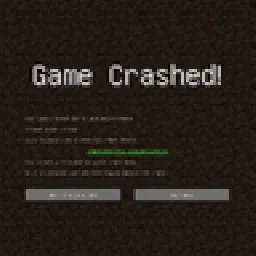
Simply added a crash menu to prevent exiting game during crash.
Direkter Download von Modrinth · 9 Downloads
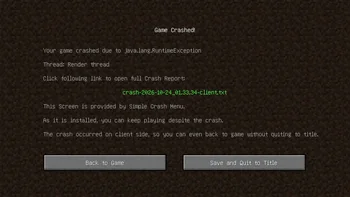
Simple Crash Menu (Mod) stammt von Admsgenter. Simply added a crash menu to prevent exiting game during crash.
Unterstützt wird Minecraft 1.16 – 1.21. Auf Modrinth gibt es 9 Downloads. Das letzte Update erschien am 17.10.2026.
Simple Crash Menu hat seit 16.10.2026 8 Versionen auf Modrinth veröffentlicht. 8 davon erschienen im letzten Jahr. Die neueste ist 0, erschienen am 17.10.2026. Sie ist für Minecraft 1.21 – 1.21.11 gemacht. Sie läuft auf NeoForge. Der Download ist 16 KB groß.
| Version | Veröffentlicht | Minecraft | Typ |
|---|---|---|---|
0 | 17.10.2026 | 1.21 – 1.21.11 | Release |
0 | 16.10.2026 | 1.20.1 | Release |
0 | 16.10.2026 | 1.19.2 | Release |
0 | 16.10.2026 | 1.18.2 | Release |
0 | 16.10.2026 | 1.17.1 | Release |
Simple Crash Menu is a client-sided mod simply provides a Crash Menu. When your game crashes, your game will go to a Crash Menu instead of exiting.
What this mod does is only to intercept the game right before a crash forces it to exit, and takes you to a Crash Menu.
This mod is extremely lightweight: it doesn't modify any vanilla game logic, doesn't add any extra try-catch sentences, doesn't perform any so-called "optimizations", and doesn't attempt to analyze the cause of the crash. It is only responsible for preventing the game from exiting when a crash would otherwise force it to exit, and redirecting you to the Crash Menu provided by this mod, so you can keep playing without restarting the game.
In addition, if the crash occurs only on client side, you can even just back to game without quiting to title!
Crash on client side:
Crash on server side:
If the button "Back to Title Screen" doesn't exist, don't worry, just press ESC to back to Title Screen.
Geschrieben von Admsgenter. Mit Bildern auf Modrinth lesen.
Diese Mod läuft nur in deinem eigenen Spiel. Server brauchen sie nicht, du kannst sie also auf jedem Server nutzen.
Installiere Forge und NeoForge für Minecraft 1.16 – 1.21.
Lade die .jar-Datei von Modrinth herunter und lege sie in den mods-Ordner deines .minecraft-Verzeichnisses.
Starte Minecraft mit dem Forge-Profil.
Einfacher: Suche in Prism Launcher oder der Modrinth App in den Mods deiner Instanz nach Simple Crash Menu und klicke auf Install. Loader und benötigte Mods werden für dich hinzugefügt.
| Ressource | Downloads | Versionen | Letztes Update | Preis |
|---|---|---|---|---|
| Simple Crash Menudie du angesehen hast | 9 | 1.16 – 1.21 | vor 25 Tagen | Kostenlos |
| No Report ButtonLucaslah | 3.7M | 1.19 – 26.x | 2. Okt. 2026 | Kostenlos |
 Projection Opens Genshin / Crashtianhongya | 25 | 1.21 – 26.x | 9. Aug. 2026 | Kostenlos |
 Container SearchVethre | 20 | 1.20 – 26.x | 10. Okt. 2026 | Kostenlos |
Noch nicht. Die neueste unterstützte Version ist Minecraft 1.21.
Ja. Simple Crash Menu kannst du kostenlos bei Modrinth herunterladen.
Clientseitig. Simple Crash Menu kommt in deinen eigenen mods-Ordner und funktioniert auf jedem Server, auch auf Servern ohne Mods.
Ja. Das letzte Update kam innerhalb des letzten Tages.
Am ähnlichsten sind No Report Button, Projection Opens Genshin / Crash und Container Search. Alle Alternativen vergleichen
No Report ButtonMods · 1.19 – 26.xRemoves the chat report button from the game menu screen
Projection Opens Genshin / CrashMods · 1.21 – 26.xDetects projection mods (Litematica/Schematica) and either opens the Genshin Impact website or crashes the game.
Container SearchMods · 1.20 – 26.xThis project is a quality of life mod that indexes and organize the contents of containers into one in game menu to allow the player to easily find what they…
Logg dich ein, um eine Bewertung zu schreiben.