
 No Report ButtonMods · 1.19 – 26.x
Removes the chat report button from the game menu screen
Free3,717,146 downloads
Simply added a crash menu to prevent exiting game during crash.
Direct download from Modrinth · 9 downloads
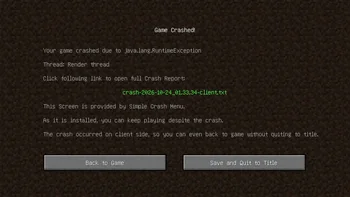
Simple Crash Menu is a mod made by Admsgenter. Simply added a crash menu to prevent exiting game during crash.
It supports Minecraft 1.16 – 1.21. It has been downloaded 9 times on Modrinth. The last update came out on Oct 17, 2026.
Simple Crash Menu has had 8 releases on Modrinth since Oct 16, 2026. 8 of them came out in the past year. The newest is 0, released on Oct 17, 2026. It is made for Minecraft 1.21 – 1.21.11. It runs on NeoForge. The download is 16 KB.
| Version | Released | Minecraft | Type |
|---|---|---|---|
0 | Oct 17, 2026 | 1.21 – 1.21.11 | Release |
0 | Oct 16, 2026 | 1.20.1 | Release |
0 | Oct 16, 2026 | 1.19.2 | Release |
0 | Oct 16, 2026 | 1.18.2 | Release |
0 | Oct 16, 2026 | 1.17.1 | Release |
Simple Crash Menu is a client-sided mod simply provides a Crash Menu. When your game crashes, your game will go to a Crash Menu instead of exiting.
What this mod does is only to intercept the game right before a crash forces it to exit, and takes you to a Crash Menu.
This mod is extremely lightweight: it doesn't modify any vanilla game logic, doesn't add any extra try-catch sentences, doesn't perform any so-called "optimizations", and doesn't attempt to analyze the cause of the crash. It is only responsible for preventing the game from exiting when a crash would otherwise force it to exit, and redirecting you to the Crash Menu provided by this mod, so you can keep playing without restarting the game.
In addition, if the crash occurs only on client side, you can even just back to game without quiting to title!
Crash on client side:
Crash on server side:
If the button "Back to Title Screen" doesn't exist, don't worry, just press ESC to back to Title Screen.
Written by Admsgenter. Read it with pictures on Modrinth.
This mod runs only on your own game. Servers do not need it, so you can use it on any server.
Install Forge and NeoForge for Minecraft 1.16 – 1.21.
Download the .jar file from Modrinth and put it in the mods folder of your .minecraft directory.
Start Minecraft with the Forge profile.
Easier: in Prism Launcher or the Modrinth App, search for Simple Crash Menu in your instance's mods and click Install. It adds the loader and the mods it needs for you.
Full guide: How to install Minecraft mods
| Resource | Downloads | Versions | Last update | Price |
|---|---|---|---|---|
| Simple Crash Menuthe one you looked at | 9 | 1.16 – 1.21 | 24 days ago | Free |
| No Report ButtonLucaslah | 3.7M | 1.19 – 26.x | Oct 2, 2026 | Free |
 Projection Opens Genshin / Crashtianhongya | 25 | 1.21 – 26.x | Aug 9, 2026 | Free |
 Container SearchVethre | 20 | 1.20 – 26.x | Oct 10, 2026 | Free |
Not yet. The newest version it supports is Minecraft 1.21.
Yes. Simple Crash Menu is free to download from Modrinth.
Client-side. Simple Crash Menu goes in your own mods folder and works on any server, including servers without mods.
Yes. The last update came out in the past day.
The closest ones are No Report Button, Projection Opens Genshin / Crash and Container Search. Compare all alternatives
No Report ButtonMods · 1.19 – 26.xRemoves the chat report button from the game menu screen
Projection Opens Genshin / CrashMods · 1.21 – 26.xDetects projection mods (Litematica/Schematica) and either opens the Genshin Impact website or crashes the game.
Container SearchMods · 1.20 – 26.xThis project is a quality of life mod that indexes and organize the contents of containers into one in game menu to allow the player to easily find what they…
Log in to leave a review.