O que ele faz
LifeTweaks (mod) é obra de OhBubba. A customizable all-in-one Minecraft utility mod.
É compatível com o Minecraft 1.21. Tem 46 downloads em Modrinth. A última atualização saiu em 31/08/2026.
Versões suportadas
1.21
Histórico de versões
A mais recente é 1.0.0, lançada em 31/08/2026. Ela é feita para o Minecraft 1.21.11. Ela roda em Fabric. O download tem 121 KB.
| Versão | Lançado | Minecraft | Tipo |
|---|
1.0.0 | 31/08/2026 | 1.21.11 | Estável |
Descrição do autor no Modrinth
LifeTweaks
NOTE: Picture Gallery shows default settings, this mod is entirely customizable (that was the point when making it). Any questions/requests, ohbubba. on discord
- LifeTweaks is a client-side quality-of-life mod. It bundles the small HUD and rendering tweaks that most players end up installing one by one into a single mod with one clean, categorised settings screen.
- Every feature is off by default. Nothing here touches the server or gives an unfair advantage, it is all information you could already see, shown better.
Features
- Fullbright — Every block is lit as if under full daylight, caves included, with no washed-out colours. Toggle it with a keybind (default K).
- Flat Lighting — removes directional face shading, ambient occlusion and entity shadows for a clean, evenly-lit look. Pairs with Fullbright or stands on its own.
///
- More Chat History — raises the message limit from 100 to 16,384 or over 1,000,000 so you stop losing messages.
- Chat Scrollbar — a thin, draggable scrollbar on the chat while it is open.
///
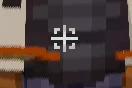
- Custom crosshair icon — paint your own crosshair on a 35×35 grid with a built-in editor. Optionally replace the vanilla + entirely.
- Reach indicator — a bracket around the crosshair that appears only while the entity you are looking at is inside your attack range. Filter it to players, hostiles, or everything.
- Projectile hitmarkers — a marker (and optional sound) whenever one of your arrows deals damage, including hits that only touch the target's armour. Separate colour for a killing blow, adjustable sound volume and on-screen duration, and a custom marker shape if you want one.
- Elytra indicator — a small icon below the crosshair while an elytra is equipped, so you always know before you jump. Optional "only while gliding" mode.
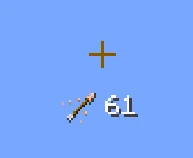
- Arrow indicator — shows the actual arrow item you would fire next and how many you are carrying. Only appears with a bow or crossbow in hand (optional), with sliders for icon size, text size and a free grid position.
- Every color above can be a hex value or set to adaptive, which uses the same inversion blend as the vanilla crosshair so the indicator stays readable against any background.
HUD
- FPS & Ping counters — independent counters with several text formats, colour, shadow, a size slider each, and drag-to-place positioning on a snapping grid.
- Effect Timer — a compact status-effect display with icons and a countdown, coloured by effect category, in the style of EffectTimerPlus. Six locked preset positions, including middle-left and middle-right.
- Armor HUD — a self-contained four-slot strip built from the vanilla hotbar sprite so it matches your resource pack. Optional durability readout as a number or a percentage, coloured with the exact vanilla damage-bar gradient, with its own text-size slider and six preset anchors.
- Movement & name
- Sprint by Default — always sprint without holding the key. Toggle sprint to walk.
- Own Name — renders your own name tag in third person, the way you see everyone else's.
- Configuration
- A categorised settings screen with a left sidebar — Fullbright, Chat, Crosshair, HUD, Movement, Nametag — and a scrollbar for long pages.
- A drag-and-drop colour picker for every colour option: pick from the square, drag the hue and alpha bars, or type a hex code.
- Opens from Mod Menu or from a keybind.
- Compatibility
- Minecraft: 1.21.11
- Loader: Fabric
- Environment: client-side only. Safe on any server, including vanilla — the server never sees the mod.
- Works alongside Sodium, Iris and other rendering mods. If another mod already changes world lighting, run Fullbright or Flat Lighting on their own to avoid fighting over the lightmap.
Dependencies
- Fabric API — required.
- Mod Menu — optional, adds the settings button in the mods list. The keybind opens the same screen without it.
NOTE: LifeTweaks is entirely client-side and purely cosmetic or informational. It does not automate play, reveal hidden information, or send anything to the server.
Created by OhBubba. All rights reserved.
Escrita por OhBubba. Leia com imagens no Modrinth.
Como instalar LifeTweaks
Este mod roda só no seu jogo. Os servidores não precisam dele, então você pode usar em qualquer servidor.
Instale Fabric para o Minecraft 1.21.
Adicione os mods que ele precisa: API do Fabric.
Baixe o arquivo .jar pelo Modrinth e coloque na pasta mods do seu diretório .minecraft.
Abra o Minecraft com o perfil Fabric.
Mais fácil: no Prism Launcher ou no Modrinth App, procure LifeTweaks nos mods da sua instância e clique em Install. Ele adiciona o loader e os mods necessários para você.
Compatibilidade
- Versões do Minecraft
- 1.21
- Roda em
- Fabric
- Onde roda
- Só cliente (seu jogo)
- Edição
- Java
- Precisa de
- API do Mod Menu, Fabric
- Licença
- Uso gratuito
- Preço
- Grátis
- Manutenção
- Atualizado ativamente (12/11/2026)
Perguntas
LifeTweaks funciona no Minecraft 26.x?
Ainda não. A versão mais recente compatível é o Minecraft 1.21.
LifeTweaks é grátis?
Sim. Você pode baixar LifeTweaks de graça em Modrinth.
LifeTweaks é do lado do cliente ou do servidor?
Do lado do cliente. LifeTweaks vai na sua própria pasta mods e funciona em qualquer servidor, inclusive sem mods.
LifeTweaks precisa de mais alguma coisa?
Sim: Mod Menu, Fabric API. Instale antes de LifeTweaks.
LifeTweaks ainda recebe atualizações?
Sim. A última atualização saiu há 2 dias.
Avaliações
Entre para deixar uma avaliação.

 Elytra TrimsMods · 1.19 – 26.x

 LifeTweakso que você estava vendo
 API do Radical Cobblemon Trainershd42
 Better Compatibility CheckerGaz492
 TrashSlotMods · 1.18 – 26.x
 Sounds Be GoneMods · 1.19 – 26.x
 SeasonHud-FabricMods · 1.16 – 26.x