Что он умеет
LifeTweaks — мод от OhBubba. A customizable all-in-one Minecraft utility mod.
Поддерживаемые версии: Minecraft 1.21. Скачиваний на Modrinth: 46. Последнее обновление: 31.08.2026.
Поддерживаемые версии
1.21
История версий
Новейшая — 1.0.0, вышла 31.08.2026. Она сделана для Minecraft 1.21.11. Работает на Fabric. Размер файла — 121 KB.
| Версия | Выпущен | Minecraft | Тип |
|---|
1.0.0 | 31.08.2026 | 1.21.11 | Релиз |
Описание автора на Modrinth
LifeTweaks
NOTE: Picture Gallery shows default settings, this mod is entirely customizable (that was the point when making it). Any questions/requests, ohbubba. on discord
- LifeTweaks is a client-side quality-of-life mod. It bundles the small HUD and rendering tweaks that most players end up installing one by one into a single mod with one clean, categorised settings screen.
- Every feature is off by default. Nothing here touches the server or gives an unfair advantage, it is all information you could already see, shown better.
Features
- Fullbright — Every block is lit as if under full daylight, caves included, with no washed-out colours. Toggle it with a keybind (default K).
- Flat Lighting — removes directional face shading, ambient occlusion and entity shadows for a clean, evenly-lit look. Pairs with Fullbright or stands on its own.
///
- More Chat History — raises the message limit from 100 to 16,384 or over 1,000,000 so you stop losing messages.
- Chat Scrollbar — a thin, draggable scrollbar on the chat while it is open.
///
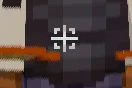
- Custom crosshair icon — paint your own crosshair on a 35×35 grid with a built-in editor. Optionally replace the vanilla + entirely.
- Reach indicator — a bracket around the crosshair that appears only while the entity you are looking at is inside your attack range. Filter it to players, hostiles, or everything.
- Projectile hitmarkers — a marker (and optional sound) whenever one of your arrows deals damage, including hits that only touch the target's armour. Separate colour for a killing blow, adjustable sound volume and on-screen duration, and a custom marker shape if you want one.
- Elytra indicator — a small icon below the crosshair while an elytra is equipped, so you always know before you jump. Optional "only while gliding" mode.
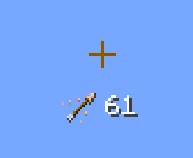
- Arrow indicator — shows the actual arrow item you would fire next and how many you are carrying. Only appears with a bow or crossbow in hand (optional), with sliders for icon size, text size and a free grid position.
- Every color above can be a hex value or set to adaptive, which uses the same inversion blend as the vanilla crosshair so the indicator stays readable against any background.
HUD
- FPS & Ping counters — independent counters with several text formats, colour, shadow, a size slider each, and drag-to-place positioning on a snapping grid.
- Effect Timer — a compact status-effect display with icons and a countdown, coloured by effect category, in the style of EffectTimerPlus. Six locked preset positions, including middle-left and middle-right.
- Armor HUD — a self-contained four-slot strip built from the vanilla hotbar sprite so it matches your resource pack. Optional durability readout as a number or a percentage, coloured with the exact vanilla damage-bar gradient, with its own text-size slider and six preset anchors.
- Movement & name
- Sprint by Default — always sprint without holding the key. Toggle sprint to walk.
- Own Name — renders your own name tag in third person, the way you see everyone else's.
- Configuration
- A categorised settings screen with a left sidebar — Fullbright, Chat, Crosshair, HUD, Movement, Nametag — and a scrollbar for long pages.
- A drag-and-drop colour picker for every colour option: pick from the square, drag the hue and alpha bars, or type a hex code.
- Opens from Mod Menu or from a keybind.
- Compatibility
- Minecraft: 1.21.11
- Loader: Fabric
- Environment: client-side only. Safe on any server, including vanilla — the server never sees the mod.
- Works alongside Sodium, Iris and other rendering mods. If another mod already changes world lighting, run Fullbright or Flat Lighting on their own to avoid fighting over the lightmap.
Dependencies
- Fabric API — required.
- Mod Menu — optional, adds the settings button in the mods list. The keybind opens the same screen without it.
NOTE: LifeTweaks is entirely client-side and purely cosmetic or informational. It does not automate play, reveal hidden information, or send anything to the server.
Created by OhBubba. All rights reserved.
Автор: OhBubba. С картинками — на Modrinth.
Как установить LifeTweaks
Этот мод работает только в твоей игре. Серверам он не нужен, так что его можно использовать на любом сервере.
Установи Fabric для Minecraft 1.21.
Добавь нужные ему моды: API Fabric.
Скачай .jar-файл с Modrinth и положи его в папку mods в каталоге .minecraft.
Запусти Minecraft с профилем Fabric.
Проще: в Prism Launcher или Modrinth App найдите LifeTweaks в модах своей сборки и нажмите Install. Загрузчик и нужные моды добавятся сами.
Совместимость
- Версии Minecraft
- 1.21
- Работает на
- Fabric
- Где работает
- Только клиент (твоя игра)
- Издание
- Java
- Требует
- API Mod Menu, Fabric
- Лицензия
- Бесплатно
- Цена
- Бесплатно
- Поддержка
- Активно обновляется (12.11.2026)
Вопросы
Работает ли LifeTweaks на Minecraft 26.x?
Пока нет. Последняя поддерживаемая версия — Minecraft 1.21.
Можно ли скачать LifeTweaks бесплатно?
Да. LifeTweaks можно бесплатно скачать на Modrinth.
LifeTweaks работает на клиенте или на сервере?
На клиенте. LifeTweaks кладётся в твою папку mods и работает на любом сервере, даже без модов.
Нужно ли LifeTweaks что-то ещё?
Да: Mod Menu, Fabric API. Установи это до LifeTweaks.
LifeTweaks ещё обновляется?
Да. Последнее обновление вышло за последние сутки.
Отзывы
Войди, чтобы оставить отзыв.

 Elytra TrimsМоды · 1.19 – 26.x

 LifeTweaksтот, что ты смотрел
 API Radical Cobblemon Trainershd42
 Better Compatibility CheckerGaz492
 TrashSlotМоды · 1.18 – 26.x
 Sounds Be GoneМоды · 1.19 – 26.x
 SeasonHud-FabricМоды · 1.16 – 26.x