
 YouTube ThemedRessourcenpakete · 1.21 – 26.x
This Texture Pack Introduces new textures for items and equipment to enhance gameplay themed like YouTube
Kostenlos8 Downloads
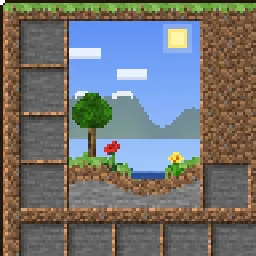
This texture pack makes the GUI overworld themed.
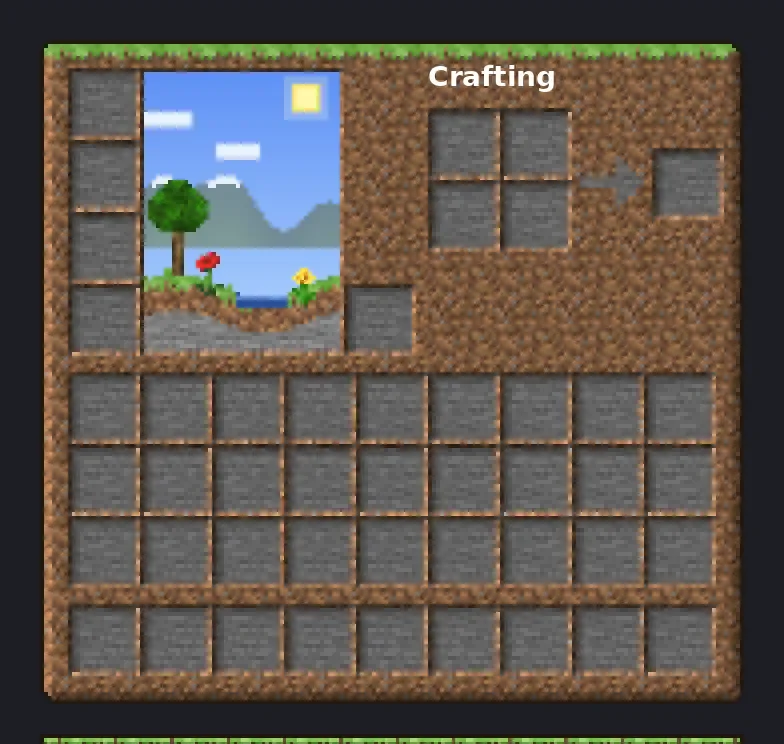
This texture pack makes the GUI overworld themed.
OverworldGUI (Ressourcenpaket) stammt von TheRealPJ. Unterstützt wird Minecraft 26.x. Auf Modrinth gibt es 14 Downloads. Das letzte Update erschien am 03.11.2026.
Die neueste ist Version1, erschienen am 03.11.2026. Sie ist für Minecraft 26.2, 26.3 gemacht. Sie läuft auf Minecraft. Der Download ist 657 KB groß.
| Version | Veröffentlicht | Minecraft | Typ |
|---|---|---|---|
Version1 | 03.11.2026 | 26.2, 26.3 | Release |
Your menus, built from the Overworld. Every inventory, button and hotbar is made from real Overworld blocks, with real lighting on the edges, so it feels like you're looking at actual grass, dirt and stone.
Hearts, hunger, armor, the crosshair, the Minecraft logo and colored icons stay vanilla, so your HUD stays easy to read.
💡 Tip: If you use other packs that change the GUI, put Overworld GUI above them.
Minecraft version · 26.2.x
Resolution · 16x
Download size · ~660 KB
Geschrieben von TheRealPJ. Mit Bildern auf Modrinth lesen.
Lade die .zip-Datei von Modrinth herunter. Entpacke sie nicht.
Öffne in Minecraft Optionen, dann Ressourcenpakete, dann Paketordner öffnen.
Lege die .zip-Datei in diesen Ordner und gehe zurück ins Spiel.
Schiebe OverworldGUI in die rechte Liste und klicke auf Fertig.
Es ist für Minecraft 26.x gemacht. Auf anderen Versionen markiert Minecraft es als inkompatibel, oft funktioniert es aber trotzdem.
| Ressource | Downloads | Versionen | Letztes Update | Preis |
|---|---|---|---|---|
| OverworldGUIdie du angesehen hast | 14 | 26.x | vor 7 Tagen | Kostenlos |
| YouTube ThemedFudgeMan8171 | 8 | 1.21 – 26.x | vor 1 Tag | Kostenlos |
 Recolourful Containers GUI + HUDVi_Tul | 4.3M | 1.19 – 26.x | 1. Okt. 2026 | Kostenlos |
 Better 3D Bedsheycronus | 1.7M | 1.12 – 1.21 | 7. Feb. 2026 | Kostenlos |
Ja. OverworldGUI unterstützt Minecraft 26.x. Alle unterstützten Versionen: 26.x.
Ja. OverworldGUI kannst du kostenlos bei Modrinth herunterladen.
Ja. Das letzte Update kam innerhalb des letzten Tages.
Am ähnlichsten sind YouTube Themed, Recolourful Containers GUI + HUD und Better 3D Beds. Alle Alternativen vergleichen
YouTube ThemedRessourcenpakete · 1.21 – 26.xThis Texture Pack Introduces new textures for items and equipment to enhance gameplay themed like YouTube
Recolourful Containers GUI + HUDRessourcenpakete · 1.19 – 26.xDo you want more immersive, more interesting, more colourful GUIs and HUD? Than this pack is for you!
Better 3D BedsRessourcenpakete · 1.12 – 1.21Better 3D Beds is a texture pack for Minecraft that significantly enhances the appearance of beds in the game, making them more realistic and detailed with…
 Raki Kazuki HUD & GUIRessourcenpakete · 1.19 – 1.20
A fan-driven HUD and GUI overhaul themed around PixelLink's 1st Generation VTuber, Raki Kazuki! Rah!
 FA ExtensionsRessourcenpakete · 1.19 – 1.21
This is a temporary patch pack to fix vanilla chest models in the GUI slot when using Fresh Animation Extensions in newer versions of Minecraft
 Rent-A-Girlfriend Custom GUI PackRessourcenpakete · 1.20 – 1.21
Rent-A-Girlfriend Custom GUI Pack
Logg dich ein, um eine Bewertung zu schreiben.