
 YouTube ThemedPaquetes de recursos · 1.21 – 26.x
This Texture Pack Introduces new textures for items and equipment to enhance gameplay themed like YouTube
Gratis8 descargas
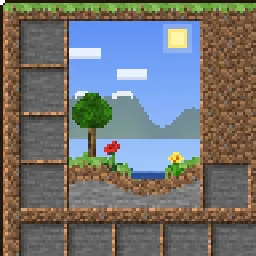
This texture pack makes the GUI overworld themed.
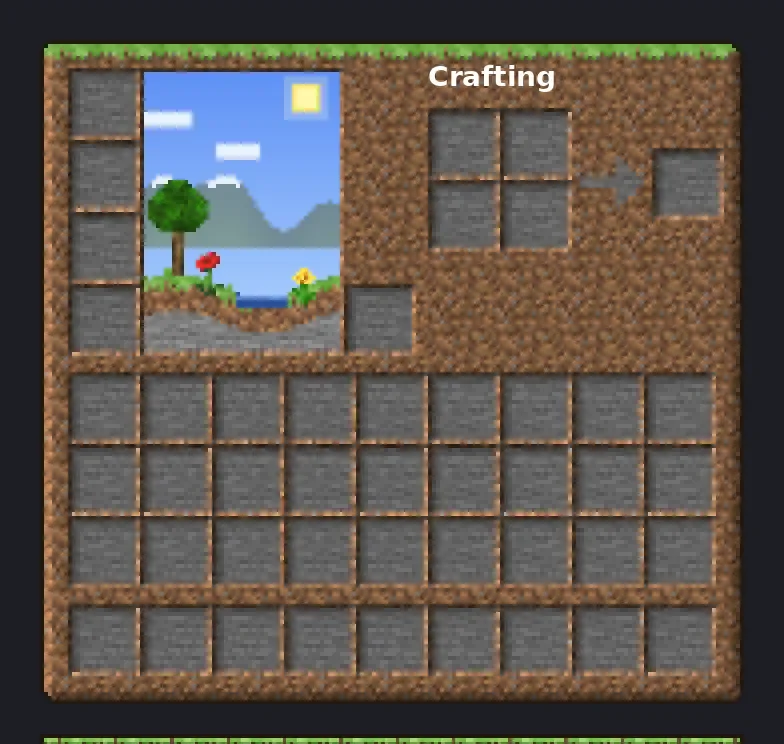
This texture pack makes the GUI overworld themed.
OverworldGUI (paquete de recursos) es obra de TheRealPJ. Es compatible con Minecraft 26.x. Se ha descargado 14 veces en Modrinth. La última actualización salió el 03/11/2026.
La más reciente es Version1, publicada el 03/11/2026. Está hecha para Minecraft 26.2, 26.3. Funciona en Minecraft. La descarga ocupa 657 KB.
| Versión | Publicado | Minecraft | Tipo |
|---|---|---|---|
Version1 | 03/11/2026 | 26.2, 26.3 | Estable |
Your menus, built from the Overworld. Every inventory, button and hotbar is made from real Overworld blocks, with real lighting on the edges, so it feels like you're looking at actual grass, dirt and stone.
Hearts, hunger, armor, the crosshair, the Minecraft logo and colored icons stay vanilla, so your HUD stays easy to read.
💡 Tip: If you use other packs that change the GUI, put Overworld GUI above them.
Minecraft version · 26.2.x
Resolution · 16x
Download size · ~660 KB
Escrita por TheRealPJ. Léela con imágenes en Modrinth.
Descarga el archivo .zip desde Modrinth. No lo descomprimas.
En Minecraft, abre Opciones, luego Paquetes de recursos y luego Abrir carpeta de paquetes.
Suelta el archivo .zip en esa carpeta y vuelve al juego.
Mueve OverworldGUI a la lista de la derecha y pulsa Hecho.
Está hecho para Minecraft 26.x. En otras versiones Minecraft lo marca como incompatible, pero a menudo funciona igual.
| Recurso | Descargas | Versiones | Última actualización | Precio |
|---|---|---|---|---|
| OverworldGUIel que estabas viendo | 14 | 26.x | hace 7 días | Gratis |
| YouTube ThemedFudgeMan8171 | 8 | 1.21 – 26.x | hace 1 día | Gratis |
 Recolourful Containers GUI + HUDVi_Tul | 4.3M | 1.19 – 26.x | 1 oct 2026 | Gratis |
 Better 3D Bedsheycronus | 1.7M | 1.12 – 1.21 | 7 feb 2026 | Gratis |
Sí. OverworldGUI es compatible con Minecraft 26.x. Todas las versiones compatibles: 26.x.
Sí. OverworldGUI se puede descargar gratis desde Modrinth.
Sí. La última actualización salió en el último día.
Los más parecidos son YouTube Themed, Recolourful Containers GUI + HUD y Better 3D Beds. Comparar todas las alternativas
YouTube ThemedPaquetes de recursos · 1.21 – 26.xThis Texture Pack Introduces new textures for items and equipment to enhance gameplay themed like YouTube
Recolourful Containers GUI + HUDPaquetes de recursos · 1.19 – 26.xDo you want more immersive, more interesting, more colourful GUIs and HUD? Than this pack is for you!
Better 3D BedsPaquetes de recursos · 1.12 – 1.21Better 3D Beds is a texture pack for Minecraft that significantly enhances the appearance of beds in the game, making them more realistic and detailed with…
 Raki Kazuki HUD & GUIPaquetes de recursos · 1.19 – 1.20
A fan-driven HUD and GUI overhaul themed around PixelLink's 1st Generation VTuber, Raki Kazuki! Rah!
 FA ExtensionsPaquetes de recursos · 1.19 – 1.21
This is a temporary patch pack to fix vanilla chest models in the GUI slot when using Fresh Animation Extensions in newer versions of Minecraft
 Rent-A-Girlfriend Custom GUI PackPaquetes de recursos · 1.20 – 1.21
Rent-A-Girlfriend Custom GUI Pack
Inicia sesión para dejar una reseña.