
 YouTube ThemedKaynak paketleri · 1.21 – 26.x
This Texture Pack Introduces new textures for items and equipment to enhance gameplay themed like YouTube
Ücretsiz8 indirme
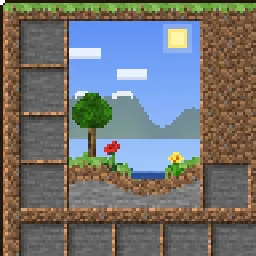
This texture pack makes the GUI overworld themed.
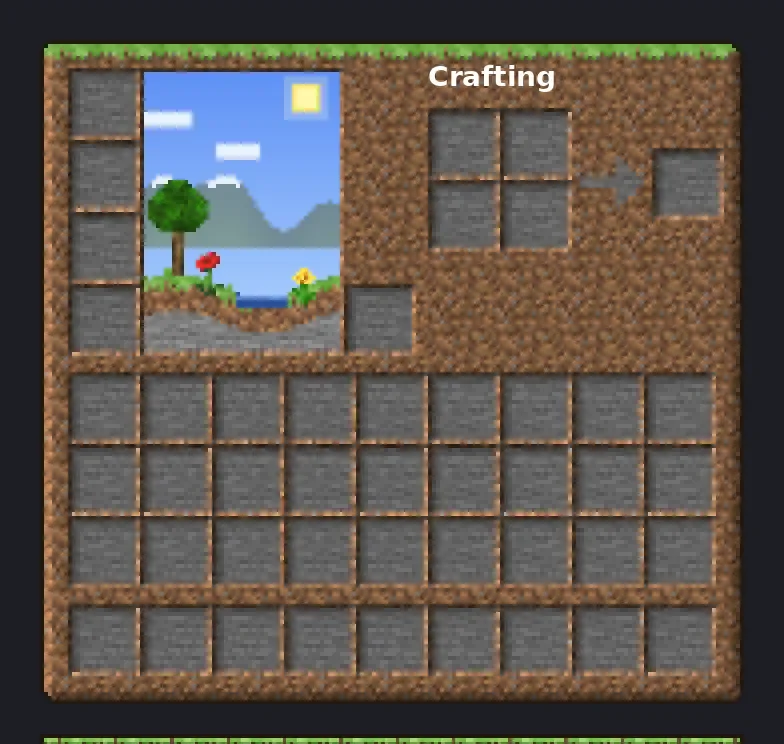
This texture pack makes the GUI overworld themed.
OverworldGUI, TheRealPJ tarafından yapılmış bir kaynak paketi. Desteklediği sürümler: Minecraft 26.x. Modrinth üzerinde 14 kez indirildi. Son güncelleme 03.11.2026 tarihinde çıktı.
En yenisi 03.11.2026 tarihinde çıkan Version1. Minecraft 26.2, 26.3 için yapıldı. Minecraft üzerinde çalışır. İndirme boyutu 657 KB.
| Sürüm | Yayın tarihi | Minecraft | Tür |
|---|---|---|---|
Version1 | 03.11.2026 | 26.2, 26.3 | Kararlı |
Your menus, built from the Overworld. Every inventory, button and hotbar is made from real Overworld blocks, with real lighting on the edges, so it feels like you're looking at actual grass, dirt and stone.
Hearts, hunger, armor, the crosshair, the Minecraft logo and colored icons stay vanilla, so your HUD stays easy to read.
💡 Tip: If you use other packs that change the GUI, put Overworld GUI above them.
Minecraft version · 26.2.x
Resolution · 16x
Download size · ~660 KB
Yazan: TheRealPJ. Resimli halini Modrinth sayfasında oku.
.zip dosyasını Modrinth üzerinden indir. Zipten çıkarma.
Minecraft'ta Seçenekler'i, sonra Kaynak Paketleri'ni aç ve Paket Klasörünü Aç'a tıkla.
.zip dosyasını o klasöre bırak ve oyuna dön.
OverworldGUI paketini sağdaki listeye taşı ve Bitti'ye tıkla.
Minecraft 26.x için yapıldı. Diğer sürümlerde Minecraft onu uyumsuz olarak işaretler ama çoğu zaman yine de çalışır.
| Kaynak | İndirmeler | Sürümler | Son güncelleme | Fiyat |
|---|---|---|---|---|
| OverworldGUIbaktığın | 14 | 26.x | 7 gün önce | Ücretsiz |
| YouTube ThemedFudgeMan8171 | 8 | 1.21 – 26.x | 1 gün önce | Ücretsiz |
 Recolourful Containers GUI + HUDVi_Tul | 4.3M | 1.19 – 26.x | 1 Eki 2026 | Ücretsiz |
 Better 3D Bedsheycronus | 1.7M | 1.12 – 1.21 | 7 Şub 2026 | Ücretsiz |
Evet. OverworldGUI, Minecraft 26.x sürümünü destekliyor. Desteklenen tüm sürümler: 26.x.
Evet. OverworldGUI, Modrinth üzerinden ücretsiz indirilebilir.
Evet. Son güncelleme son 24 saat içinde çıktı.
En yakın olanlar YouTube Themed, Recolourful Containers GUI + HUD ve Better 3D Beds. Tüm alternatifleri karşılaştır
YouTube ThemedKaynak paketleri · 1.21 – 26.xThis Texture Pack Introduces new textures for items and equipment to enhance gameplay themed like YouTube
Recolourful Containers GUI + HUDKaynak paketleri · 1.19 – 26.xDo you want more immersive, more interesting, more colourful GUIs and HUD? Than this pack is for you!
Better 3D BedsKaynak paketleri · 1.12 – 1.21Better 3D Beds is a texture pack for Minecraft that significantly enhances the appearance of beds in the game, making them more realistic and detailed with…
 Raki Kazuki HUD & GUIKaynak paketleri · 1.19 – 1.20
A fan-driven HUD and GUI overhaul themed around PixelLink's 1st Generation VTuber, Raki Kazuki! Rah!
 FA ExtensionsKaynak paketleri · 1.19 – 1.21
This is a temporary patch pack to fix vanilla chest models in the GUI slot when using Fresh Animation Extensions in newer versions of Minecraft
 Rent-A-Girlfriend Custom GUI PackKaynak paketleri · 1.20 – 1.21
Rent-A-Girlfriend Custom GUI Pack
Yorum yazmak için giriş yap.