
 YouTube ThemedResource packs · 1.21 – 26.x
This Texture Pack Introduces new textures for items and equipment to enhance gameplay themed like YouTube
Free8 downloads
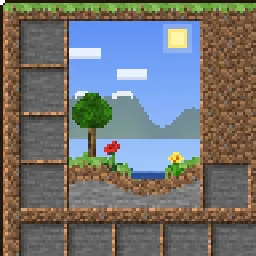
This texture pack makes the GUI overworld themed.
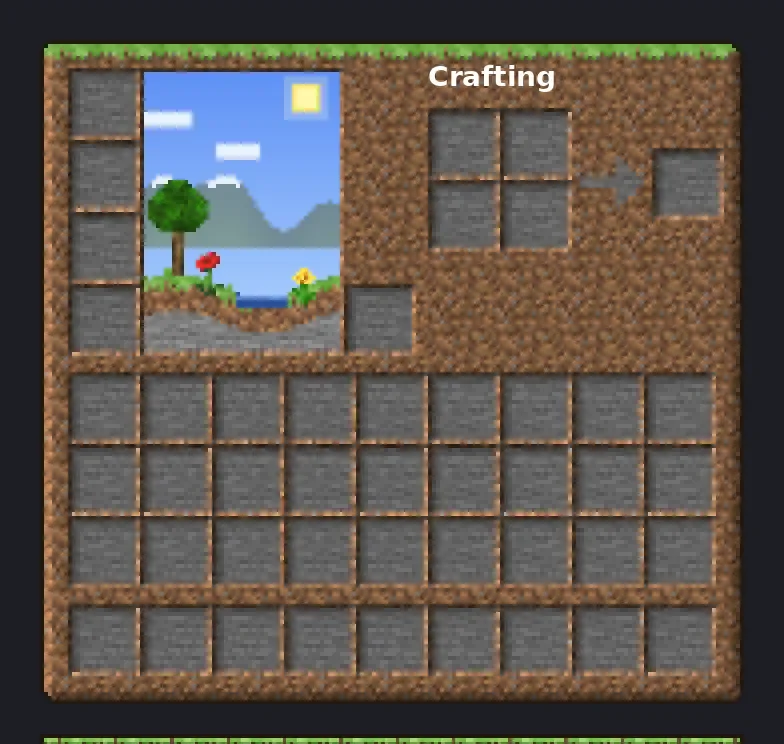
This texture pack makes the GUI overworld themed.
OverworldGUI is a resource pack made by TheRealPJ. It supports Minecraft 26.x. It has been downloaded 14 times on Modrinth. The last update came out on Nov 3, 2026.
The newest is Version1, released on Nov 3, 2026. It is made for Minecraft 26.2, 26.3. It runs on Minecraft. The download is 657 KB.
| Version | Released | Minecraft | Type |
|---|---|---|---|
Version1 | Nov 3, 2026 | 26.2, 26.3 | Release |
Your menus, built from the Overworld. Every inventory, button and hotbar is made from real Overworld blocks, with real lighting on the edges, so it feels like you're looking at actual grass, dirt and stone.
Hearts, hunger, armor, the crosshair, the Minecraft logo and colored icons stay vanilla, so your HUD stays easy to read.
💡 Tip: If you use other packs that change the GUI, put Overworld GUI above them.
Minecraft version · 26.2.x
Resolution · 16x
Download size · ~660 KB
Written by TheRealPJ. Read it with pictures on Modrinth.
Download the .zip file from Modrinth. Do not unzip it.
In Minecraft, open Options, then Resource Packs, then Open Pack Folder.
Drop the .zip file into that folder and go back to the game.
Move OverworldGUI to the right-hand list and click Done.
It is made for Minecraft 26.x. On other versions Minecraft marks it as incompatible, but it often still works.
| Resource | Downloads | Versions | Last update | Price |
|---|---|---|---|---|
| OverworldGUIthe one you looked at | 14 | 26.x | 6 days ago | Free |
| YouTube ThemedFudgeMan8171 | 8 | 1.21 – 26.x | 1 day ago | Free |
 Recolourful Containers GUI + HUDVi_Tul | 4.3M | 1.19 – 26.x | Oct 1, 2026 | Free |
 Better 3D Bedsheycronus | 1.7M | 1.12 – 1.21 | Feb 7, 2026 | Free |
Yes. OverworldGUI supports Minecraft 26.x. All supported versions: 26.x.
Yes. OverworldGUI is free to download from Modrinth.
Yes. The last update came out in the past day.
The closest ones are YouTube Themed, Recolourful Containers GUI + HUD and Better 3D Beds. Compare all alternatives
YouTube ThemedResource packs · 1.21 – 26.xThis Texture Pack Introduces new textures for items and equipment to enhance gameplay themed like YouTube
Recolourful Containers GUI + HUDResource packs · 1.19 – 26.xDo you want more immersive, more interesting, more colourful GUIs and HUD? Than this pack is for you!
Better 3D BedsResource packs · 1.12 – 1.21Better 3D Beds is a texture pack for Minecraft that significantly enhances the appearance of beds in the game, making them more realistic and detailed with…
 Raki Kazuki HUD & GUIResource packs · 1.19 – 1.20
A fan-driven HUD and GUI overhaul themed around PixelLink's 1st Generation VTuber, Raki Kazuki! Rah!
 FA ExtensionsResource packs · 1.19 – 1.21
This is a temporary patch pack to fix vanilla chest models in the GUI slot when using Fresh Animation Extensions in newer versions of Minecraft
 Rent-A-Girlfriend Custom GUI PackResource packs · 1.20 – 1.21
Rent-A-Girlfriend Custom GUI Pack
Log in to leave a review.