
 Nautilus 3DResource packs · 1.20 – 26.x
Nautilus 3D is a Minecraft Resource-pack, mainly focused on 3D-Models with a vanilla style.
Free1,608,455 downloads

This is a temporary patch pack to fix vanilla chest models in the GUI slot when using Fresh Animation Extensions in newer versions of Minecraft

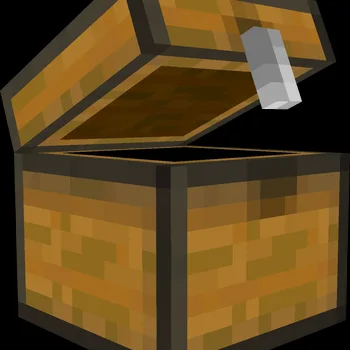
This is a temporary patch pack to fix vanilla chest models in the GUI slot when using Fresh Animation Extensions in newer versions of Minecraft
FA Extensions is a resource pack made by Braytonks. It supports Minecraft 1.19 – 1.21. It has been downloaded 183,123 times on Modrinth. The last update came out on Nov 12, 2025.
FA Extensions has had 2 releases on Modrinth since Jun 2, 2025. One of them came out in the past year. The newest is 2.0, released on Nov 12, 2025. It is made for Minecraft 1.19 – 1.21.10. It runs on Minecraft. The download is 177 KB.
| Version | Released | Minecraft | Type |
|---|---|---|---|
2.0 | Nov 12, 2025 | 1.19 – 1.21.10 | Release |
1.0 | Jun 2, 2025 | 1.19.4 – 1.21.8 | Release |
This is a temporary patch pack to fix vanilla chest models in the GUI slot when using Fresh Animation Extensions in newer versions of Minecraft
Go support FreshLX for their work :)
The chest GUI model has been bugged for some time when using Fresh Animation Extensions which includes custom chest animations. This may be patched very shortly by FreshLX but in the mean time I created this pack to overwrite that bug by creating a custom inventory/GUI model for chests instead of one that was derived from the chest entity model which was causing the bug in the first place!
Written by Braytonks. Read it with pictures on Modrinth.
Download the .zip file from Modrinth. Do not unzip it.
In Minecraft, open Options, then Resource Packs, then Open Pack Folder.
Drop the .zip file into that folder and go back to the game.
Move FA Extensions to the right-hand list and click Done.
It is made for Minecraft 1.19 – 1.21. On other versions Minecraft marks it as incompatible, but it often still works.
| Resource | Downloads | Versions | Last update | Price |
|---|---|---|---|---|
| FA Extensionsthe one you looked at | 183K | 1.19 – 1.21 | Nov 12, 2025 | Free |
| Nautilus 3DFabianMPunkt | 1.6M | 1.20 – 26.x | Jun 21, 2026 | Free |
| Fresh Music Discscyber | 1.2M | 1.20 – 26.x | 14 days ago | Free |
| Fresh Flowers and Plantscyber | 1.5M | 1.20 – 26.x | 15 days ago | Free |
Not yet. The newest version it supports is Minecraft 1.21.
Yes. FA Extensions is free to download from Modrinth.
Yes. The last update came out in the past day.
The closest ones are Nautilus 3D, Fresh Music Discs and Fresh Flowers and Plants. Compare all alternatives
Nautilus 3DResource packs · 1.20 – 26.xNautilus 3D is a Minecraft Resource-pack, mainly focused on 3D-Models with a vanilla style.
A Minecraft resource pack that adds 3D music disc models!
A Minecraft resource pack that adds 3D plant and flowers models!
 Recolourful Containers GUI + HUDResource packs · 1.19 – 26.x
Do you want more immersive, more interesting, more colourful GUIs and HUD? Than this pack is for you!
 Ben's BundlesResource packs · 1.20 – 26.x
3D Bundle item in hand while keeping the vanilla 2D sprite in the GUI
 Remodeled Doors 3DResource packs · 1.19 – 26.x
Makes all the doors and trapdoors have 3D models. Changes the model and the item within the GUI.
Log in to leave a review.