
 Lumina ShaderShader · 1.8 – 26.x
Cinematic shaders for Minecraft Java featuring a black hole and white hole in the End, atmospheric lighting, volumetric clouds, water reflections and…
Kostenlos197,002 Downloads
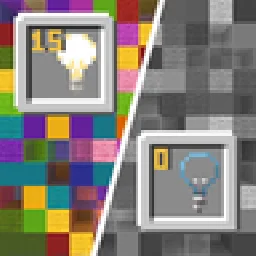
Blocks gradually turn black and white as light levels decrease.
Direkter Download von Modrinth · 22,686 Downloads
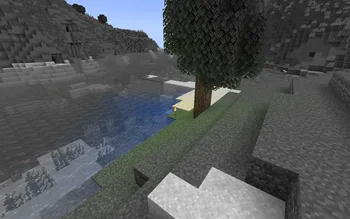


No Light (Shaderpack) stammt von SuperAnt_. Blocks gradually turn black and white as light levels decrease.
Unterstützt wird Minecraft 1.17 – 1.21. Auf Modrinth gibt es 22,686 Downloads. Das letzte Update erschien am 03.01.2026.
No Light hat seit 29.09.2024 5 Versionen auf Modrinth veröffentlicht. Eine davon erschien im letzten Jahr. Die neueste ist 1.2, erschienen am 03.01.2026. Sie ist für Minecraft 1.20.2 – 1.21.11 gemacht. Sie läuft auf Minecraft. Der Download ist 281 KB groß.
| Version | Veröffentlicht | Minecraft | Typ |
|---|---|---|---|
1.2 | 03.01.2026 | 1.20.2 – 1.21.11 | Release |
1.1 | 14.09.2025 | 1.20.2 – 1.21.8 | Release |
1.0 | 29.09.2024 | 1.17 – 1.18.1 | Release |
1.0 | 29.09.2024 | 1.18.2 – 1.20.1 | Release |
1.0 | 29.09.2024 | 1.20.2 – 1.21.5 | Release |
This resource pack makes blocks smoothly become less colorful when they have less block light. Sky light doesn't affect this, only block light. Please note — this resource pack applies only to most of the blocks. Entities, some block entities, particles and other stuff will not be affected due to a different lighting method. Maybe I'll try to make entities and block entities work in the future.
You can also adjust radius and smoothness of how light will colorize blocks.
Go into the resource pack into a file assets/minecraft/shaders/include/no_light_no_color.glsl. You can change the numbers in the first 2 lines. The variables don't work very intuitively so just play around until you are comfortable with the result.
Radius variable here is set to 82:
Geschrieben von SuperAnt_. Mit Bildern auf Modrinth lesen.
Installiere Iris (mit Sodium) oder OptiFine für deine Minecraft-Version: Shader brauchen eins davon.
Lade die .zip-Datei von Modrinth herunter. Entpacke sie nicht.
Öffne in Minecraft Optionen, dann Grafikeinstellungen, dann Shaderpacks und klicke auf Shaderpack-Ordner öffnen.
Lege die .zip-Datei in diesen Ordner, wähle No Light in der Liste und klicke auf Fertig.
Shader belasten die Grafikkarte. Wird das Spiel langsam, wähle in den Shader-Einstellungen ein niedrigeres Profil.
| Ressource | Downloads | Versionen | Letztes Update | Preis |
|---|---|---|---|---|
| No Lightdie du angesehen hast | 23K | 1.17 – 1.21 | 3. Jan. 2026 | Kostenlos |
| Lumina ShaderBenjiaa | 197K | 1.8 – 26.x | 20. Sept. 2026 | Kostenlos |
 B&W ShaderCat4blep | 60K | 1.12 – 26.x | 28. Sept. 2025 | Kostenlos |
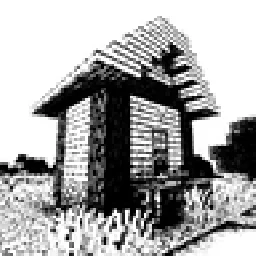 Bitmap Vanilla ShaderEevee_17 | 46K | 1.21 – 26.x | 23. Juli 2026 | Kostenlos |
Noch nicht. Die neueste unterstützte Version ist Minecraft 1.21.
Ja. No Light kannst du kostenlos bei Modrinth herunterladen.
Ja. Das letzte Update kam innerhalb des letzten Tages.
Am ähnlichsten sind Lumina Shader, B&W Shader und Bitmap Vanilla Shader. Alle Alternativen vergleichen
Lumina ShaderShader · 1.8 – 26.xCinematic shaders for Minecraft Java featuring a black hole and white hole in the End, atmospheric lighting, volumetric clouds, water reflections and…
B&W ShaderShader · 1.12 – 26.xA shader that completely turns your game into a black and white version
Bitmap Vanilla ShaderShader · 1.21 – 26.xRenders the game with only the colors black and white (bitmap).
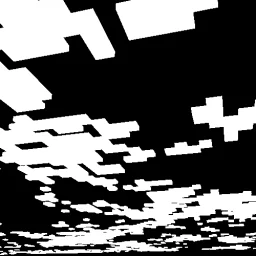 CMSShader · 1.8 – 1.21
Shader that makes clouds white, and everything else, black
 0light1levels15Shader · 1.21 – 26.x
A simple and lightweight rp that works in vanilla and allows you to see the exact light levels: 0, 1 and 15
 Black And White ShadersShader · 1.16 – 26.x
Cinematic grayscale shader pack
Logg dich ein, um eine Bewertung zu schreiben.