The Light Overlay Mod with a twist!

The Light Overlay Mod with a twist!
Lighty (Ressource) stammt von andi-makes. Unterstützt wird Minecraft 1.18 – 26.x. Auf Modrinth gibt es 4,048,259 Downloads. Das letzte Update erschien am 16.09.2026.
Lighty hat seit 07.08.2022 130 Versionen auf Modrinth veröffentlicht. 15 davon erschienen im letzten Jahr. Die neueste ist 4.0.1+26.3, erschienen am 16.09.2026. Sie ist für Minecraft 26.3 gemacht. Sie läuft auf NeoForge. Der Download ist 75 KB groß.
| Version | Veröffentlicht | Minecraft | Typ |
|---|---|---|---|
4.0.1+26.3 | 16.09.2026 | 26.3 | Release |
4.0.1+26.3 | 16.09.2026 | 26.3 | Release |
4.0.1+26.2 | 23.07.2026 | 26.2 | Release |
4.0.1+26.2 | 23.07.2026 | 26.2 | Release |
1.1.0-BTA | 22.07.2026 | – | Release |
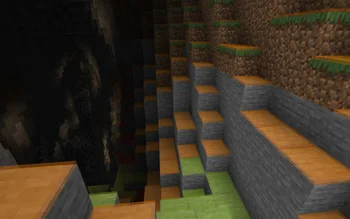
Instead of rendering crosses or numbers on the top face of blocks, Lighty takes a different approach - It renders a transparent carpet-like block on top! Or, new in version 1.1.0 - Renders the actual light level numbers, but Lighty Style!
Make sure to check out the Gallery for some pictures!
If you have some ideas for this mod, feel free to open a new Codeberg Issue!
If you like this mod, consider following the project to get notified about new updates!
This mod was inspired by LightLevel.
Geschrieben von andi-makes. Mit Bildern auf Modrinth lesen.
Diese Mod läuft nur in deinem eigenen Spiel. Server brauchen sie nicht, du kannst sie also auf jedem Server nutzen.
Installiere Fabric, Quilt, Forge und NeoForge für Minecraft 1.18 – 26.x.
Lade die .jar-Datei von Modrinth herunter und lege sie in den mods-Ordner deines .minecraft-Verzeichnisses.
Starte Minecraft mit dem Fabric-Profil.
Mit dem CraftRank Launcher sparst du dir diese Schritte: Öffne Mods, suche nach Lighty und klicke auf Installieren.
Ja. Lighty unterstützt Minecraft 26.x. Alle unterstützten Versionen: 26.x, 1.21, 1.20, 1.19, 1.18.
Ja. Lighty kannst du kostenlos bei Modrinth herunterladen.
Clientseitig. Lighty kommt in deinen eigenen mods-Ordner und funktioniert auf jedem Server, auch auf Servern ohne Mods.
Ja. Das letzte Update kam innerhalb des letzten Tages.
Logg dich ein, um eine Bewertung zu schreiben.
