
 Bloom AFKPlugins · 1.21 – 26.x
Highly Optimized and Supported AFK Plugin. Folia, All Paper Forks, Spigot. 1.21.x - 26.x
Kostenlos3 Downloads

Highly Optimized and Supported Command Filter Plugin. Folia, All Paper Forks, Spigot. 1.21.x - 26.x
Direkter Download von Modrinth · 2 Downloads
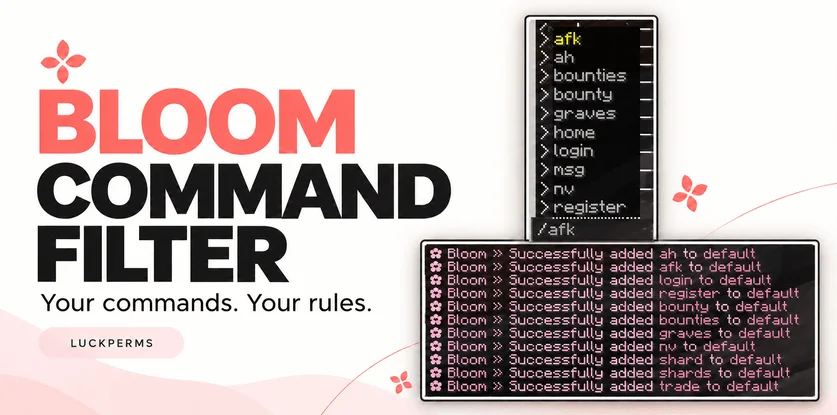
Bloom Command Filter (Plugin) ist für Server mit Paper / Spigot gedacht und stammt von Metene. Highly Optimized and Supported Command Filter Plugin. Folia, All Paper Forks, Spigot. 1.21.x - 26.x.
Unterstützt wird Minecraft 1.21 – 26.x. Auf Modrinth gibt es 2 Downloads. Damit liegt es auf Platz 133 der 146 hier gelisteten Performance-Plugins. Das letzte Update erschien am 04.11.2026.
Bloom Command Filter hat seit 30.10.2026 3 Versionen auf Modrinth veröffentlicht. 3 davon erschienen im letzten Jahr. Die neueste ist 1.0.0, erschienen am 04.11.2026. Sie ist für Minecraft 1.21 – 26.3 gemacht. Sie läuft auf Bukkit, Folia, Paper, Purpur und Spigot. Der Download ist 144 KB groß.
| Version | Veröffentlicht | Minecraft | Typ |
|---|---|---|---|
1.0.0 | 04.11.2026 | 1.21 – 26.3 | Release |
1.0.0 | 03.11.2026 | 1.21 – 26.3 | Release |
1.0.0 | 30.10.2026 | 1.21 – 26.3 | Release |
Die Befehle, die auf der Modrinth-Seite von Bloom Command Filter stehen:
/commandfilterDort genannte Berechtigungen, zu vergeben mit einem Plugin wie LuckPerms:
bloomcommandfilter.adminbloomcommandfilter.bypassYour commands. Your rules.
Keep your server’s command suggestions clean and easy to navigate. Choose which commands players see, create additional lists for LuckPerms groups, and manage everything directly in-game.
/commandfilter add default spawn
/commandfilter add default home
/commandfilter add default sell
The default list applies to all normal players. With LuckPerms installed, you can also assign additional commands to a group:
/commandfilter add mvip fly
Players receive the combined commands from the default list and their matching LuckPerms groups.
LuckPerms is optional. Without it, the default list continues to work.
Command · Description
/commandfilter · Show help.
/commandfilter help · Show available commands.
/commandfilter add · Add a command to a group’s list.
/commandfilter remove · Remove a command from a group’s list.
/commandfilter list · Display a group’s configured commands.
/commandfilter reload · Reload configuration and language files.
Enter command names without the leading /, such as sell. Management commands can also be used from the console.
Permission · Description · Default
bloomcommandfilter.admin · Manage command lists and reload settings. · OP
bloomcommandfilter.bypass · Bypass Bloom’s visibility and execution restrictions. · OP
Operators bypass filtering automatically. Non-OP staff can receive the bypass permission separately.
Edit plugins/BloomCommandFilter/config.yml to manage command lists, filtering options, colors, and sounds.
Messages are available in:
plugins/BloomCommandFilter/lang/en.yml
plugins/BloomCommandFilter/lang/tr.yml
Visibility filtering and execution blocking are independent: you can hide a command from suggestions while still allowing players to type it manually.
Aliases and namespaced labels, such as plugin:command, must be added explicitly if you want to allow them.
Bloom Command Filter works alongside your existing permission system.
No database or resource pack is required. Refer to the release details for compatibility information.
✿ A little less clutter. A better command list.
Geschrieben von Metene. Mit Bildern auf Modrinth lesen.
Stelle sicher, dass dein Server Paper und Spigot auf Minecraft 1.21 – 26.x nutzt.
Lade die .jar-Datei von Modrinth herunter und lege sie in den plugins-Ordner deines Servers.
Starte den Server neu. Vermeide /reload, viele Plugins kommen damit nicht gut klar.
Gib /plugins in der Konsole ein: Bloom Command Filter sollte grün aufgelistet sein. Die Konfigurationsdateien werden beim ersten Start im plugins-Ordner angelegt.
Ausführliche Anleitung: So installierst du Plugins auf einem Minecraft-Server
| Ressource | Downloads | Versionen | Letztes Update | Preis |
|---|---|---|---|---|
| Bloom Command Filterdie du angesehen hast | 2 | 1.21 – 26.x | vor 10 Tagen | Kostenlos |
| Bloom AFKMetene | 3 | 1.21 – 26.x | vor 11 Tagen | Kostenlos |
 Bloom AuthMetene | 2 | 1.21 – 26.x | vor 11 Tagen | Kostenlos |
 Bloom Auto PickupMetene | 5 | 1.21 – 26.x | vor 1 Tag | Kostenlos |
Ja. Bloom Command Filter unterstützt Minecraft 26.x. Alle unterstützten Versionen: 26.x, 1.21.
Ja. Bloom Command Filter kannst du kostenlos bei Modrinth herunterladen.
Bloom Command Filter läuft auf Servern mit Paper und Spigot.
Ja. Das letzte Update kam innerhalb des letzten Tages.
Am ähnlichsten sind Bloom AFK, Bloom Auth und Bloom Auto Pickup. Alle Alternativen vergleichen
Bloom AFKPlugins · 1.21 – 26.xHighly Optimized and Supported AFK Plugin. Folia, All Paper Forks, Spigot. 1.21.x - 26.x
Bloom AuthPlugins · 1.21 – 26.xHighly Optimized and Supported Auth Plugin. Folia, All Paper Forks, Spigot. 1.21.x - 26.x
Bloom Auto PickupPlugins · 1.21 – 26.xHighly Optimized and Supported Auto Pickup Plugin. Folia, All Paper Forks, Spigot. 1.21.x - 26.3
 Bloom MinionsPlugins · 1.21 – 26.x
Highly Optimized and Supported Minions Plugin. Folia, All Paper Forks, Spigot. 1.21.x - 26.3
 Bloom ToolsPlugins · 1.21 – 26.x
Highly Optimized and Supported Tools Plugin. Folia, All Paper Forks, Spigot. 1.21.x - 26.x
 Bloom SpawnersPlugins · 1.21 – 26.x
Highly Optimized and Supported Spawner Plugin. Folia, All Paper Forks, Spigot. 1.21.x - 26.3
Logg dich ein, um eine Bewertung zu schreiben.