
 Bloom AFKPlugins · 1.21 – 26.x
Highly Optimized and Supported AFK Plugin. Folia, All Paper Forks, Spigot. 1.21.x - 26.x
Free3 downloads

Highly Optimized and Supported Command Filter Plugin. Folia, All Paper Forks, Spigot. 1.21.x - 26.x
Direct download from Modrinth · 2 downloads
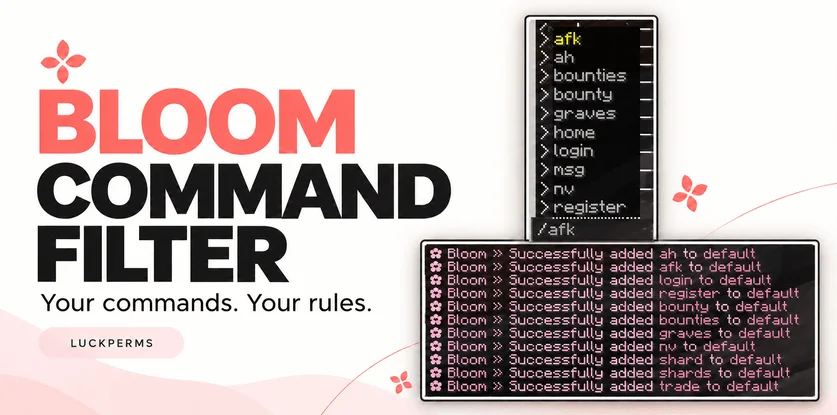
Bloom Command Filter is a plugin for Paper / Spigot servers, made by Metene. Highly Optimized and Supported Command Filter Plugin. Folia, All Paper Forks, Spigot. 1.21.x - 26.x.
It supports Minecraft 1.21 – 26.x. It has been downloaded 2 times on Modrinth. That puts it at #133 of the 146 performance plugins listed here. The last update came out on Nov 4, 2026.
Bloom Command Filter has had 3 releases on Modrinth since Oct 30, 2026. 3 of them came out in the past year. The newest is 1.0.0, released on Nov 4, 2026. It is made for Minecraft 1.21 – 26.3. It runs on Bukkit, Folia, Paper, Purpur and Spigot. The download is 144 KB.
| Version | Released | Minecraft | Type |
|---|---|---|---|
1.0.0 | Nov 4, 2026 | 1.21 – 26.3 | Release |
1.0.0 | Nov 3, 2026 | 1.21 – 26.3 | Release |
1.0.0 | Oct 30, 2026 | 1.21 – 26.3 | Release |
The commands named on the Modrinth page of Bloom Command Filter:
/commandfilterPermission nodes named there, to give with a plugin like LuckPerms:
bloomcommandfilter.adminbloomcommandfilter.bypassYour commands. Your rules.
Keep your server’s command suggestions clean and easy to navigate. Choose which commands players see, create additional lists for LuckPerms groups, and manage everything directly in-game.
/commandfilter add default spawn
/commandfilter add default home
/commandfilter add default sell
The default list applies to all normal players. With LuckPerms installed, you can also assign additional commands to a group:
/commandfilter add mvip fly
Players receive the combined commands from the default list and their matching LuckPerms groups.
LuckPerms is optional. Without it, the default list continues to work.
Command · Description
/commandfilter · Show help.
/commandfilter help · Show available commands.
/commandfilter add · Add a command to a group’s list.
/commandfilter remove · Remove a command from a group’s list.
/commandfilter list · Display a group’s configured commands.
/commandfilter reload · Reload configuration and language files.
Enter command names without the leading /, such as sell. Management commands can also be used from the console.
Permission · Description · Default
bloomcommandfilter.admin · Manage command lists and reload settings. · OP
bloomcommandfilter.bypass · Bypass Bloom’s visibility and execution restrictions. · OP
Operators bypass filtering automatically. Non-OP staff can receive the bypass permission separately.
Edit plugins/BloomCommandFilter/config.yml to manage command lists, filtering options, colors, and sounds.
Messages are available in:
plugins/BloomCommandFilter/lang/en.yml
plugins/BloomCommandFilter/lang/tr.yml
Visibility filtering and execution blocking are independent: you can hide a command from suggestions while still allowing players to type it manually.
Aliases and namespaced labels, such as plugin:command, must be added explicitly if you want to allow them.
Bloom Command Filter works alongside your existing permission system.
No database or resource pack is required. Refer to the release details for compatibility information.
✿ A little less clutter. A better command list.
Written by Metene. Read it with pictures on Modrinth.
Make sure your server runs Paper and Spigot on Minecraft 1.21 – 26.x.
Download the .jar file from Modrinth and put it in the plugins folder of your server.
Restart the server. Avoid /reload, many plugins do not handle it well.
Type /plugins in the console: Bloom Command Filter should be listed in green. Its config files are created in the plugins folder on the first start.
Full guide: How to install plugins on a Minecraft server
| Resource | Downloads | Versions | Last update | Price |
|---|---|---|---|---|
| Bloom Command Filterthe one you looked at | 2 | 1.21 – 26.x | 10 days ago | Free |
| Bloom AFKMetene | 3 | 1.21 – 26.x | 11 days ago | Free |
 Bloom AuthMetene | 2 | 1.21 – 26.x | 11 days ago | Free |
 Bloom Auto PickupMetene | 5 | 1.21 – 26.x | 1 day ago | Free |
Yes. Bloom Command Filter supports Minecraft 26.x. All supported versions: 26.x, 1.21.
Yes. Bloom Command Filter is free to download from Modrinth.
Bloom Command Filter runs on Paper and Spigot servers.
Yes. The last update came out in the past day.
The closest ones are Bloom AFK, Bloom Auth and Bloom Auto Pickup. Compare all alternatives
Bloom AFKPlugins · 1.21 – 26.xHighly Optimized and Supported AFK Plugin. Folia, All Paper Forks, Spigot. 1.21.x - 26.x
Bloom AuthPlugins · 1.21 – 26.xHighly Optimized and Supported Auth Plugin. Folia, All Paper Forks, Spigot. 1.21.x - 26.x
Bloom Auto PickupPlugins · 1.21 – 26.xHighly Optimized and Supported Auto Pickup Plugin. Folia, All Paper Forks, Spigot. 1.21.x - 26.3
 Bloom MinionsPlugins · 1.21 – 26.x
Highly Optimized and Supported Minions Plugin. Folia, All Paper Forks, Spigot. 1.21.x - 26.3
 Bloom ToolsPlugins · 1.21 – 26.x
Highly Optimized and Supported Tools Plugin. Folia, All Paper Forks, Spigot. 1.21.x - 26.x
 Bloom SpawnersPlugins · 1.21 – 26.x
Highly Optimized and Supported Spawner Plugin. Folia, All Paper Forks, Spigot. 1.21.x - 26.3
Log in to leave a review.