
 Bloom AFKPlugins · 1.21 – 26.x
Highly Optimized and Supported AFK Plugin. Folia, All Paper Forks, Spigot. 1.21.x - 26.x
Gratis3 descargas

Highly Optimized and Supported Command Filter Plugin. Folia, All Paper Forks, Spigot. 1.21.x - 26.x
Descarga directa desde Modrinth · 2 descargas
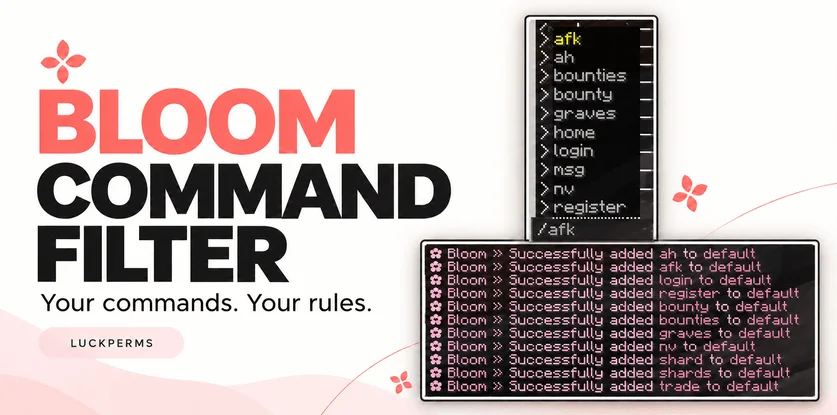
Metene creó Bloom Command Filter (plugin) para servidores Paper / Spigot. Highly Optimized and Supported Command Filter Plugin. Folia, All Paper Forks, Spigot. 1.21.x - 26.x.
Es compatible con Minecraft 1.21 – 26.x. Se ha descargado 2 veces en Modrinth. Eso lo sitúa en el puesto 133 de los 146 plugins de rendimiento de esta lista. La última actualización salió el 04/11/2026.
Bloom Command Filter ha publicado 3 versiones en Modrinth desde el 30/10/2026. 3 salieron en el último año. La más reciente es 1.0.0, publicada el 04/11/2026. Está hecha para Minecraft 1.21 – 26.3. Funciona en Bukkit, Folia, Paper, Purpur y Spigot. La descarga ocupa 144 KB.
| Versión | Publicado | Minecraft | Tipo |
|---|---|---|---|
1.0.0 | 04/11/2026 | 1.21 – 26.3 | Estable |
1.0.0 | 03/11/2026 | 1.21 – 26.3 | Estable |
1.0.0 | 30/10/2026 | 1.21 – 26.3 | Estable |
Los comandos que aparecen en la página de Bloom Command Filter en Modrinth:
/commandfilterPermisos que se nombran allí, para dar con un plugin como LuckPerms:
bloomcommandfilter.adminbloomcommandfilter.bypassYour commands. Your rules.
Keep your server’s command suggestions clean and easy to navigate. Choose which commands players see, create additional lists for LuckPerms groups, and manage everything directly in-game.
/commandfilter add default spawn
/commandfilter add default home
/commandfilter add default sell
The default list applies to all normal players. With LuckPerms installed, you can also assign additional commands to a group:
/commandfilter add mvip fly
Players receive the combined commands from the default list and their matching LuckPerms groups.
LuckPerms is optional. Without it, the default list continues to work.
Command · Description
/commandfilter · Show help.
/commandfilter help · Show available commands.
/commandfilter add · Add a command to a group’s list.
/commandfilter remove · Remove a command from a group’s list.
/commandfilter list · Display a group’s configured commands.
/commandfilter reload · Reload configuration and language files.
Enter command names without the leading /, such as sell. Management commands can also be used from the console.
Permission · Description · Default
bloomcommandfilter.admin · Manage command lists and reload settings. · OP
bloomcommandfilter.bypass · Bypass Bloom’s visibility and execution restrictions. · OP
Operators bypass filtering automatically. Non-OP staff can receive the bypass permission separately.
Edit plugins/BloomCommandFilter/config.yml to manage command lists, filtering options, colors, and sounds.
Messages are available in:
plugins/BloomCommandFilter/lang/en.yml
plugins/BloomCommandFilter/lang/tr.yml
Visibility filtering and execution blocking are independent: you can hide a command from suggestions while still allowing players to type it manually.
Aliases and namespaced labels, such as plugin:command, must be added explicitly if you want to allow them.
Bloom Command Filter works alongside your existing permission system.
No database or resource pack is required. Refer to the release details for compatibility information.
✿ A little less clutter. A better command list.
Escrita por Metene. Léela con imágenes en Modrinth.
Asegúrate de que tu servidor use Paper y Spigot en Minecraft 1.21 – 26.x.
Descarga el archivo .jar desde Modrinth y ponlo en la carpeta plugins de tu servidor.
Reinicia el servidor. Evita /reload, muchos plugins no lo llevan bien.
Escribe /plugins en la consola: Bloom Command Filter debería aparecer en verde. Sus archivos de configuración se crean en la carpeta plugins al primer arranque.
Guía completa: Cómo instalar plugins en un servidor de Minecraft
| Recurso | Descargas | Versiones | Última actualización | Precio |
|---|---|---|---|---|
| Bloom Command Filterel que estabas viendo | 2 | 1.21 – 26.x | hace 10 días | Gratis |
| Bloom AFKMetene | 3 | 1.21 – 26.x | hace 11 días | Gratis |
 Bloom AuthMetene | 2 | 1.21 – 26.x | hace 11 días | Gratis |
 Bloom Auto PickupMetene | 5 | 1.21 – 26.x | hace 1 día | Gratis |
Sí. Bloom Command Filter es compatible con Minecraft 26.x. Todas las versiones compatibles: 26.x, 1.21.
Sí. Bloom Command Filter se puede descargar gratis desde Modrinth.
Bloom Command Filter funciona en servidores Paper y Spigot.
Sí. La última actualización salió en el último día.
Los más parecidos son Bloom AFK, Bloom Auth y Bloom Auto Pickup. Comparar todas las alternativas
Bloom AFKPlugins · 1.21 – 26.xHighly Optimized and Supported AFK Plugin. Folia, All Paper Forks, Spigot. 1.21.x - 26.x
Bloom AuthPlugins · 1.21 – 26.xHighly Optimized and Supported Auth Plugin. Folia, All Paper Forks, Spigot. 1.21.x - 26.x
Bloom Auto PickupPlugins · 1.21 – 26.xHighly Optimized and Supported Auto Pickup Plugin. Folia, All Paper Forks, Spigot. 1.21.x - 26.3
 Bloom MinionsPlugins · 1.21 – 26.x
Highly Optimized and Supported Minions Plugin. Folia, All Paper Forks, Spigot. 1.21.x - 26.3
 Bloom ToolsPlugins · 1.21 – 26.x
Highly Optimized and Supported Tools Plugin. Folia, All Paper Forks, Spigot. 1.21.x - 26.x
 Bloom SpawnersPlugins · 1.21 – 26.x
Highly Optimized and Supported Spawner Plugin. Folia, All Paper Forks, Spigot. 1.21.x - 26.3
Inicia sesión para dejar una reseña.