
 Bloom AFKPlugins · 1.21 – 26.x
Highly Optimized and Supported AFK Plugin. Folia, All Paper Forks, Spigot. 1.21.x - 26.x
Gratis3 descargas

Highly Optimized and Supported Auth Plugin. Folia, All Paper Forks, Spigot. 1.21.x - 26.x
Descarga directa desde Modrinth · 2 descargas
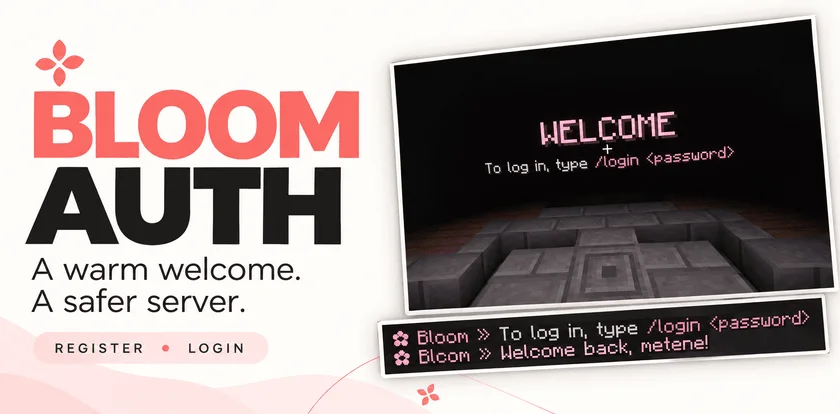
Metene creó Bloom Auth (plugin) para servidores Paper / Spigot. Highly Optimized and Supported Auth Plugin. Folia, All Paper Forks, Spigot. 1.21.x - 26.x.
Es compatible con Minecraft 1.21 – 26.x. Se ha descargado 2 veces en Modrinth. Eso lo sitúa en el puesto 134 de los 146 plugins de rendimiento de esta lista. La última actualización salió el 03/11/2026.
Bloom Auth ha publicado 2 versiones en Modrinth desde el 30/10/2026. 2 salieron en el último año. La más reciente es 1.0.0, publicada el 03/11/2026. Está hecha para Minecraft 1.21 – 26.3. Funciona en Bukkit, Folia, Paper, Purpur y Spigot. La descarga ocupa 141 KB.
| Versión | Publicado | Minecraft | Tipo |
|---|---|---|---|
1.0.0 | 03/11/2026 | 1.21 – 26.3 | Estable |
1.0.0 | 30/10/2026 | 1.21 – 26.3 | Estable |
Los comandos que aparecen en la página de Bloom Auth en Modrinth:
/register/login/changepassword/bloomauthPermisos que se nombran allí, para dar con un plugin como LuckPerms:
bloomauth.admin.setspawnbloomauth.admin.reloadbloom.**Add password-based account protection with a welcoming Bloom touch. Bloom Auth combines simple registration, clear login instructions, and customizable pink details.
Simple commands. Protected accounts. No resource pack required.
New players create their account with:
/register
Registration automatically signs them in. On their next connection, they use:
/login
Need a new password? Change it while signed in:
/changepassword
Every new connection requires authentication—including operators and administrators.
Until authentication is complete, players cannot:
Players are also protected from damage and mob targeting while signing in. Restrictions are lifted after successful authentication.
A configurable WELCOME title shows players exactly what to do next.
Optional blindness keeps the focus on signing in and can be disabled in the configuration.
Enable the optional authentication spawn to give players a dedicated place to sign in.
Set the location with:
/bloomauth setspawn
Players return to their previous location after authentication. If they disconnect before logging in, their return location is preserved for their next visit.
If the original world is unavailable, a safe fallback spawn is used.
Customize the experience through organized configuration and language files:
English and Turkish translations included. Account data is stored locally, with no external database required.
Command · Description
/register · Create an account and sign in.
/login · Sign in to your account.
/changepassword · Change your password while signed in.
/bloomauth setspawn · Set the authentication spawn.
/bloomauth reload · Reload configuration and language files.
Players can register, log in, and change their own passwords by default.
Permission · Description · Default
bloomauth.admin.setspawn · Set the authentication spawn. · OP
bloomauth.admin.reload · Reload configuration and language files. · OP
Administrative permissions do not bypass authentication.
Let every welcome Bloom.
Escrita por Metene. Léela con imágenes en Modrinth.
Asegúrate de que tu servidor use Paper y Spigot en Minecraft 1.21 – 26.x.
Descarga el archivo .jar desde Modrinth y ponlo en la carpeta plugins de tu servidor.
Reinicia el servidor. Evita /reload, muchos plugins no lo llevan bien.
Escribe /plugins en la consola: Bloom Auth debería aparecer en verde. Sus archivos de configuración se crean en la carpeta plugins al primer arranque.
Guía completa: Cómo instalar plugins en un servidor de Minecraft
| Recurso | Descargas | Versiones | Última actualización | Precio |
|---|---|---|---|---|
| Bloom Authel que estabas viendo | 2 | 1.21 – 26.x | hace 11 días | Gratis |
| Bloom AFKMetene | 3 | 1.21 – 26.x | hace 11 días | Gratis |
 Bloom SellMetene | 4 | 1.21 – 26.x | hace 11 días | Gratis |
 Bloom CratesMetene | 2 | 1.21 – 26.x | hace 7 días | Gratis |
Sí. Bloom Auth es compatible con Minecraft 26.x. Todas las versiones compatibles: 26.x, 1.21.
Sí. Bloom Auth se puede descargar gratis desde Modrinth.
Bloom Auth funciona en servidores Paper y Spigot.
Sí. La última actualización salió en el último día.
Los más parecidos son Bloom AFK, Bloom Sell y Bloom Crates. Comparar todas las alternativas
Bloom AFKPlugins · 1.21 – 26.xHighly Optimized and Supported AFK Plugin. Folia, All Paper Forks, Spigot. 1.21.x - 26.x
Bloom SellPlugins · 1.21 – 26.xHighly Optimized and Supported Sell Plugin. Folia, All Paper Forks, Spigot. 1.21.x - 26.x
Bloom CratesPlugins · 1.21 – 26.xHighly Optimized and Supported Crate Plugin. Folia, All Paper Forks, Spigot. 1.21.x - 26.3
 Bloom GravesPlugins · 1.21 – 26.x
Highly Optimized and Supported Graves Plugin. Folia, All Paper Forks, Spigot. 1.21.x - 26.x
 Bloom Command FilterPlugins · 1.21 – 26.x
Highly Optimized and Supported Command Filter Plugin. Folia, All Paper Forks, Spigot. 1.21.x - 26.x
 Bloom Auto PickupPlugins · 1.21 – 26.x
Highly Optimized and Supported Auto Pickup Plugin. Folia, All Paper Forks, Spigot. 1.21.x - 26.3
Inicia sesión para dejar una reseña.