
 Bloom AFKPluginy · 1.21 – 26.x
Highly Optimized and Supported AFK Plugin. Folia, All Paper Forks, Spigot. 1.21.x - 26.x
Za darmoPobrania: 3
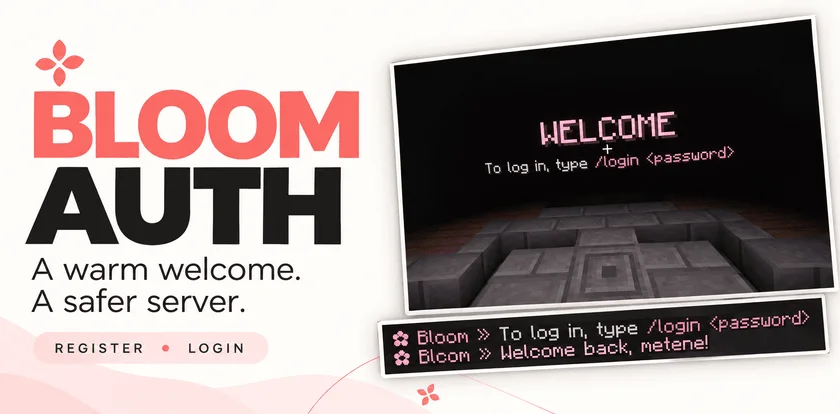
Bloom Auth to plugin do serwerów Paper / Spigot, autor: Metene. Highly Optimized and Supported Auth Plugin. Folia, All Paper Forks, Spigot. 1.21.x - 26.x.
Obsługiwane wersje: Minecraft 1.21 – 26.x. Liczba pobrań w serwisie Modrinth: 2. Zajmuje 134. miejsce w kategorii „pluginy wydajności” (łącznie: 146). Ostatnia aktualizacja: 03.11.2026.
Bloom Auth ma 2 wydań na Modrinth od 30.10.2026. 2 z nich wyszło w ostatnim roku. Najnowsza to 1.0.0, wydana 03.11.2026. Jest zrobiona dla Minecraft 1.21 – 26.3. Działa na Bukkit, Folia, Paper, Purpur i Spigot. Plik ma 141 KB.
| Wersja | Wydano | Minecraft | Typ |
|---|---|---|---|
1.0.0 | 03.11.2026 | 1.21 – 26.3 | Wydanie |
1.0.0 | 30.10.2026 | 1.21 – 26.3 | Wydanie |
Komendy wymienione na stronie Bloom Auth w Modrinth:
/register/login/changepassword/bloomauthWymienione tam uprawnienia, do nadania pluginem takim jak LuckPerms:
bloomauth.admin.setspawnbloomauth.admin.reloadbloom.**Add password-based account protection with a welcoming Bloom touch. Bloom Auth combines simple registration, clear login instructions, and customizable pink details.
Simple commands. Protected accounts. No resource pack required.
New players create their account with:
/register
Registration automatically signs them in. On their next connection, they use:
/login
Need a new password? Change it while signed in:
/changepassword
Every new connection requires authentication—including operators and administrators.
Until authentication is complete, players cannot:
Players are also protected from damage and mob targeting while signing in. Restrictions are lifted after successful authentication.
A configurable WELCOME title shows players exactly what to do next.
Optional blindness keeps the focus on signing in and can be disabled in the configuration.
Enable the optional authentication spawn to give players a dedicated place to sign in.
Set the location with:
/bloomauth setspawn
Players return to their previous location after authentication. If they disconnect before logging in, their return location is preserved for their next visit.
If the original world is unavailable, a safe fallback spawn is used.
Customize the experience through organized configuration and language files:
English and Turkish translations included. Account data is stored locally, with no external database required.
Command · Description
/register · Create an account and sign in.
/login · Sign in to your account.
/changepassword · Change your password while signed in.
/bloomauth setspawn · Set the authentication spawn.
/bloomauth reload · Reload configuration and language files.
Players can register, log in, and change their own passwords by default.
Permission · Description · Default
bloomauth.admin.setspawn · Set the authentication spawn. · OP
bloomauth.admin.reload · Reload configuration and language files. · OP
Administrative permissions do not bypass authentication.
Let every welcome Bloom.
Autor: Metene. Z obrazkami na Modrinth.
Upewnij się, że twój serwer działa na Paper i Spigot w Minecraft 1.21 – 26.x.
Pobierz plik .jar z Modrinth i wrzuć go do folderu plugins na serwerze.
Zrestartuj serwer. Unikaj /reload, wiele pluginów źle to znosi.
Wpisz /plugins w konsoli: Bloom Auth powinien być na zielono. Pliki konfiguracyjne tworzą się w folderze plugins przy pierwszym starcie.
Pełny poradnik: Jak zainstalować pluginy na serwerze Minecraft
| Zasób | Pobrania | Wersje | Aktualizacja | Cena |
|---|---|---|---|---|
 Bloom Authten, który oglądałeś | 2 | 1.21 – 26.x | 11 d. temu | Za darmo |
| Bloom AFKMetene | 3 | 1.21 – 26.x | 11 d. temu | Za darmo |
 Bloom SellMetene | 4 | 1.21 – 26.x | 11 d. temu | Za darmo |
 Bloom CratesMetene | 2 | 1.21 – 26.x | 7 d. temu | Za darmo |
Tak. Bloom Auth działa w wersji Minecrafta 26.x. Wszystkie obsługiwane wersje: 26.x, 1.21.
Tak. Bloom Auth można pobrać za darmo z serwisu Modrinth.
Bloom Auth działa na serwerach Paper i Spigot.
Tak. Ostatnia aktualizacja wyszła w ciągu ostatniej doby.
Najbliższe to Bloom AFK, Bloom Sell i Bloom Crates. Porównaj wszystkie alternatywy
Bloom AFKPluginy · 1.21 – 26.xHighly Optimized and Supported AFK Plugin. Folia, All Paper Forks, Spigot. 1.21.x - 26.x
Bloom SellPluginy · 1.21 – 26.xHighly Optimized and Supported Sell Plugin. Folia, All Paper Forks, Spigot. 1.21.x - 26.x
Bloom CratesPluginy · 1.21 – 26.xHighly Optimized and Supported Crate Plugin. Folia, All Paper Forks, Spigot. 1.21.x - 26.3
 Bloom GravesPluginy · 1.21 – 26.x
Highly Optimized and Supported Graves Plugin. Folia, All Paper Forks, Spigot. 1.21.x - 26.x
 Bloom Command FilterPluginy · 1.21 – 26.x
Highly Optimized and Supported Command Filter Plugin. Folia, All Paper Forks, Spigot. 1.21.x - 26.x
 Bloom Auto PickupPluginy · 1.21 – 26.x
Highly Optimized and Supported Auto Pickup Plugin. Folia, All Paper Forks, Spigot. 1.21.x - 26.3
Zaloguj się, aby wystawić opinię.