
 Bloom AFKPlugins · 1.21 – 26.x
Highly Optimized and Supported AFK Plugin. Folia, All Paper Forks, Spigot. 1.21.x - 26.x
Free3 downloads

Highly Optimized and Supported Auth Plugin. Folia, All Paper Forks, Spigot. 1.21.x - 26.x
Direct download from Modrinth · 2 downloads
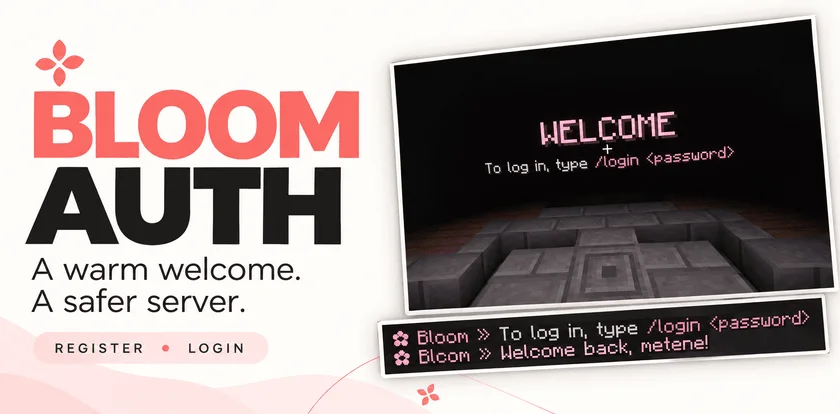
Bloom Auth is a plugin for Paper / Spigot servers, made by Metene. Highly Optimized and Supported Auth Plugin. Folia, All Paper Forks, Spigot. 1.21.x - 26.x.
It supports Minecraft 1.21 – 26.x. It has been downloaded 2 times on Modrinth. That puts it at #134 of the 146 performance plugins listed here. The last update came out on Nov 3, 2026.
Bloom Auth has had 2 releases on Modrinth since Oct 30, 2026. 2 of them came out in the past year. The newest is 1.0.0, released on Nov 3, 2026. It is made for Minecraft 1.21 – 26.3. It runs on Bukkit, Folia, Paper, Purpur and Spigot. The download is 141 KB.
| Version | Released | Minecraft | Type |
|---|---|---|---|
1.0.0 | Nov 3, 2026 | 1.21 – 26.3 | Release |
1.0.0 | Oct 30, 2026 | 1.21 – 26.3 | Release |
The commands named on the Modrinth page of Bloom Auth:
/register/login/changepassword/bloomauthPermission nodes named there, to give with a plugin like LuckPerms:
bloomauth.admin.setspawnbloomauth.admin.reloadbloom.**Add password-based account protection with a welcoming Bloom touch. Bloom Auth combines simple registration, clear login instructions, and customizable pink details.
Simple commands. Protected accounts. No resource pack required.
New players create their account with:
/register
Registration automatically signs them in. On their next connection, they use:
/login
Need a new password? Change it while signed in:
/changepassword
Every new connection requires authentication—including operators and administrators.
Until authentication is complete, players cannot:
Players are also protected from damage and mob targeting while signing in. Restrictions are lifted after successful authentication.
A configurable WELCOME title shows players exactly what to do next.
Optional blindness keeps the focus on signing in and can be disabled in the configuration.
Enable the optional authentication spawn to give players a dedicated place to sign in.
Set the location with:
/bloomauth setspawn
Players return to their previous location after authentication. If they disconnect before logging in, their return location is preserved for their next visit.
If the original world is unavailable, a safe fallback spawn is used.
Customize the experience through organized configuration and language files:
English and Turkish translations included. Account data is stored locally, with no external database required.
Command · Description
/register · Create an account and sign in.
/login · Sign in to your account.
/changepassword · Change your password while signed in.
/bloomauth setspawn · Set the authentication spawn.
/bloomauth reload · Reload configuration and language files.
Players can register, log in, and change their own passwords by default.
Permission · Description · Default
bloomauth.admin.setspawn · Set the authentication spawn. · OP
bloomauth.admin.reload · Reload configuration and language files. · OP
Administrative permissions do not bypass authentication.
Let every welcome Bloom.
Written by Metene. Read it with pictures on Modrinth.
Make sure your server runs Paper and Spigot on Minecraft 1.21 – 26.x.
Download the .jar file from Modrinth and put it in the plugins folder of your server.
Restart the server. Avoid /reload, many plugins do not handle it well.
Type /plugins in the console: Bloom Auth should be listed in green. Its config files are created in the plugins folder on the first start.
Full guide: How to install plugins on a Minecraft server
| Resource | Downloads | Versions | Last update | Price |
|---|---|---|---|---|
| Bloom Auththe one you looked at | 2 | 1.21 – 26.x | 11 days ago | Free |
| Bloom AFKMetene | 3 | 1.21 – 26.x | 11 days ago | Free |
 Bloom SellMetene | 4 | 1.21 – 26.x | 11 days ago | Free |
 Bloom CratesMetene | 2 | 1.21 – 26.x | 7 days ago | Free |
Yes. Bloom Auth supports Minecraft 26.x. All supported versions: 26.x, 1.21.
Yes. Bloom Auth is free to download from Modrinth.
Bloom Auth runs on Paper and Spigot servers.
Yes. The last update came out in the past day.
The closest ones are Bloom AFK, Bloom Sell and Bloom Crates. Compare all alternatives
Bloom AFKPlugins · 1.21 – 26.xHighly Optimized and Supported AFK Plugin. Folia, All Paper Forks, Spigot. 1.21.x - 26.x
Bloom SellPlugins · 1.21 – 26.xHighly Optimized and Supported Sell Plugin. Folia, All Paper Forks, Spigot. 1.21.x - 26.x
Bloom CratesPlugins · 1.21 – 26.xHighly Optimized and Supported Crate Plugin. Folia, All Paper Forks, Spigot. 1.21.x - 26.3
 Bloom GravesPlugins · 1.21 – 26.x
Highly Optimized and Supported Graves Plugin. Folia, All Paper Forks, Spigot. 1.21.x - 26.x
 Bloom Command FilterPlugins · 1.21 – 26.x
Highly Optimized and Supported Command Filter Plugin. Folia, All Paper Forks, Spigot. 1.21.x - 26.x
 Bloom Auto PickupPlugins · 1.21 – 26.x
Highly Optimized and Supported Auto Pickup Plugin. Folia, All Paper Forks, Spigot. 1.21.x - 26.3
Log in to leave a review.