
 Bloom CratesPlugins · 1.21 – 26.x
Highly Optimized and Supported Crate Plugin. Folia, All Paper Forks, Spigot. 1.21.x - 26.3
Free2 downloads

Highly Optimized and Supported Graves Plugin. Folia, All Paper Forks, Spigot. 1.21.x - 26.x
Direct download from Modrinth · 2 downloads
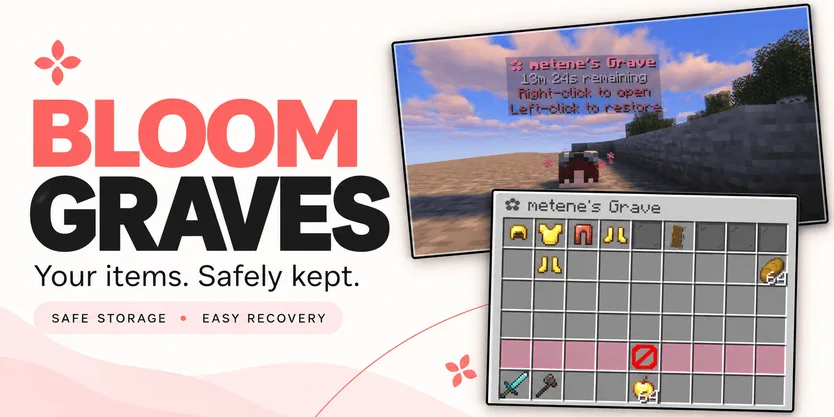
Bloom Graves is a plugin for Paper / Spigot servers, made by Metene. Highly Optimized and Supported Graves Plugin. Folia, All Paper Forks, Spigot. 1.21.x - 26.x.
It supports Minecraft 1.21 – 26.x. It has been downloaded 2 times on Modrinth. That puts it at #132 of the 146 performance plugins listed here. The last update came out on Nov 3, 2026.
Bloom Graves has had 2 releases on Modrinth since Oct 30, 2026. 2 of them came out in the past year. The newest is 1.0.0, released on Nov 3, 2026. It is made for Minecraft 1.21 – 26.3. It runs on Bukkit, Folia, Paper, Purpur and Spigot. The download is 167 KB.
| Version | Released | Minecraft | Type |
|---|---|---|---|
1.0.0 | Nov 3, 2026 | 1.21 – 26.3 | Release |
1.0.0 | Oct 30, 2026 | 1.21 – 26.3 | Release |
The commands named on the Modrinth page of Bloom Graves:
/graves/bloomgravesPermission nodes named there, to give with a plugin like LuckPerms:
bloomgraves.usebloomgraves.command.listbloomgraves.admin.reloadbloomgraves.admin.accessYour items. A second chance.
Bloom Graves stores your dropped items in a personal player-head grave when you die. Return to your grave, collect items through an organized menu, or restore everything to its original slots.
Soft pink menus, floating countdowns, and gentle particles bring a little Bloom charm to your survival server. No resource pack required.
Quick restoration requires your main inventory, hotbar, armor, offhand, and cursor to be empty.
Empty graves disappear automatically. No grave is created when keepInventory is enabled or there are no eligible items to store.
Grave duration is configurable. When time runs out, choose between:
Action · Behavior
DROP — default · Releases remaining items at the grave's location.
DELETE · Permanently removes remaining items.
Server downtime counts toward expiration. Once dropped, items are subject to normal despawning and environmental damage.
Command · Description
/graves · List your active graves, coordinates, and remaining time.
/bloomgraves reload · Reload configuration and language files.
Permission · Description · Default
bloomgraves.use · Create graves and access your own items. · Everyone
bloomgraves.command.list · List your own graves. · Everyone
bloomgraves.admin.reload · Reload the plugin configuration. · OP
bloomgraves.admin.access · Open and withdraw items from other players' graves. · OP
Select English or Turkish in config.yml. Messages can be edited in lang/en.yml and lang/tr.yml.
Designed for Paper, Folia, and compatible forks. Check the selected release's version information for supported Minecraft versions and use a compatible FancyHolograms release.
Spigot is not supported with the required FancyHolograms dependency.
Bloom Graves stores items only, not experience.
✿ A little charm. Another chance.
Written by Metene. Read it with pictures on Modrinth.
Make sure your server runs Paper and Spigot on Minecraft 1.21 – 26.x.
Download the .jar file from Modrinth and put it in the plugins folder of your server.
Restart the server. Avoid /reload, many plugins do not handle it well.
Type /plugins in the console: Bloom Graves should be listed in green. Its config files are created in the plugins folder on the first start.
Full guide: How to install plugins on a Minecraft server
| Resource | Downloads | Versions | Last update | Price |
|---|---|---|---|---|
| Bloom Gravesthe one you looked at | 2 | 1.21 – 26.x | 11 days ago | Free |
| Bloom CratesMetene | 2 | 1.21 – 26.x | 7 days ago | Free |
 Bloom SellMetene | 4 | 1.21 – 26.x | 11 days ago | Free |
 Bloom AFKMetene | 3 | 1.21 – 26.x | 11 days ago | Free |
Yes. Bloom Graves supports Minecraft 26.x. All supported versions: 26.x, 1.21.
Yes. Bloom Graves is free to download from Modrinth.
Bloom Graves runs on Paper and Spigot servers.
Yes. The last update came out in the past day.
The closest ones are Bloom Crates, Bloom Sell and Bloom AFK. Compare all alternatives
Bloom CratesPlugins · 1.21 – 26.xHighly Optimized and Supported Crate Plugin. Folia, All Paper Forks, Spigot. 1.21.x - 26.3
Bloom SellPlugins · 1.21 – 26.xHighly Optimized and Supported Sell Plugin. Folia, All Paper Forks, Spigot. 1.21.x - 26.x
Bloom AFKPlugins · 1.21 – 26.xHighly Optimized and Supported AFK Plugin. Folia, All Paper Forks, Spigot. 1.21.x - 26.x
 Bloom AuthPlugins · 1.21 – 26.x
Highly Optimized and Supported Auth Plugin. Folia, All Paper Forks, Spigot. 1.21.x - 26.x
 Bloom Auto PickupPlugins · 1.21 – 26.x
Highly Optimized and Supported Auto Pickup Plugin. Folia, All Paper Forks, Spigot. 1.21.x - 26.3
 Bloom MinionsPlugins · 1.21 – 26.x
Highly Optimized and Supported Minions Plugin. Folia, All Paper Forks, Spigot. 1.21.x - 26.3
Log in to leave a review.