
 Bloom CratesPlugins · 1.21 – 26.x
Highly Optimized and Supported Crate Plugin. Folia, All Paper Forks, Spigot. 1.21.x - 26.3
Kostenlos2 Downloads

Highly Optimized and Supported Graves Plugin. Folia, All Paper Forks, Spigot. 1.21.x - 26.x
Direkter Download von Modrinth · 2 Downloads
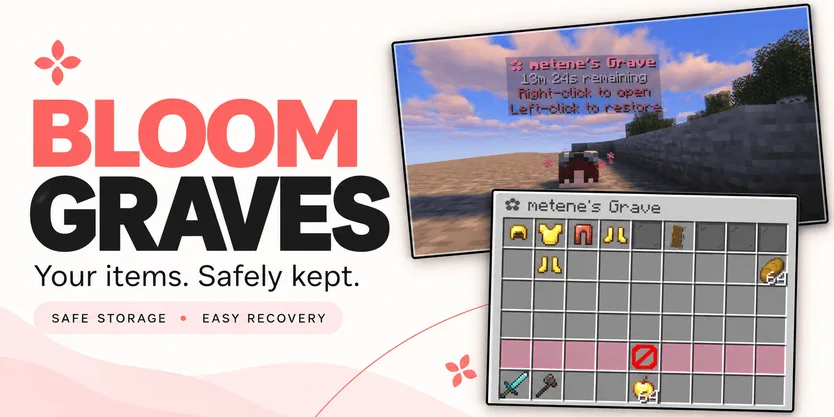
Bloom Graves (Plugin) ist für Server mit Paper / Spigot gedacht und stammt von Metene. Highly Optimized and Supported Graves Plugin. Folia, All Paper Forks, Spigot. 1.21.x - 26.x.
Unterstützt wird Minecraft 1.21 – 26.x. Auf Modrinth gibt es 2 Downloads. Damit liegt es auf Platz 132 der 146 hier gelisteten Performance-Plugins. Das letzte Update erschien am 03.11.2026.
Bloom Graves hat seit 30.10.2026 2 Versionen auf Modrinth veröffentlicht. 2 davon erschienen im letzten Jahr. Die neueste ist 1.0.0, erschienen am 03.11.2026. Sie ist für Minecraft 1.21 – 26.3 gemacht. Sie läuft auf Bukkit, Folia, Paper, Purpur und Spigot. Der Download ist 167 KB groß.
| Version | Veröffentlicht | Minecraft | Typ |
|---|---|---|---|
1.0.0 | 03.11.2026 | 1.21 – 26.3 | Release |
1.0.0 | 30.10.2026 | 1.21 – 26.3 | Release |
Die Befehle, die auf der Modrinth-Seite von Bloom Graves stehen:
/graves/bloomgravesDort genannte Berechtigungen, zu vergeben mit einem Plugin wie LuckPerms:
bloomgraves.usebloomgraves.command.listbloomgraves.admin.reloadbloomgraves.admin.accessYour items. A second chance.
Bloom Graves stores your dropped items in a personal player-head grave when you die. Return to your grave, collect items through an organized menu, or restore everything to its original slots.
Soft pink menus, floating countdowns, and gentle particles bring a little Bloom charm to your survival server. No resource pack required.
Quick restoration requires your main inventory, hotbar, armor, offhand, and cursor to be empty.
Empty graves disappear automatically. No grave is created when keepInventory is enabled or there are no eligible items to store.
Grave duration is configurable. When time runs out, choose between:
Action · Behavior
DROP — default · Releases remaining items at the grave's location.
DELETE · Permanently removes remaining items.
Server downtime counts toward expiration. Once dropped, items are subject to normal despawning and environmental damage.
Command · Description
/graves · List your active graves, coordinates, and remaining time.
/bloomgraves reload · Reload configuration and language files.
Permission · Description · Default
bloomgraves.use · Create graves and access your own items. · Everyone
bloomgraves.command.list · List your own graves. · Everyone
bloomgraves.admin.reload · Reload the plugin configuration. · OP
bloomgraves.admin.access · Open and withdraw items from other players' graves. · OP
Select English or Turkish in config.yml. Messages can be edited in lang/en.yml and lang/tr.yml.
Designed for Paper, Folia, and compatible forks. Check the selected release's version information for supported Minecraft versions and use a compatible FancyHolograms release.
Spigot is not supported with the required FancyHolograms dependency.
Bloom Graves stores items only, not experience.
✿ A little charm. Another chance.
Geschrieben von Metene. Mit Bildern auf Modrinth lesen.
Stelle sicher, dass dein Server Paper und Spigot auf Minecraft 1.21 – 26.x nutzt.
Lade die .jar-Datei von Modrinth herunter und lege sie in den plugins-Ordner deines Servers.
Starte den Server neu. Vermeide /reload, viele Plugins kommen damit nicht gut klar.
Gib /plugins in der Konsole ein: Bloom Graves sollte grün aufgelistet sein. Die Konfigurationsdateien werden beim ersten Start im plugins-Ordner angelegt.
Ausführliche Anleitung: So installierst du Plugins auf einem Minecraft-Server
| Ressource | Downloads | Versionen | Letztes Update | Preis |
|---|---|---|---|---|
| Bloom Gravesdie du angesehen hast | 2 | 1.21 – 26.x | vor 11 Tagen | Kostenlos |
| Bloom CratesMetene | 2 | 1.21 – 26.x | vor 7 Tagen | Kostenlos |
 Bloom SellMetene | 4 | 1.21 – 26.x | vor 11 Tagen | Kostenlos |
 Bloom AFKMetene | 3 | 1.21 – 26.x | vor 11 Tagen | Kostenlos |
Ja. Bloom Graves unterstützt Minecraft 26.x. Alle unterstützten Versionen: 26.x, 1.21.
Ja. Bloom Graves kannst du kostenlos bei Modrinth herunterladen.
Bloom Graves läuft auf Servern mit Paper und Spigot.
Ja. Das letzte Update kam innerhalb des letzten Tages.
Am ähnlichsten sind Bloom Crates, Bloom Sell und Bloom AFK. Alle Alternativen vergleichen
Bloom CratesPlugins · 1.21 – 26.xHighly Optimized and Supported Crate Plugin. Folia, All Paper Forks, Spigot. 1.21.x - 26.3
Bloom SellPlugins · 1.21 – 26.xHighly Optimized and Supported Sell Plugin. Folia, All Paper Forks, Spigot. 1.21.x - 26.x
Bloom AFKPlugins · 1.21 – 26.xHighly Optimized and Supported AFK Plugin. Folia, All Paper Forks, Spigot. 1.21.x - 26.x
 Bloom AuthPlugins · 1.21 – 26.x
Highly Optimized and Supported Auth Plugin. Folia, All Paper Forks, Spigot. 1.21.x - 26.x
 Bloom Auto PickupPlugins · 1.21 – 26.x
Highly Optimized and Supported Auto Pickup Plugin. Folia, All Paper Forks, Spigot. 1.21.x - 26.3
 Bloom MinionsPlugins · 1.21 – 26.x
Highly Optimized and Supported Minions Plugin. Folia, All Paper Forks, Spigot. 1.21.x - 26.3
Logg dich ein, um eine Bewertung zu schreiben.