
 Bloom CratesPlugins · 1.21 – 26.x
Highly Optimized and Supported Crate Plugin. Folia, All Paper Forks, Spigot. 1.21.x - 26.3
Gratis2 descargas

Highly Optimized and Supported Graves Plugin. Folia, All Paper Forks, Spigot. 1.21.x - 26.x
Descarga directa desde Modrinth · 2 descargas
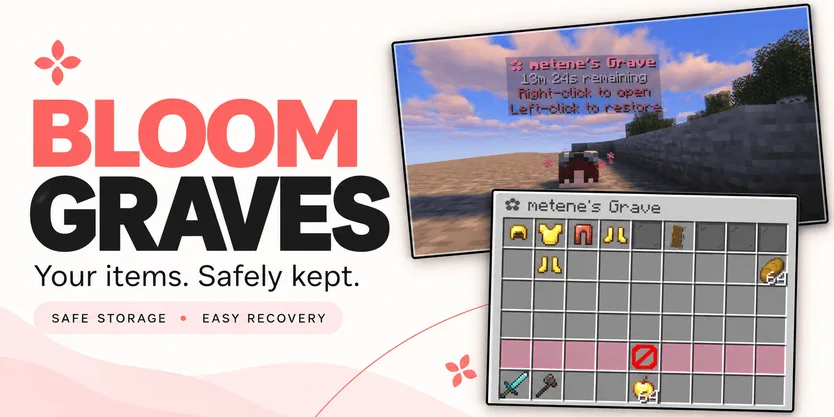
Metene creó Bloom Graves (plugin) para servidores Paper / Spigot. Highly Optimized and Supported Graves Plugin. Folia, All Paper Forks, Spigot. 1.21.x - 26.x.
Es compatible con Minecraft 1.21 – 26.x. Se ha descargado 2 veces en Modrinth. Eso lo sitúa en el puesto 132 de los 146 plugins de rendimiento de esta lista. La última actualización salió el 03/11/2026.
Bloom Graves ha publicado 2 versiones en Modrinth desde el 30/10/2026. 2 salieron en el último año. La más reciente es 1.0.0, publicada el 03/11/2026. Está hecha para Minecraft 1.21 – 26.3. Funciona en Bukkit, Folia, Paper, Purpur y Spigot. La descarga ocupa 167 KB.
| Versión | Publicado | Minecraft | Tipo |
|---|---|---|---|
1.0.0 | 03/11/2026 | 1.21 – 26.3 | Estable |
1.0.0 | 30/10/2026 | 1.21 – 26.3 | Estable |
Los comandos que aparecen en la página de Bloom Graves en Modrinth:
/graves/bloomgravesPermisos que se nombran allí, para dar con un plugin como LuckPerms:
bloomgraves.usebloomgraves.command.listbloomgraves.admin.reloadbloomgraves.admin.accessYour items. A second chance.
Bloom Graves stores your dropped items in a personal player-head grave when you die. Return to your grave, collect items through an organized menu, or restore everything to its original slots.
Soft pink menus, floating countdowns, and gentle particles bring a little Bloom charm to your survival server. No resource pack required.
Quick restoration requires your main inventory, hotbar, armor, offhand, and cursor to be empty.
Empty graves disappear automatically. No grave is created when keepInventory is enabled or there are no eligible items to store.
Grave duration is configurable. When time runs out, choose between:
Action · Behavior
DROP — default · Releases remaining items at the grave's location.
DELETE · Permanently removes remaining items.
Server downtime counts toward expiration. Once dropped, items are subject to normal despawning and environmental damage.
Command · Description
/graves · List your active graves, coordinates, and remaining time.
/bloomgraves reload · Reload configuration and language files.
Permission · Description · Default
bloomgraves.use · Create graves and access your own items. · Everyone
bloomgraves.command.list · List your own graves. · Everyone
bloomgraves.admin.reload · Reload the plugin configuration. · OP
bloomgraves.admin.access · Open and withdraw items from other players' graves. · OP
Select English or Turkish in config.yml. Messages can be edited in lang/en.yml and lang/tr.yml.
Designed for Paper, Folia, and compatible forks. Check the selected release's version information for supported Minecraft versions and use a compatible FancyHolograms release.
Spigot is not supported with the required FancyHolograms dependency.
Bloom Graves stores items only, not experience.
✿ A little charm. Another chance.
Escrita por Metene. Léela con imágenes en Modrinth.
Asegúrate de que tu servidor use Paper y Spigot en Minecraft 1.21 – 26.x.
Descarga el archivo .jar desde Modrinth y ponlo en la carpeta plugins de tu servidor.
Reinicia el servidor. Evita /reload, muchos plugins no lo llevan bien.
Escribe /plugins en la consola: Bloom Graves debería aparecer en verde. Sus archivos de configuración se crean en la carpeta plugins al primer arranque.
Guía completa: Cómo instalar plugins en un servidor de Minecraft
| Recurso | Descargas | Versiones | Última actualización | Precio |
|---|---|---|---|---|
| Bloom Gravesel que estabas viendo | 2 | 1.21 – 26.x | hace 11 días | Gratis |
| Bloom CratesMetene | 2 | 1.21 – 26.x | hace 7 días | Gratis |
 Bloom SellMetene | 4 | 1.21 – 26.x | hace 11 días | Gratis |
 Bloom AFKMetene | 3 | 1.21 – 26.x | hace 11 días | Gratis |
Sí. Bloom Graves es compatible con Minecraft 26.x. Todas las versiones compatibles: 26.x, 1.21.
Sí. Bloom Graves se puede descargar gratis desde Modrinth.
Bloom Graves funciona en servidores Paper y Spigot.
Sí. La última actualización salió en el último día.
Los más parecidos son Bloom Crates, Bloom Sell y Bloom AFK. Comparar todas las alternativas
Bloom CratesPlugins · 1.21 – 26.xHighly Optimized and Supported Crate Plugin. Folia, All Paper Forks, Spigot. 1.21.x - 26.3
Bloom SellPlugins · 1.21 – 26.xHighly Optimized and Supported Sell Plugin. Folia, All Paper Forks, Spigot. 1.21.x - 26.x
Bloom AFKPlugins · 1.21 – 26.xHighly Optimized and Supported AFK Plugin. Folia, All Paper Forks, Spigot. 1.21.x - 26.x
 Bloom AuthPlugins · 1.21 – 26.x
Highly Optimized and Supported Auth Plugin. Folia, All Paper Forks, Spigot. 1.21.x - 26.x
 Bloom Auto PickupPlugins · 1.21 – 26.x
Highly Optimized and Supported Auto Pickup Plugin. Folia, All Paper Forks, Spigot. 1.21.x - 26.3
 Bloom MinionsPlugins · 1.21 – 26.x
Highly Optimized and Supported Minions Plugin. Folia, All Paper Forks, Spigot. 1.21.x - 26.3
Inicia sesión para dejar una reseña.