
 Bloom CratesPluginy · 1.21 – 26.x
Highly Optimized and Supported Crate Plugin. Folia, All Paper Forks, Spigot. 1.21.x - 26.3
Za darmoPobrania: 2
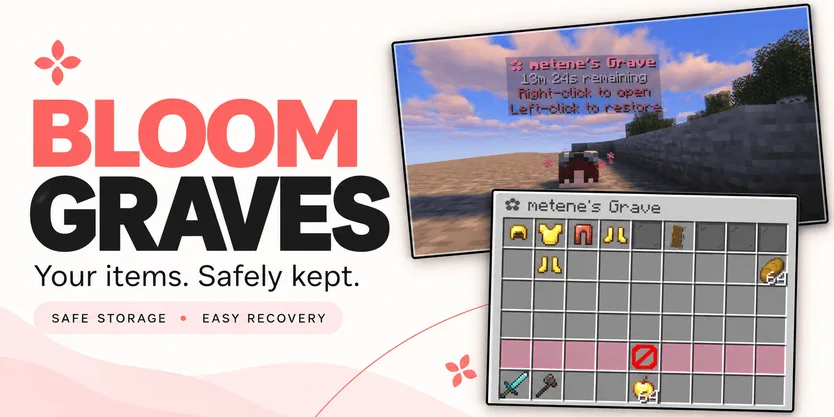
Bloom Graves to plugin do serwerów Paper / Spigot, autor: Metene. Highly Optimized and Supported Graves Plugin. Folia, All Paper Forks, Spigot. 1.21.x - 26.x.
Obsługiwane wersje: Minecraft 1.21 – 26.x. Liczba pobrań w serwisie Modrinth: 2. Zajmuje 132. miejsce w kategorii „pluginy wydajności” (łącznie: 146). Ostatnia aktualizacja: 03.11.2026.
Bloom Graves ma 2 wydań na Modrinth od 30.10.2026. 2 z nich wyszło w ostatnim roku. Najnowsza to 1.0.0, wydana 03.11.2026. Jest zrobiona dla Minecraft 1.21 – 26.3. Działa na Bukkit, Folia, Paper, Purpur i Spigot. Plik ma 167 KB.
| Wersja | Wydano | Minecraft | Typ |
|---|---|---|---|
1.0.0 | 03.11.2026 | 1.21 – 26.3 | Wydanie |
1.0.0 | 30.10.2026 | 1.21 – 26.3 | Wydanie |
Komendy wymienione na stronie Bloom Graves w Modrinth:
/graves/bloomgravesWymienione tam uprawnienia, do nadania pluginem takim jak LuckPerms:
bloomgraves.usebloomgraves.command.listbloomgraves.admin.reloadbloomgraves.admin.accessYour items. A second chance.
Bloom Graves stores your dropped items in a personal player-head grave when you die. Return to your grave, collect items through an organized menu, or restore everything to its original slots.
Soft pink menus, floating countdowns, and gentle particles bring a little Bloom charm to your survival server. No resource pack required.
Quick restoration requires your main inventory, hotbar, armor, offhand, and cursor to be empty.
Empty graves disappear automatically. No grave is created when keepInventory is enabled or there are no eligible items to store.
Grave duration is configurable. When time runs out, choose between:
Action · Behavior
DROP — default · Releases remaining items at the grave's location.
DELETE · Permanently removes remaining items.
Server downtime counts toward expiration. Once dropped, items are subject to normal despawning and environmental damage.
Command · Description
/graves · List your active graves, coordinates, and remaining time.
/bloomgraves reload · Reload configuration and language files.
Permission · Description · Default
bloomgraves.use · Create graves and access your own items. · Everyone
bloomgraves.command.list · List your own graves. · Everyone
bloomgraves.admin.reload · Reload the plugin configuration. · OP
bloomgraves.admin.access · Open and withdraw items from other players' graves. · OP
Select English or Turkish in config.yml. Messages can be edited in lang/en.yml and lang/tr.yml.
Designed for Paper, Folia, and compatible forks. Check the selected release's version information for supported Minecraft versions and use a compatible FancyHolograms release.
Spigot is not supported with the required FancyHolograms dependency.
Bloom Graves stores items only, not experience.
✿ A little charm. Another chance.
Autor: Metene. Z obrazkami na Modrinth.
Upewnij się, że twój serwer działa na Paper i Spigot w Minecraft 1.21 – 26.x.
Pobierz plik .jar z Modrinth i wrzuć go do folderu plugins na serwerze.
Zrestartuj serwer. Unikaj /reload, wiele pluginów źle to znosi.
Wpisz /plugins w konsoli: Bloom Graves powinien być na zielono. Pliki konfiguracyjne tworzą się w folderze plugins przy pierwszym starcie.
Pełny poradnik: Jak zainstalować pluginy na serwerze Minecraft
| Zasób | Pobrania | Wersje | Aktualizacja | Cena |
|---|---|---|---|---|
 Bloom Gravesten, który oglądałeś | 2 | 1.21 – 26.x | 11 d. temu | Za darmo |
| Bloom CratesMetene | 2 | 1.21 – 26.x | 7 d. temu | Za darmo |
 Bloom SellMetene | 4 | 1.21 – 26.x | 11 d. temu | Za darmo |
 Bloom AFKMetene | 3 | 1.21 – 26.x | 11 d. temu | Za darmo |
Tak. Bloom Graves działa w wersji Minecrafta 26.x. Wszystkie obsługiwane wersje: 26.x, 1.21.
Tak. Bloom Graves można pobrać za darmo z serwisu Modrinth.
Bloom Graves działa na serwerach Paper i Spigot.
Tak. Ostatnia aktualizacja wyszła w ciągu ostatniej doby.
Najbliższe to Bloom Crates, Bloom Sell i Bloom AFK. Porównaj wszystkie alternatywy
Bloom CratesPluginy · 1.21 – 26.xHighly Optimized and Supported Crate Plugin. Folia, All Paper Forks, Spigot. 1.21.x - 26.3
Bloom SellPluginy · 1.21 – 26.xHighly Optimized and Supported Sell Plugin. Folia, All Paper Forks, Spigot. 1.21.x - 26.x
Bloom AFKPluginy · 1.21 – 26.xHighly Optimized and Supported AFK Plugin. Folia, All Paper Forks, Spigot. 1.21.x - 26.x
 Bloom AuthPluginy · 1.21 – 26.x
Highly Optimized and Supported Auth Plugin. Folia, All Paper Forks, Spigot. 1.21.x - 26.x
 Bloom Auto PickupPluginy · 1.21 – 26.x
Highly Optimized and Supported Auto Pickup Plugin. Folia, All Paper Forks, Spigot. 1.21.x - 26.3
 Bloom MinionsPluginy · 1.21 – 26.x
Highly Optimized and Supported Minions Plugin. Folia, All Paper Forks, Spigot. 1.21.x - 26.3
Zaloguj się, aby wystawić opinię.