
 Bloom AFKPluginy · 1.21 – 26.x
Highly Optimized and Supported AFK Plugin. Folia, All Paper Forks, Spigot. 1.21.x - 26.x
Za darmoPobrania: 3
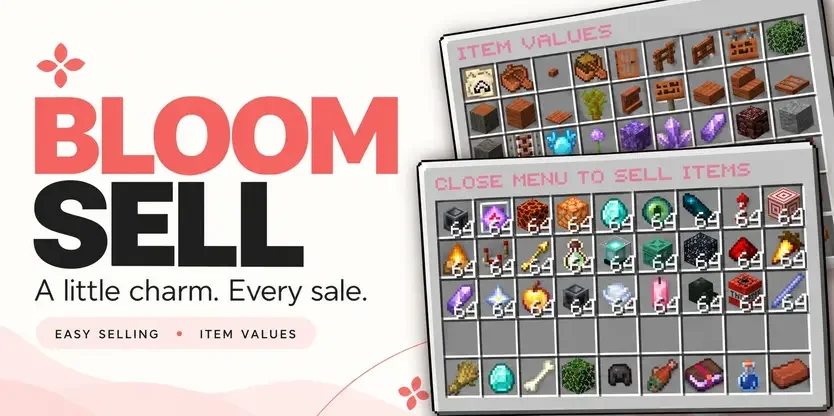
Bloom Sell to plugin do serwerów Paper / Spigot, autor: Metene. Highly Optimized and Supported Sell Plugin. Folia, All Paper Forks, Spigot. 1.21.x - 26.x.
Obsługiwane wersje: Minecraft 1.21 – 26.x. Liczba pobrań w serwisie Modrinth: 4. Zajmuje 111. miejsce w kategorii „pluginy wydajności” (łącznie: 146). Ostatnia aktualizacja: 03.11.2026.
Bloom Sell ma 4 wydań na Modrinth od 29.10.2026. 4 z nich wyszło w ostatnim roku. Najnowsza to 1.4, wydana 03.11.2026. Jest zrobiona dla Minecraft 1.21 – 26.3. Działa na Bukkit, Folia, Paper, Purpur i Spigot. Plik ma 320 KB.
| Wersja | Wydano | Minecraft | Typ |
|---|---|---|---|
1.4 | 03.11.2026 | 1.21 – 26.3 | Wydanie |
1.0.0 | 03.11.2026 | 1.21 – 26.3 | Wydanie |
1.0.0 | 02.11.2026 | 1.21 – 26.3 | Wydanie |
1.0.0 | 29.10.2026 | 1.21 – 26.3 | Wydanie |
Komendy wymienione na stronie Bloom Sell w Modrinth:
/sell/worthWymienione tam uprawnienia, do nadania pluginem takim jak LuckPerms:
bloomsell.usebloomsell.worthbloomsell.historybloomsell.admin.reloadbloomsell.admin.resetbloomsell.admin.*A little charm. More from every sale.
Turn everyday items into rewarding progress. Bloom Sell combines simple selling, personal category multipliers, and a browsable item-value menu with soft pink details and gentle sounds.
Beautiful menus. Growing rewards. No resource pack required.
Your next sale is only a few clicks away.
Build your own selling multiplier in each category, starting at 1.0x and progressing up to 3.0x by default.
Progress comes from the money you earn in that category, not the number of items you sell.
Each category progresses independently, giving players more reasons to explore different ways of earning. Default milestones begin at $25K, $50K, and $100K, with increasing requirements for later tiers. Server owners can customize the thresholds.
Left-click a category in the sell menu to explore its multiplier path:
Open /worth to browse item values across all categories. See your current selling price, category multiplier, and stack value directly on each item.
(Tip: You can also right-click a category in /sell to jump straight to its item values.)
Sell shulker boxes together with their contents! Bloom calculates the box’s value and adds the value of the items inside. Each item uses its own category multiplier.
Open /sell history to review your completed sales. Check previous payouts, quantities, and category breakdowns through a paginated history menu.
Keep the welcoming pink defaults or create a style that belongs to your server.
Bloom Sell pays players using your server’s money through Vault. No separate selling currency to manage—just familiar balances and rewards that grow with your players.
Command · Description
/sell · Opens the selling menu. Close it to sell deposited eligible items.
/worth · Opens the item-value browser.
/sell history · Shows your completed sales.
/sell reload · Reloads configuration and language settings.
/sell reset · Resets a player’s category multiplier progress.
Permission · Description · Default
bloomsell.use · Access to /sell. · Everyone
bloomsell.worth · Access to /worth. · Everyone
bloomsell.history · Access to personal sale history. · Everyone
bloomsell.admin.reload · Reload configuration and languages. · OP
bloomsell.admin.reset · Reset a player’s category progress. · OP
bloomsell.admin.* · Grants the administrative permission group. · OP
(Check the included compatibility documentation for exact supported and tested Minecraft versions, server platforms, and Folia requirements.)
✿ Small details. Sweeter selling. Let every sale Bloom.
Autor: Metene. Z obrazkami na Modrinth.
Upewnij się, że twój serwer działa na Paper i Spigot w Minecraft 1.21 – 26.x.
Pobierz plik .jar z Modrinth i wrzuć go do folderu plugins na serwerze.
Zrestartuj serwer. Unikaj /reload, wiele pluginów źle to znosi.
Wpisz /plugins w konsoli: Bloom Sell powinien być na zielono. Pliki konfiguracyjne tworzą się w folderze plugins przy pierwszym starcie.
Pełny poradnik: Jak zainstalować pluginy na serwerze Minecraft
| Zasób | Pobrania | Wersje | Aktualizacja | Cena |
|---|---|---|---|---|
 Bloom Sellten, który oglądałeś | 4 | 1.21 – 26.x | 11 d. temu | Za darmo |
| Bloom AFKMetene | 3 | 1.21 – 26.x | 11 d. temu | Za darmo |
 Bloom CratesMetene | 2 | 1.21 – 26.x | 7 d. temu | Za darmo |
 Bloom GravesMetene | 2 | 1.21 – 26.x | 11 d. temu | Za darmo |
Tak. Bloom Sell działa w wersji Minecrafta 26.x. Wszystkie obsługiwane wersje: 26.x, 1.21.
Tak. Bloom Sell można pobrać za darmo z serwisu Modrinth.
Bloom Sell działa na serwerach Paper i Spigot.
Tak. Ostatnia aktualizacja wyszła w ciągu ostatniej doby.
Najbliższe to Bloom AFK, Bloom Crates i Bloom Graves. Porównaj wszystkie alternatywy
Bloom AFKPluginy · 1.21 – 26.xHighly Optimized and Supported AFK Plugin. Folia, All Paper Forks, Spigot. 1.21.x - 26.x
Bloom CratesPluginy · 1.21 – 26.xHighly Optimized and Supported Crate Plugin. Folia, All Paper Forks, Spigot. 1.21.x - 26.3
Bloom GravesPluginy · 1.21 – 26.xHighly Optimized and Supported Graves Plugin. Folia, All Paper Forks, Spigot. 1.21.x - 26.x
 Bloom AuthPluginy · 1.21 – 26.x
Highly Optimized and Supported Auth Plugin. Folia, All Paper Forks, Spigot. 1.21.x - 26.x
 Bloom BountyPluginy · 1.21 – 26.x
Highly Optimized and Supported Bounty Plugin. Folia, All Paper Forks, Spigot. 1.21.x - 26.x
 Bloom ShopPluginy · 1.21 – 26.x
Highly Optimized and Supported Shop Plugin. Folia, All Paper Forks, Spigot. 1.21.x - 26.x
Zaloguj się, aby wystawić opinię.