
 Bloom CratesEklentiler · 1.21 – 26.x
Highly Optimized and Supported Crate Plugin. Folia, All Paper Forks, Spigot. 1.21.x - 26.3
Ücretsiz2 indirme

Highly Optimized and Supported Graves Plugin. Folia, All Paper Forks, Spigot. 1.21.x - 26.x
Modrinth üzerinden doğrudan indirme · 2 indirme
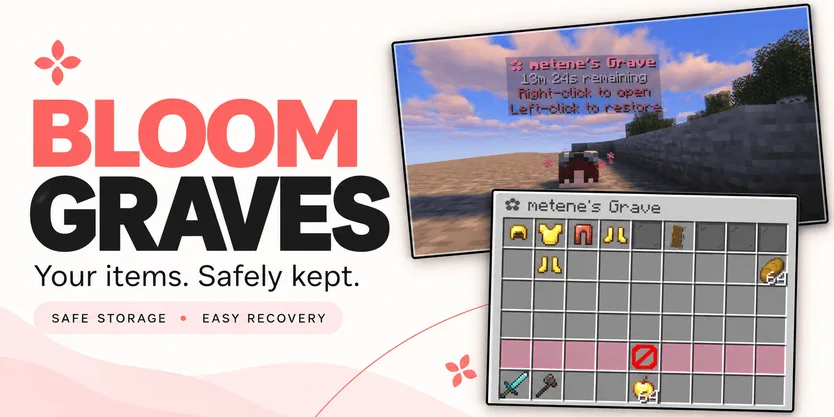
Bloom Graves, Metene tarafından Paper / Spigot sunucuları için yapılmış bir eklenti. Highly Optimized and Supported Graves Plugin. Folia, All Paper Forks, Spigot. 1.21.x - 26.x.
Desteklediği sürümler: Minecraft 1.21 – 26.x. Modrinth üzerinde 2 kez indirildi. Böylece burada listelenen performans eklentileri (146 adet) arasında 132. sırada yer alıyor. Son güncelleme 03.11.2026 tarihinde çıktı.
Bloom Graves, 30.10.2026 tarihinden beri Modrinth üzerinde 2 sürüm yayınladı. Bunların 2 tanesi son bir yılda çıktı. En yenisi 03.11.2026 tarihinde çıkan 1.0.0. Minecraft 1.21 – 26.3 için yapıldı. Bukkit, Folia, Paper, Purpur ve Spigot üzerinde çalışır. İndirme boyutu 167 KB.
| Sürüm | Yayın tarihi | Minecraft | Tür |
|---|---|---|---|
1.0.0 | 03.11.2026 | 1.21 – 26.3 | Kararlı |
1.0.0 | 30.10.2026 | 1.21 – 26.3 | Kararlı |
Bloom Graves için Modrinth sayfasında geçen komutlar:
/graves/bloomgravesOrada geçen yetki düğümleri (LuckPerms gibi bir eklentiyle verilir):
bloomgraves.usebloomgraves.command.listbloomgraves.admin.reloadbloomgraves.admin.accessYour items. A second chance.
Bloom Graves stores your dropped items in a personal player-head grave when you die. Return to your grave, collect items through an organized menu, or restore everything to its original slots.
Soft pink menus, floating countdowns, and gentle particles bring a little Bloom charm to your survival server. No resource pack required.
Quick restoration requires your main inventory, hotbar, armor, offhand, and cursor to be empty.
Empty graves disappear automatically. No grave is created when keepInventory is enabled or there are no eligible items to store.
Grave duration is configurable. When time runs out, choose between:
Action · Behavior
DROP — default · Releases remaining items at the grave's location.
DELETE · Permanently removes remaining items.
Server downtime counts toward expiration. Once dropped, items are subject to normal despawning and environmental damage.
Command · Description
/graves · List your active graves, coordinates, and remaining time.
/bloomgraves reload · Reload configuration and language files.
Permission · Description · Default
bloomgraves.use · Create graves and access your own items. · Everyone
bloomgraves.command.list · List your own graves. · Everyone
bloomgraves.admin.reload · Reload the plugin configuration. · OP
bloomgraves.admin.access · Open and withdraw items from other players' graves. · OP
Select English or Turkish in config.yml. Messages can be edited in lang/en.yml and lang/tr.yml.
Designed for Paper, Folia, and compatible forks. Check the selected release's version information for supported Minecraft versions and use a compatible FancyHolograms release.
Spigot is not supported with the required FancyHolograms dependency.
Bloom Graves stores items only, not experience.
✿ A little charm. Another chance.
Yazan: Metene. Resimli halini Modrinth sayfasında oku.
Sunucunun Minecraft 1.21 – 26.x üzerinde Paper ve Spigot çalıştırdığından emin ol.
.jar dosyasını Modrinth üzerinden indir ve sunucunun plugins klasörüne koy.
Sunucuyu yeniden başlat. /reload kullanma, birçok eklenti bununla sorun çıkarır.
Konsola /plugins yaz: Bloom Graves yeşil olarak listelenmeli. Ayar dosyaları ilk açılışta plugins klasöründe oluşturulur.
Detaylı rehber: Minecraft sunucusuna eklenti nasıl kurulur
| Kaynak | İndirmeler | Sürümler | Son güncelleme | Fiyat |
|---|---|---|---|---|
| Bloom Gravesbaktığın | 2 | 1.21 – 26.x | 11 gün önce | Ücretsiz |
| Bloom CratesMetene | 2 | 1.21 – 26.x | 7 gün önce | Ücretsiz |
 Bloom SellMetene | 4 | 1.21 – 26.x | 11 gün önce | Ücretsiz |
 Bloom AFKMetene | 3 | 1.21 – 26.x | 11 gün önce | Ücretsiz |
Evet. Bloom Graves, Minecraft 26.x sürümünü destekliyor. Desteklenen tüm sürümler: 26.x, 1.21.
Evet. Bloom Graves, Modrinth üzerinden ücretsiz indirilebilir.
Bloom Graves, Paper ve Spigot sunucularında çalışır.
Evet. Son güncelleme son 24 saat içinde çıktı.
En yakın olanlar Bloom Crates, Bloom Sell ve Bloom AFK. Tüm alternatifleri karşılaştır
Bloom CratesEklentiler · 1.21 – 26.xHighly Optimized and Supported Crate Plugin. Folia, All Paper Forks, Spigot. 1.21.x - 26.3
Bloom SellEklentiler · 1.21 – 26.xHighly Optimized and Supported Sell Plugin. Folia, All Paper Forks, Spigot. 1.21.x - 26.x
Bloom AFKEklentiler · 1.21 – 26.xHighly Optimized and Supported AFK Plugin. Folia, All Paper Forks, Spigot. 1.21.x - 26.x
 Bloom AuthEklentiler · 1.21 – 26.x
Highly Optimized and Supported Auth Plugin. Folia, All Paper Forks, Spigot. 1.21.x - 26.x
 Bloom Auto PickupEklentiler · 1.21 – 26.x
Highly Optimized and Supported Auto Pickup Plugin. Folia, All Paper Forks, Spigot. 1.21.x - 26.3
 Bloom MinionsEklentiler · 1.21 – 26.x
Highly Optimized and Supported Minions Plugin. Folia, All Paper Forks, Spigot. 1.21.x - 26.3
Yorum yazmak için giriş yap.