
 Bloom AFKPlugins · 1.21 – 26.x
Highly Optimized and Supported AFK Plugin. Folia, All Paper Forks, Spigot. 1.21.x - 26.x
Kostenlos3 Downloads

Highly Optimized and Supported Auth Plugin. Folia, All Paper Forks, Spigot. 1.21.x - 26.x
Direkter Download von Modrinth · 2 Downloads
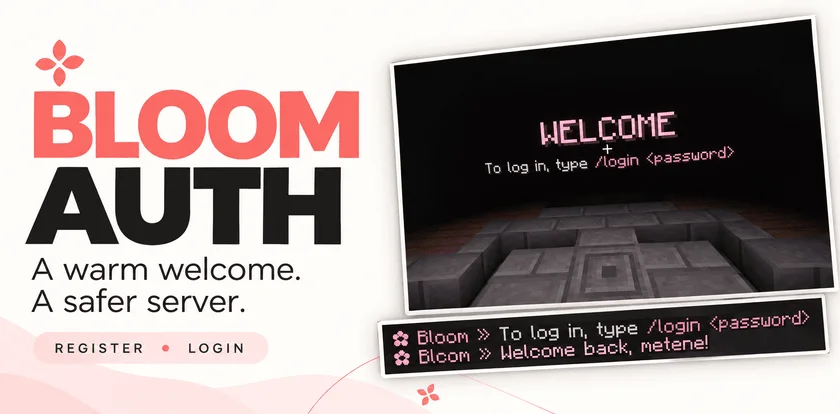
Bloom Auth (Plugin) ist für Server mit Paper / Spigot gedacht und stammt von Metene. Highly Optimized and Supported Auth Plugin. Folia, All Paper Forks, Spigot. 1.21.x - 26.x.
Unterstützt wird Minecraft 1.21 – 26.x. Auf Modrinth gibt es 2 Downloads. Damit liegt es auf Platz 134 der 146 hier gelisteten Performance-Plugins. Das letzte Update erschien am 03.11.2026.
Bloom Auth hat seit 30.10.2026 2 Versionen auf Modrinth veröffentlicht. 2 davon erschienen im letzten Jahr. Die neueste ist 1.0.0, erschienen am 03.11.2026. Sie ist für Minecraft 1.21 – 26.3 gemacht. Sie läuft auf Bukkit, Folia, Paper, Purpur und Spigot. Der Download ist 141 KB groß.
| Version | Veröffentlicht | Minecraft | Typ |
|---|---|---|---|
1.0.0 | 03.11.2026 | 1.21 – 26.3 | Release |
1.0.0 | 30.10.2026 | 1.21 – 26.3 | Release |
Die Befehle, die auf der Modrinth-Seite von Bloom Auth stehen:
/register/login/changepassword/bloomauthDort genannte Berechtigungen, zu vergeben mit einem Plugin wie LuckPerms:
bloomauth.admin.setspawnbloomauth.admin.reloadbloom.**Add password-based account protection with a welcoming Bloom touch. Bloom Auth combines simple registration, clear login instructions, and customizable pink details.
Simple commands. Protected accounts. No resource pack required.
New players create their account with:
/register
Registration automatically signs them in. On their next connection, they use:
/login
Need a new password? Change it while signed in:
/changepassword
Every new connection requires authentication—including operators and administrators.
Until authentication is complete, players cannot:
Players are also protected from damage and mob targeting while signing in. Restrictions are lifted after successful authentication.
A configurable WELCOME title shows players exactly what to do next.
Optional blindness keeps the focus on signing in and can be disabled in the configuration.
Enable the optional authentication spawn to give players a dedicated place to sign in.
Set the location with:
/bloomauth setspawn
Players return to their previous location after authentication. If they disconnect before logging in, their return location is preserved for their next visit.
If the original world is unavailable, a safe fallback spawn is used.
Customize the experience through organized configuration and language files:
English and Turkish translations included. Account data is stored locally, with no external database required.
Command · Description
/register · Create an account and sign in.
/login · Sign in to your account.
/changepassword · Change your password while signed in.
/bloomauth setspawn · Set the authentication spawn.
/bloomauth reload · Reload configuration and language files.
Players can register, log in, and change their own passwords by default.
Permission · Description · Default
bloomauth.admin.setspawn · Set the authentication spawn. · OP
bloomauth.admin.reload · Reload configuration and language files. · OP
Administrative permissions do not bypass authentication.
Let every welcome Bloom.
Geschrieben von Metene. Mit Bildern auf Modrinth lesen.
Stelle sicher, dass dein Server Paper und Spigot auf Minecraft 1.21 – 26.x nutzt.
Lade die .jar-Datei von Modrinth herunter und lege sie in den plugins-Ordner deines Servers.
Starte den Server neu. Vermeide /reload, viele Plugins kommen damit nicht gut klar.
Gib /plugins in der Konsole ein: Bloom Auth sollte grün aufgelistet sein. Die Konfigurationsdateien werden beim ersten Start im plugins-Ordner angelegt.
Ausführliche Anleitung: So installierst du Plugins auf einem Minecraft-Server
| Ressource | Downloads | Versionen | Letztes Update | Preis |
|---|---|---|---|---|
| Bloom Authdie du angesehen hast | 2 | 1.21 – 26.x | vor 11 Tagen | Kostenlos |
| Bloom AFKMetene | 3 | 1.21 – 26.x | vor 11 Tagen | Kostenlos |
 Bloom SellMetene | 4 | 1.21 – 26.x | vor 11 Tagen | Kostenlos |
 Bloom CratesMetene | 2 | 1.21 – 26.x | vor 7 Tagen | Kostenlos |
Ja. Bloom Auth unterstützt Minecraft 26.x. Alle unterstützten Versionen: 26.x, 1.21.
Ja. Bloom Auth kannst du kostenlos bei Modrinth herunterladen.
Bloom Auth läuft auf Servern mit Paper und Spigot.
Ja. Das letzte Update kam innerhalb des letzten Tages.
Am ähnlichsten sind Bloom AFK, Bloom Sell und Bloom Crates. Alle Alternativen vergleichen
Bloom AFKPlugins · 1.21 – 26.xHighly Optimized and Supported AFK Plugin. Folia, All Paper Forks, Spigot. 1.21.x - 26.x
Bloom SellPlugins · 1.21 – 26.xHighly Optimized and Supported Sell Plugin. Folia, All Paper Forks, Spigot. 1.21.x - 26.x
Bloom CratesPlugins · 1.21 – 26.xHighly Optimized and Supported Crate Plugin. Folia, All Paper Forks, Spigot. 1.21.x - 26.3
 Bloom GravesPlugins · 1.21 – 26.x
Highly Optimized and Supported Graves Plugin. Folia, All Paper Forks, Spigot. 1.21.x - 26.x
 Bloom Command FilterPlugins · 1.21 – 26.x
Highly Optimized and Supported Command Filter Plugin. Folia, All Paper Forks, Spigot. 1.21.x - 26.x
 Bloom Auto PickupPlugins · 1.21 – 26.x
Highly Optimized and Supported Auto Pickup Plugin. Folia, All Paper Forks, Spigot. 1.21.x - 26.3
Logg dich ein, um eine Bewertung zu schreiben.