
 Bloom AFKPlugins · 1.21 – 26.x
Highly Optimized and Supported AFK Plugin. Folia, All Paper Forks, Spigot. 1.21.x - 26.x
Gratuit3 téléchargements

Highly Optimized and Supported Auth Plugin. Folia, All Paper Forks, Spigot. 1.21.x - 26.x
Téléchargement direct depuis Modrinth · 2 téléchargements
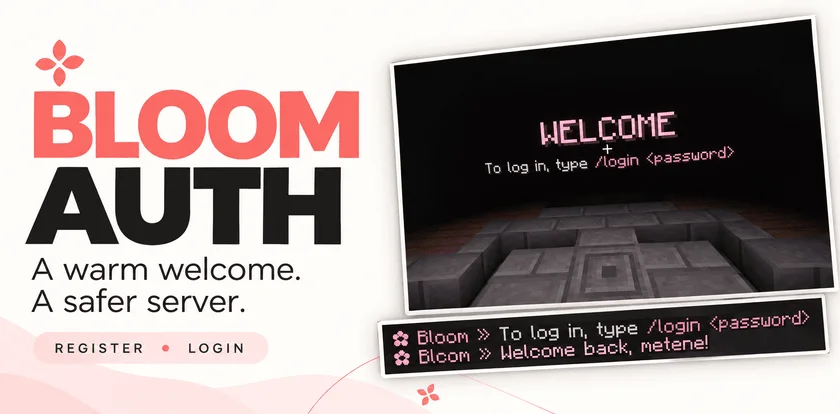
Metene a créé Bloom Auth (plugin) pour les serveurs Paper / Spigot. Highly Optimized and Supported Auth Plugin. Folia, All Paper Forks, Spigot. 1.21.x - 26.x.
Versions prises en charge : Minecraft 1.21 – 26.x. On compte 2 téléchargements sur Modrinth. Il arrive ainsi en position n° 134 sur les 146 plugins de performance listés ici. La dernière mise à jour date du 03/11/2026.
Bloom Auth a publié 2 versions sur Modrinth depuis le 30/10/2026. 2 sont sorties au cours de l'année passée. La plus récente est 1.0.0, sortie le 03/11/2026. Elle est faite pour Minecraft 1.21 – 26.3. Elle fonctionne sur Bukkit, Folia, Paper, Purpur et Spigot. Le téléchargement fait 141 KB.
| Version | Publié | Minecraft | Type |
|---|---|---|---|
1.0.0 | 03/11/2026 | 1.21 – 26.3 | Stable |
1.0.0 | 30/10/2026 | 1.21 – 26.3 | Stable |
Les commandes citées sur la page Modrinth de Bloom Auth :
/register/login/changepassword/bloomauthPermissions citées là-bas, à donner avec un plugin comme LuckPerms :
bloomauth.admin.setspawnbloomauth.admin.reloadbloom.**Add password-based account protection with a welcoming Bloom touch. Bloom Auth combines simple registration, clear login instructions, and customizable pink details.
Simple commands. Protected accounts. No resource pack required.
New players create their account with:
/register
Registration automatically signs them in. On their next connection, they use:
/login
Need a new password? Change it while signed in:
/changepassword
Every new connection requires authentication—including operators and administrators.
Until authentication is complete, players cannot:
Players are also protected from damage and mob targeting while signing in. Restrictions are lifted after successful authentication.
A configurable WELCOME title shows players exactly what to do next.
Optional blindness keeps the focus on signing in and can be disabled in the configuration.
Enable the optional authentication spawn to give players a dedicated place to sign in.
Set the location with:
/bloomauth setspawn
Players return to their previous location after authentication. If they disconnect before logging in, their return location is preserved for their next visit.
If the original world is unavailable, a safe fallback spawn is used.
Customize the experience through organized configuration and language files:
English and Turkish translations included. Account data is stored locally, with no external database required.
Command · Description
/register · Create an account and sign in.
/login · Sign in to your account.
/changepassword · Change your password while signed in.
/bloomauth setspawn · Set the authentication spawn.
/bloomauth reload · Reload configuration and language files.
Players can register, log in, and change their own passwords by default.
Permission · Description · Default
bloomauth.admin.setspawn · Set the authentication spawn. · OP
bloomauth.admin.reload · Reload configuration and language files. · OP
Administrative permissions do not bypass authentication.
Let every welcome Bloom.
Écrite par Metene. À lire avec les images sur Modrinth.
Vérifie que ton serveur tourne sous Paper et Spigot en Minecraft 1.21 – 26.x.
Télécharge le fichier .jar depuis Modrinth et place-le dans le dossier plugins de ton serveur.
Redémarre le serveur. Évite /reload, beaucoup de plugins le supportent mal.
Tape /plugins dans la console : Bloom Auth doit apparaître en vert. Ses fichiers de config sont créés dans le dossier plugins au premier démarrage.
Guide complet: Comment installer des plugins sur un serveur Minecraft
| Ressource | Téléchargements | Versions | Mise à jour | Prix |
|---|---|---|---|---|
| Bloom Authcelle que tu regardais | 2 | 1.21 – 26.x | il y a 11 jours | Gratuit |
| Bloom AFKMetene | 3 | 1.21 – 26.x | il y a 11 jours | Gratuit |
 Bloom SellMetene | 4 | 1.21 – 26.x | il y a 11 jours | Gratuit |
 Bloom CratesMetene | 2 | 1.21 – 26.x | il y a 7 jours | Gratuit |
Oui. Bloom Auth prend en charge Minecraft 26.x. Toutes les versions prises en charge : 26.x, 1.21.
Oui. Bloom Auth se télécharge gratuitement sur Modrinth.
Bloom Auth fonctionne sur les serveurs Paper et Spigot.
Oui. La dernière mise à jour date des dernières 24 heures.
Les plus proches sont Bloom AFK, Bloom Sell et Bloom Crates. Comparer toutes les alternatives
Bloom AFKPlugins · 1.21 – 26.xHighly Optimized and Supported AFK Plugin. Folia, All Paper Forks, Spigot. 1.21.x - 26.x
Bloom SellPlugins · 1.21 – 26.xHighly Optimized and Supported Sell Plugin. Folia, All Paper Forks, Spigot. 1.21.x - 26.x
Bloom CratesPlugins · 1.21 – 26.xHighly Optimized and Supported Crate Plugin. Folia, All Paper Forks, Spigot. 1.21.x - 26.3
 Bloom GravesPlugins · 1.21 – 26.x
Highly Optimized and Supported Graves Plugin. Folia, All Paper Forks, Spigot. 1.21.x - 26.x
 Bloom Command FilterPlugins · 1.21 – 26.x
Highly Optimized and Supported Command Filter Plugin. Folia, All Paper Forks, Spigot. 1.21.x - 26.x
 Bloom Auto PickupPlugins · 1.21 – 26.x
Highly Optimized and Supported Auto Pickup Plugin. Folia, All Paper Forks, Spigot. 1.21.x - 26.3
Connecte-toi pour laisser un avis.