
 Vanilish ShadersShaders · 1.8 – 1.21
A lightweight shader that adds a realistic, warm atmosphere and soft lighting to Minecraft while maintaining the vanilla style.
Free66,442 downloads

Simple shaders that focus on looking good while remaining within the style of vanilla Minecraft instead of fancy realistic rendering techniques
Opens Modrinth · 9,053 downloads there
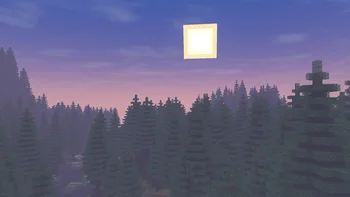

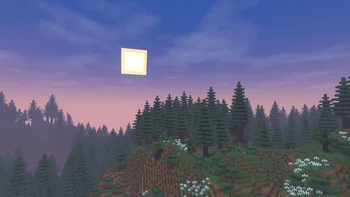
Simple shaders that focus on looking good while remaining within the style of vanilla Minecraft instead of fancy realistic rendering techniques
Wisp Shaders is a shader pack made by n643064. It supports Minecraft 1.20 – 26.x. It has been downloaded 9,053 times on Modrinth. The last update came out on Apr 12, 2026.
Wisp Shaders has had 3 releases on Modrinth since Mar 3, 2026. 3 of them came out in the past year. The newest is 1.0.2, released on Apr 12, 2026. It is made for Minecraft 1.20 – 26.1.2. It runs on Iris. The download is 363 KB.
| Version | Released | Minecraft | Type |
|---|---|---|---|
1.0.2 | Apr 12, 2026 | 1.20 – 26.1.2 | Alpha |
1.0.1 | Mar 12, 2026 | 1.20 – 1.21.11 | Alpha |
1.0.0a | Mar 3, 2026 | 1.20 – 1.21.11 | Alpha |
Primitive shaders with no fancy effects or PBR, meant to make the game look good while sticking to the vanilla style.
The shaders were developed and are intended for minecraft version 1.21.1 and up, and Iris version 1.7 and up, but may work on lower versions.
If tag support is present, the tag minecraft:leaves will be used for waving leaves, otherwise leaves from vanilla and Biomes O' Plenty are used.
Written by n643064. Read it with pictures on Modrinth.
Install Iris (with Sodium) or OptiFine for your Minecraft version: shaders need one of them.
Download the .zip file from Modrinth. Do not unzip it.
In Minecraft, open Options, then Video Settings, then Shader Packs, and click Open Shader Pack Folder.
Drop the .zip file into that folder, pick Wisp Shaders in the list and click Done.
Shaders are heavy on the graphics card. If the game gets slow, pick a lower profile in the shader settings.
| Resource | Downloads | Versions | Last update | Price |
|---|---|---|---|---|
| Wisp Shadersthe one you looked at | 9,053 | 1.20 – 26.x | Apr 12, 2026 | Free |
| Vanilish ShadersTypon | 66K | 1.8 – 1.21 | Feb 16, 2026 | Free |
 Aurora's ShadersCrafterAurora | 948K | 1.20 – 1.21 | Mar 28, 2025 | Free |
 Tricked Shaderstricked33 | 95K | 1.8 – 26.x | Sep 6, 2026 | Free |
Yes. Wisp Shaders supports Minecraft 26.x. All supported versions: 26.x, 1.21, 1.20.
Yes. Wisp Shaders is free to download from Modrinth.
Yes. The last update came out in the past day.
The closest ones are Vanilish Shaders, Aurora's Shaders and Tricked Shaders. Compare all alternatives
Vanilish ShadersShaders · 1.8 – 1.21A lightweight shader that adds a realistic, warm atmosphere and soft lighting to Minecraft while maintaining the vanilla style.
Aurora's ShadersShaders · 1.20 – 1.21Based on Complimentary Unbound, a beautifully colorful Vanilla+ shader meant for making the game look good while maintaining good performance and vanilla feel.
Tricked ShadersShaders · 1.8 – 26.xBased on Mellow Shader, a modified version to reduce brightness and make the game look better while maintaining good performance and vanilla feel.
 Hex's Default Shaders RewriteShaders · 1.12 – 1.21
An shader made for myself! Semi-Realistic Style. (Hex Vanilla Shaders for og ppl)
 Photon ShadersShaders · 1.16 – 26.x
A gameplay-focused shader pack with a semi-realistic style
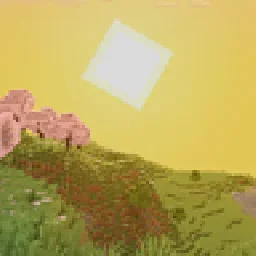 I Like VanillaShaders · 1.12 – 26.x
A shader that improves minecraft's style instead of replacing it
Log in to leave a review.