
 Recolourful Containers GUI + HUDResource packs · 1.19 – 26.x
Do you want more immersive, more interesting, more colourful GUIs and HUD? Than this pack is for you!
Free4,335,221 downloads

New GUIs for all Minecraft crafting tables and inventories!


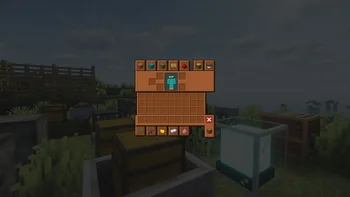
New GUIs for all Minecraft crafting tables and inventories!
Better GUI is a resource pack made by Lupin. It supports Minecraft 1.20 – 26.x. It has been downloaded 376,776 times on Modrinth. The last update came out on Jul 25, 2026.
Better GUI has had 20 releases on Modrinth since Feb 23, 2026. 20 of them came out in the past year. The newest is 4.0.0, released on Jul 25, 2026. It is made for Minecraft 26.1 – 26.3. It runs on Minecraft. The download is 12.2 MB.
| Version | Released | Minecraft | Type |
|---|---|---|---|
4.0.0 | Jul 25, 2026 | 26.1 – 26.3 | Beta |
4.0.0 | Jul 25, 2026 | 26.1 – 26.3 | Release |
4.0.0 | Jul 25, 2026 | 1.21 – 1.21.11 | Beta |
4.0.0 | Jul 25, 2026 | 1.21 – 1.21.11 | Release |
4.0.0 | Jul 25, 2026 | 1.20 – 1.20.6 | Beta |
Better Vanilla GUI will change all the GUIs of Minecraft’s workstations, including the creative inventory and many other workstations added by other mods.
In this first version, support has been added for all workstations, villager interfaces, and mobs such as camels, horses, mules, etc., as well as chests, furnaces, shulkers, basically anything that has a GUI in vanilla Minecraft. The new look for the creative inventory is also already available.
The goal of this resource pack is to add compatibility with other interfaces added by other mods. We will do this in future versions.
WE RECOMMEND USING OptiGUI!
The designer of these GUIs is Ferrum.
For exceptional server hosting services, look no further than BisectHosting. Of course, you can install all the mods or modpacks you want, and their support team is always available to help you.
With the code "Lupin" you will get a 25% discount! Click here!
Important: There is a RELEASE version and a BETA version. We only recommend using the BETA when playing with a modpack that doesn’t allow you to add OptiGUI!. In most cases, though, you’ll be able to add it correctly using Fabric, or by using Sinytra Connector on Forge or NeoForge.
If you don’t use OptiGUI, some GUIs won’t work correctly, such as villagers, shulkers, or ender chests.
The BETA version adds a standard design so that, even without OptiGUI, you won’t experience any visual issues. Unfortunately, Ender Chests will still appear identical to normal chests.
Credits: We have taken inspiration from several resource packs, and we would like to give special mention to Colourful Containers GUI.
Sure! Remember that the best way to play with mods and friends is with BisectHosting, and by clicking on this link you can get a 25% discount.
Of course! As long as it is published only on Modrinth or CurseForge. Uploading it to any other platform would be violating our rights and is not allowed at all.
However, we are really grateful if you consider adding it to your Modrinth or CurseForge modpack. If you need any small changes or have any questions, contact us!
.
Written by Lupin. Read it with pictures on Modrinth.
Download the .zip file from Modrinth. Do not unzip it.
In Minecraft, open Options, then Resource Packs, then Open Pack Folder.
Drop the .zip file into that folder and go back to the game.
Move Better GUI to the right-hand list and click Done.
It is made for Minecraft 1.20 – 26.x. On other versions Minecraft marks it as incompatible, but it often still works.
| Resource | Downloads | Versions | Last update | Price |
|---|---|---|---|---|
| Better GUIthe one you looked at | 377K | 1.20 – 26.x | Jul 25, 2026 | Free |
| Recolourful Containers GUI + HUDVi_Tul | 4.3M | 1.19 – 26.x | Oct 1, 2026 | Free |
 Better 3D Bedsheycronus | 1.7M | 1.12 – 1.21 | Feb 7, 2026 | Free |
 Remodeled Doors 3DEcorn | 237K | 1.19 – 26.x | Oct 9, 2026 | Free |
Yes. Better GUI supports Minecraft 26.x. All supported versions: 26.x, 1.21, 1.20.
Yes. Better GUI is free to download from Modrinth.
Yes. The last update came out in the past day.
The closest ones are Recolourful Containers GUI + HUD, Better 3D Beds and Remodeled Doors 3D. Compare all alternatives
Recolourful Containers GUI + HUDResource packs · 1.19 – 26.xDo you want more immersive, more interesting, more colourful GUIs and HUD? Than this pack is for you!
Better 3D BedsResource packs · 1.12 – 1.21Better 3D Beds is a texture pack for Minecraft that significantly enhances the appearance of beds in the game, making them more realistic and detailed with…
Remodeled Doors 3DResource packs · 1.19 – 26.xMakes all the doors and trapdoors have 3D models. Changes the model and the item within the GUI.
 Rent-A-Girlfriend Custom GUI PackResource packs · 1.20 – 1.21
Rent-A-Girlfriend Custom GUI Pack
 ReimaginedResource packs · 1.16 – 26.x
A Reimagined Vision of Minecraft
 Loading BackgroundsResource packs · 1.20 – 26.x
New prehistoric backgrounds with dinosaurs for the Prehistoric World modpack!
Log in to leave a review.